
aWallet Cloud Password Manager

star
19.1K reviews

Everyone
info
100K+
Downloads
Free with a Play Pass subscription Learn more

Everyone
Learn more


About this app
• Securely stores your passwords, credit card information, e-banking credentials, web accounts and other custom data.
• Synchronizes encrypted data with your own cloud account: Dropbox or Google Drive.
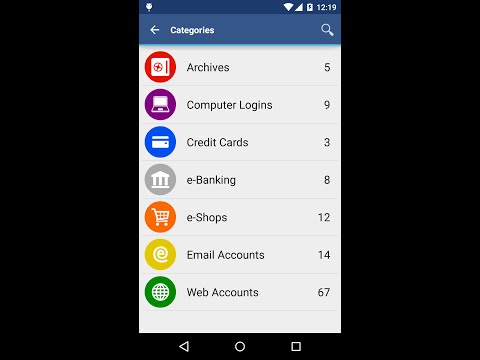
• There is a built-in Editor for changing or creating new data Categories with custom icons.
• Search within fields.
• Contains no advertisements.
• Supports backup and restore of the encrypted data file to the Android USB device.
• Export of unencrypted data in CSV format to the USB device.
• There is an Auto lock feature that can be preconfigured for a specific period of time.
PRO FEATURES, included:
• Unlock with fingerprint (on a compatible device with Android 6 or later)
• Unlock with face (on a compatible device with Android 10 or later)
• Password Generator
• CSV Import
SECURITY FEATURES
• All data is encrypted, including Entry names, Category definitions and the data itself.
• Encrypts data using AES or Blowfish algorithms with key sizes of 256, 192 or 128 bits.
• When the data file is decrypted, up to all combinations of algorithm and key size are tried with the Master password to unlock the data file. This makes brute force attacks longer. The app itself does not store any hint to the actual cipher or key size.
• Uses a randomly generated 'salt' combined with the Master password. Salt helps to protect from off-line dictionary attacks.
• The key to open the data file is created by combining your master password with the 512-bit 'salt'. The result is hashed 1000 times by SHA-256. Repetitive hashing makes a brute force attack more difficult.
• Supports auto destruction of the data file after a predefined number of unsuccessful unlocks have been tried.
For more info see http://www.awallet.org/
If you like this App, rate it in Google Play. If you have any suggestions, just let me know.
• Synchronizes encrypted data with your own cloud account: Dropbox or Google Drive.
• There is a built-in Editor for changing or creating new data Categories with custom icons.
• Search within fields.
• Contains no advertisements.
• Supports backup and restore of the encrypted data file to the Android USB device.
• Export of unencrypted data in CSV format to the USB device.
• There is an Auto lock feature that can be preconfigured for a specific period of time.
PRO FEATURES, included:
• Unlock with fingerprint (on a compatible device with Android 6 or later)
• Unlock with face (on a compatible device with Android 10 or later)
• Password Generator
• CSV Import
SECURITY FEATURES
• All data is encrypted, including Entry names, Category definitions and the data itself.
• Encrypts data using AES or Blowfish algorithms with key sizes of 256, 192 or 128 bits.
• When the data file is decrypted, up to all combinations of algorithm and key size are tried with the Master password to unlock the data file. This makes brute force attacks longer. The app itself does not store any hint to the actual cipher or key size.
• Uses a randomly generated 'salt' combined with the Master password. Salt helps to protect from off-line dictionary attacks.
• The key to open the data file is created by combining your master password with the 512-bit 'salt'. The result is hashed 1000 times by SHA-256. Repetitive hashing makes a brute force attack more difficult.
• Supports auto destruction of the data file after a predefined number of unsuccessful unlocks have been tried.
For more info see http://www.awallet.org/
If you like this App, rate it in Google Play. If you have any suggestions, just let me know.
Android Wallet Password Manager
Updated on
Safety starts with understanding how developers collect and share your data. Data privacy and security practices may vary based on your use, region, and age. The developer provided this information and may update it over time.
- No data shared with third partiesLearn more about how developers declare sharing
- No data collectedLearn more about how developers declare collection


Ratings and reviews
17.5K reviews

Bethany TG
- Flag inappropriate
- Show review history
September 10, 2026
I've used this password keeper for 6+ years and it's been an absolute lifesaver. I have never any problems with it. I try to tell others about it when they mention having to remember too many logins. It's my go-to every time I have a new login to create or a password to update. Simple interface, backup to cloud of my choice, no crashes, no ads. Love it! Thank you for this awesome app!
1 person found this review helpful
Synpet
September 11, 2026
Thank you so much for your review!

Vanny Washington
- Flag inappropriate
January 3, 2026
Have had this app as long as I can remember and never had a problem restoring data from the cloud...until now. Havving used biometrics for so long, I cannot begin to remember the Master Password! How ironic! That would be my primary complaint and reason for lowest rating...the inability to recover a master password through support team. Instructions on the website are entirely too repetitive and difficult to follow. I am at a complete loss with dozens of accounts impacted.
2 people found this review helpful
Synpet
January 3, 2026
Hello Vanny, If you have another device with aWallet that you can currently unlock with your fingerprint, it is possible to change the master password. Please see https://www.awallet.org/faq#h.56k49qy8ubh Otherwise, you will have to try remembering your master password because the password is not stored anywhere now. Sorry.

S N
- Flag inappropriate
- Show review history
May 22, 2025
Edited: kudos for a quick response from the developer. tried pressing purchase per his instruction and that did nothing, however, uninstalling and reinstalling and then re-importing the data allowed it to come back up to its previous state. other than an inconvenience, no data appears to have been lost and full functionality regained. Had paid cloud version app for years. Switched phones, imported app data from dropbox, now telling me I have to buy the app again to use it.
9 people found this review helpful
Synpet
May 22, 2025
Please try reinstalling or just press buy, you will not be charged. It worked for other users. Google Play has recently had some issues with this.
Also, ensure you use the proper Google account in Google Play.
What’s new
12.0.4
• Added WebDAV support (Synology/QNAP NAS, Nextcloud, Koofr, pCloud and more)
• Share Entry
• No keyboard suggestions in password fields
• Bug fixes and library updates
See www.awallet.org/faq-cloud to import data or get help. Thanks.
Previous versions
• Support for Android 16
• Local phone backups get timestamp in the name
• Show date and size of the cloud data.crypt file
• Fixed accessing backup and csv files on Android 14
• BiometricPrompt since Android 10
• Added WebDAV support (Synology/QNAP NAS, Nextcloud, Koofr, pCloud and more)
• Share Entry
• No keyboard suggestions in password fields
• Bug fixes and library updates
See www.awallet.org/faq-cloud to import data or get help. Thanks.
Previous versions
• Support for Android 16
• Local phone backups get timestamp in the name
• Show date and size of the cloud data.crypt file
• Fixed accessing backup and csv files on Android 14
• BiometricPrompt since Android 10
Everyone
Learn moreApp support
About the developer
PETR SYNEK
info@awallet.org
Ve Vrbičkách 2695
250 01 Brandýs nad Labem-Stará Boleslav
Czechia


