
aWallet Password Manager
Contains adsIn-app purchases

4.7star
37.1K reviews
1M+
Downloads

Everyone
info






About this app
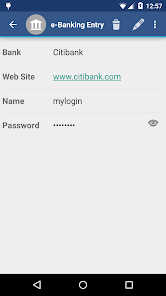
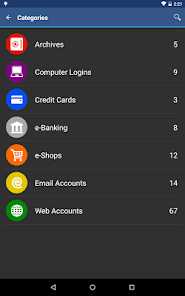
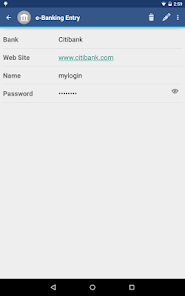
• Securely stores your passwords, credit card information, e-banking credentials, web accounts and other custom data.
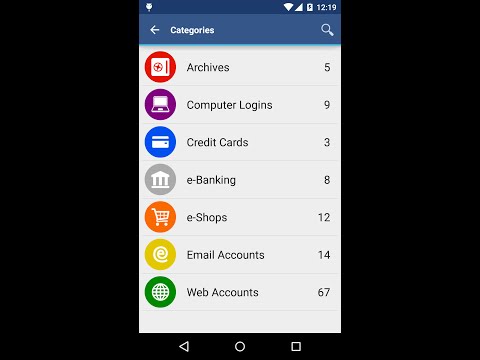
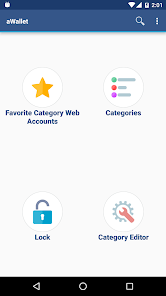
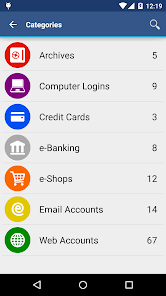
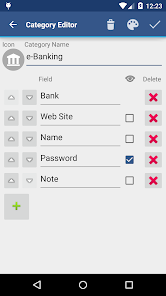
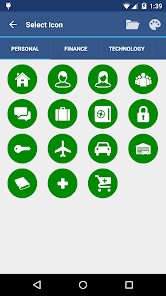
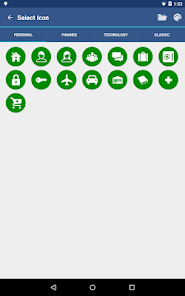
• There is a built in Editor for changing or creating new data Categories with custom icons.
• Search within fields.
• Contains no advertisements.
• Supports backup and restore of the encrypted data file to the Android USB device.
• Export of unencrypted data in CSV format to the USB device.
• There is an Auto lock feature that can be preconfigured for a specific period of time.
PRO FEATURES, available via single In-app billing payment:
• Unlock with fingerprint (on a compatible device with Android 6)
• Unlock with face (on a compatible device with Android 10 or later)
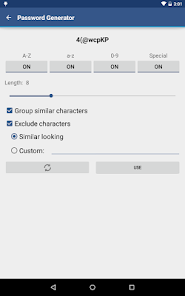
• Password Generator
• CSV Import
SECURITY FEATURES
• All data is encrypted, including Entry names, Category definitions and the data itself. Even the choice of Favorite Category is encrypted.
• Encrypts data using AES or Blowfish algorithms with key sizes of 256, 192 or 128 bits.
• When the data file is decrypted, up to all combinations of algorithm and key size are tried with the Master password to unlock the data file. The app itself does not store any hint to the actual cipher or key size.
• Uses a randomly generated 'salt' combined with the Master password. Salt helps to protect from off-line dictionary attacks.
• The key to open the data file is created by combining your master password with the 512-bit 'salt'. The result is hashed 1000 times by SHA-256. Repetitive hashing makes a brute force attack more difficult.
• Supports auto destruction of the data file after a predefined number of unsuccessful unlocks have been tried.
• Unlike other similar Android apps aWallet has no internet access permission (forever). The only permissions this app has is to access to the USB device to backup/restore the data file in case you lose your phone. USB device access is also needed to export to CSV file format. Permission is also granted to the Google Play billing service to allow for the optional purchase of the aWallet Pro features.
For more info see http://www.awallet.org/
If you like this App, rate it in the Google Play. If you have any suggestions, just let me know.
• There is a built in Editor for changing or creating new data Categories with custom icons.
• Search within fields.
• Contains no advertisements.
• Supports backup and restore of the encrypted data file to the Android USB device.
• Export of unencrypted data in CSV format to the USB device.
• There is an Auto lock feature that can be preconfigured for a specific period of time.
PRO FEATURES, available via single In-app billing payment:
• Unlock with fingerprint (on a compatible device with Android 6)
• Unlock with face (on a compatible device with Android 10 or later)
• Password Generator
• CSV Import
SECURITY FEATURES
• All data is encrypted, including Entry names, Category definitions and the data itself. Even the choice of Favorite Category is encrypted.
• Encrypts data using AES or Blowfish algorithms with key sizes of 256, 192 or 128 bits.
• When the data file is decrypted, up to all combinations of algorithm and key size are tried with the Master password to unlock the data file. The app itself does not store any hint to the actual cipher or key size.
• Uses a randomly generated 'salt' combined with the Master password. Salt helps to protect from off-line dictionary attacks.
• The key to open the data file is created by combining your master password with the 512-bit 'salt'. The result is hashed 1000 times by SHA-256. Repetitive hashing makes a brute force attack more difficult.
• Supports auto destruction of the data file after a predefined number of unsuccessful unlocks have been tried.
• Unlike other similar Android apps aWallet has no internet access permission (forever). The only permissions this app has is to access to the USB device to backup/restore the data file in case you lose your phone. USB device access is also needed to export to CSV file format. Permission is also granted to the Google Play billing service to allow for the optional purchase of the aWallet Pro features.
For more info see http://www.awallet.org/
If you like this App, rate it in the Google Play. If you have any suggestions, just let me know.
Updated on
Safety starts with understanding how developers collect and share your data. Data privacy and security practices may vary based on your use, region, and age. The developer provided this information and may update it over time.

No data shared with third parties
Learn more about how developers declare sharing

No data collected
Learn more about how developers declare collection
Ratings and reviews
4.7
35.5K reviews

Michael Beasley
- Flag inappropriate
- Show review history
February 18, 2021
**Response from the developer worked. A little of a hassle since Android 11, but probably not something they can control. Thanks! Updating to 5 stars! One issue, otherwise great app. I've used this for many years. With the latest Android 11 update, the app no longer creates a backup in the normal Android folder. When I search for the name of the backup file it creates, there's no results, even when I use the option to show hidden files.
54 people found this review helpful
Synpet
February 18, 2021
Hello Michael, It is possible to access the /Android/data folder in Android 11 with a USB cable from your computer: https://support.google.com/android/answer/9064445
Allowing saving the backup file in a different location would require adding the External Storage permission which I would like to avoid. Thanks for understanding.

Amit P
- Flag inappropriate
August 18, 2021
password locker that is not connected to the cloud so it makes it less vulnerable to cyber attacks. Love the edit mode to choose the content in each category. You will need to pay for full access that way you can save a cryptic file with all your info and transfers it to another drive. Old school but works like a charm and the pricing is not ridiculous.
158 people found this review helpful
Synpet
August 18, 2021
Hello Amit, Thanks for your review. The encrypted data backup and restore is available in the free version too, therefore also data transfer to another device is free of charge. Only the CSV (not encrypted) data import is a paid feature.

J. Miles
- Flag inappropriate
- Show review history
September 5, 2020
Great password backup app. Especially useful are the customization options (set up your own categories and also the information--data fields--you want to include, and which fields will be encrypted). Biometric option to open app is also great. _____ Only one small complaint: I wish it would request my password/biometric info when it first opens (as every other app I have does) rather than requiring I tap on an option first. It just adds a cumbersome extra step every time I open it.
10 people found this review helpful
Synpet
January 4, 2020
Hello John, If the password is not accepted after data restore it means that either the password is not correct or the data.crypt file got destroyed during transfer between the phones. Edit: If the password is not working after the restore the data.crypt file got damaged during the transfer. The FAQ suggests using "WiFi File Transfer" app.
What's new
Backup your data regularly: https://www.awallet.org/faq#h.2a86ld1hnga3
10.0.3
• Support for Android 14
• Fixed accessing backup and csv files on Android 14
• Bug fixes
Please see https://www.awallet.org/faq on how to move data to a new phone or ask support. Thanks.
Previous versions
• Added new category icons
• Increased max size of the generated password
• BiometricPrompt since Android 10
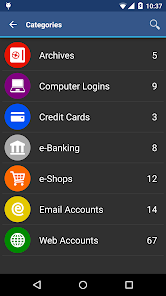
• System default Dark theme can be enabled in the app Settings since Android 10
10.0.3
• Support for Android 14
• Fixed accessing backup and csv files on Android 14
• Bug fixes
Please see https://www.awallet.org/faq on how to move data to a new phone or ask support. Thanks.
Previous versions
• Added new category icons
• Increased max size of the generated password
• BiometricPrompt since Android 10
• System default Dark theme can be enabled in the app Settings since Android 10


