BankSA Mobile Banking
Contains ads
4.5star
2.42K reviews
100K+
Downloads

Everyone
info

About this app
BankSA Mobile Banking is designed to give customers full banking functionality in an easy to use, secure environment.
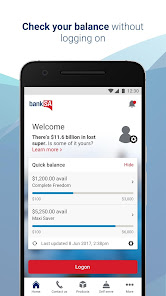
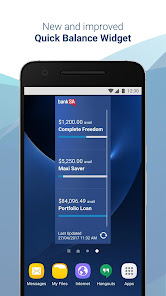
Quick balance
• View balances and 10 most recent transactions of up to 3 of your accounts without logging in
• Set up your widget to access Quick balance without opening the app
• Easily transfer money between your Quick balance accounts
• Share your BSB via message or email from Quick balance.
Quick logon
• Use your fingerprint or security number to logon†.
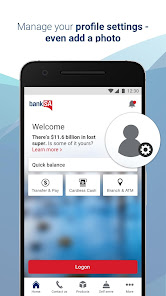
Manage your settings
• Tap the profile icon to update your contact and logon details.
Expense Splitter
• Paid for a shared expense? Use Expense Splitter to keep track of who’s paid you back. You can also SMS your friends what they owe you~.
Notifications and alerts
• Choose from 7 types of alerts: Deposit, Withdrawal, Daily Balance, Low Balance, High Balance, Dishonour and Credit Card Repayment Reminder
• Receive as a mobile push notification, SMS or email alert.
Cardless Cash
• Withdraw cash without your debit card from any BankSA, St.George, Westpac or Bank of Melbourne ATM within Australia (daily and weekly limits apply).
Lost your card?
• Temporarily lock your card for up to 15 days*
• Report your card lost or stolen.
Contact us via Mobile Banking
• Tap ‘Contact us’ to get help faster. No need to answer security questions as you’re already logged in~.
Payments & transfers
• Send and receive payments in near real time between customers with BankSA, St.George and Bank of Melbourne accounts
• Make transfers and payments (including BPAY®)
• Send money overseas to existing payees
• Make mobile payments with your eligible card with Google PayTM (using the Google Pay app from Google Play store).
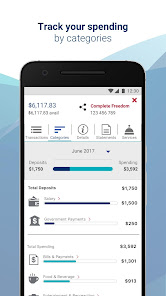
Track your spending
• See where your money goes with ‘Categories’+.
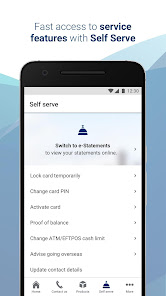
Tap the Services menu to:
• Sort or rename your accounts
• Easily search past transactions by date, amount or description
• Schedule future and recurring payments
• Download a Proof of Balance or Interest Earned report
• Download a 30, 90 or 120 day transaction listing report
• Activate your new credit or debit card
• Change your daily ATM/EFTPOS cash withdrawal limit for most credit and debit cards (daily limits apply)
• Tell us when you’re going overseas
• Set up a Plan&Pay instalment plan - learn more at banksa.com.au/planandpay
• Block gambling transactions on eligible cards.
ATM & Branch Locator
• Locate your nearest BankSA, St.George, Westpac or Bank of Melbourne ATM or branch
Need Help?
If you are having issues with our app, please delete and re-install it. If issues persist please call us on 13 13 76 (7:30am – 7:30pm Monday - Saturday).
Things you should know:
†Not available on rooted devices. View compatible phones at banksa.com.au/devices
~Standard SMS, call or data charges apply.
*Locking your card will temporarily stop new transactions on your card for up to 15 days or until reactivated. The card will automatically reactivate after 15 days if you do not unlock the card or report the card lost or stolen.
+This tool provides general information and is intended to be a guide only and not intended to be relied on. Available on savings, transactions and credit card accounts.
Some features and functions may not work on rooted devices.
Information is current at time of download and subject to change. We collect information on how you use this app for analysis of aggregate user behaviour.
Read the Terms and Conditions at banksa.com.au before making a decision and consider whether the product or service is right for you. Fees and charges may apply.
Android is a trademark of Google LLC.
® Registered to BPAY Pty Ltd ABN 69 079 137 518.
BankSA – A Division of Westpac Banking Corporation ABN 33 007 457 141 AFSL Australian credit licence 233714.
Quick balance
• View balances and 10 most recent transactions of up to 3 of your accounts without logging in
• Set up your widget to access Quick balance without opening the app
• Easily transfer money between your Quick balance accounts
• Share your BSB via message or email from Quick balance.
Quick logon
• Use your fingerprint or security number to logon†.
Manage your settings
• Tap the profile icon to update your contact and logon details.
Expense Splitter
• Paid for a shared expense? Use Expense Splitter to keep track of who’s paid you back. You can also SMS your friends what they owe you~.
Notifications and alerts
• Choose from 7 types of alerts: Deposit, Withdrawal, Daily Balance, Low Balance, High Balance, Dishonour and Credit Card Repayment Reminder
• Receive as a mobile push notification, SMS or email alert.
Cardless Cash
• Withdraw cash without your debit card from any BankSA, St.George, Westpac or Bank of Melbourne ATM within Australia (daily and weekly limits apply).
Lost your card?
• Temporarily lock your card for up to 15 days*
• Report your card lost or stolen.
Contact us via Mobile Banking
• Tap ‘Contact us’ to get help faster. No need to answer security questions as you’re already logged in~.
Payments & transfers
• Send and receive payments in near real time between customers with BankSA, St.George and Bank of Melbourne accounts
• Make transfers and payments (including BPAY®)
• Send money overseas to existing payees
• Make mobile payments with your eligible card with Google PayTM (using the Google Pay app from Google Play store).
Track your spending
• See where your money goes with ‘Categories’+.
Tap the Services menu to:
• Sort or rename your accounts
• Easily search past transactions by date, amount or description
• Schedule future and recurring payments
• Download a Proof of Balance or Interest Earned report
• Download a 30, 90 or 120 day transaction listing report
• Activate your new credit or debit card
• Change your daily ATM/EFTPOS cash withdrawal limit for most credit and debit cards (daily limits apply)
• Tell us when you’re going overseas
• Set up a Plan&Pay instalment plan - learn more at banksa.com.au/planandpay
• Block gambling transactions on eligible cards.
ATM & Branch Locator
• Locate your nearest BankSA, St.George, Westpac or Bank of Melbourne ATM or branch
Need Help?
If you are having issues with our app, please delete and re-install it. If issues persist please call us on 13 13 76 (7:30am – 7:30pm Monday - Saturday).
Things you should know:
†Not available on rooted devices. View compatible phones at banksa.com.au/devices
~Standard SMS, call or data charges apply.
*Locking your card will temporarily stop new transactions on your card for up to 15 days or until reactivated. The card will automatically reactivate after 15 days if you do not unlock the card or report the card lost or stolen.
+This tool provides general information and is intended to be a guide only and not intended to be relied on. Available on savings, transactions and credit card accounts.
Some features and functions may not work on rooted devices.
Information is current at time of download and subject to change. We collect information on how you use this app for analysis of aggregate user behaviour.
Read the Terms and Conditions at banksa.com.au before making a decision and consider whether the product or service is right for you. Fees and charges may apply.
Android is a trademark of Google LLC.
® Registered to BPAY Pty Ltd ABN 69 079 137 518.
BankSA – A Division of Westpac Banking Corporation ABN 33 007 457 141 AFSL Australian credit licence 233714.
Updated on
Safety starts with understanding how developers collect and share your data. Data privacy and security practices may vary based on your use, region, and age. The developer provided this information and may update it over time.


Ratings and reviews
4.7
2.34K reviews

Elijan Sejic
- Flag inappropriate
June 27, 2024
Switched banks due to refinancing. My god. This app is behind on features like 10 years. Honestly if I knew how bad it is I would chose other bank. Very busy overview of accounts. Doesn't show ballance of all your accounts. No credit cards details to view. So if I want to buy things online I have to have physical card with me! Clunky and unfriendly experience overall. It doesn't come close to many bank apps out there

A C Nayak
- Flag inappropriate
June 29, 2024
Not sure why the ratings are so low for this app, but having used ING, NAB and ANZ, I find this app to be the most informative and useful. Particularly like the feature of calling customer care while logged on to the app which reduces the amount of security questions that you have to go through. Definitely have had no crashes or log in issues on my Samsung Galaxy S22.
St.George Bank
June 30, 2024
Hi, thanks for taking the time to let us know about your experience. It’s great to hear you’re happy with the app. Thank you, Steve.

Phil Richards
- Flag inappropriate
June 27, 2024
Recent updates have resulted in being logged out as soon as I log in, I havetried all options but still no good I am using a Samsung phone and have been very happy with app up to now
St.George Bank
June 30, 2024
Hi Phil, thanks for letting us know. If you are still experiencing issues please clear the data on the App (go to Settings, tap Apps, select BankSA, tap Storage, tap Clear data) once completed please restart your mobile device. If the issue persists, please email us at MobileBSA@banksa.com.au so we can look into this further. Thank you, Steve.
What's new
• Minor enhancements and fixes.


