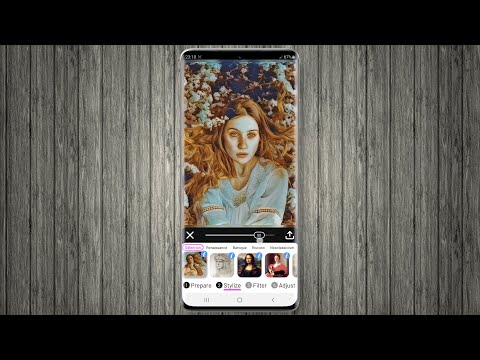

Paintation: Famous Art Filters
In-app purchases

star
388 reviews

Everyone
info
10K+
Downloads


About this app
Turn your photos into masterpieces with Paintation, a powerful offline photo editor that combines famous art filters with professional retouching tools. Unlike standard filter apps, Paintation uses local AI to process images directly on your device, ensuring 100% privacy and functionality without an internet connection.
🎨 Famous Art Filters & Style Transfer
Explore 500+ filters inspired by art history. Our AI engine transfers the style of famous paintings to your photos, simulating realistic textures and brushstrokes.
• Art Movements: Browse styles by era—Renaissance, Impressionism, Baroque, Rococo, Cubism, Surrealism, and more.
• Realistic Mediums: Apply oil painting effects, watercolor filters, charcoal sketches, and canvas textures.
• Learn Art History: Each filter includes info about the original artwork and painter, making it a great tool for art enthusiasts.
• Custom Styles: Create your own filters by uploading any reference image.
🛠️ Professional Retouching Tools
Paintation is not just about art; it’s a full-featured photo editor. Fix and enhance your images before applying effects using our advanced 4-stage workflow (Prepare, Stylize, Filter, Adjust).
• AI Object Removal: Use the Vanish tool to cleanly remove unwanted objects or people from your photos.
• Liquify & Warp: Reshape faces or objects with precision.
• Clone Stamp: Professional tool for detailed defect correction.
• Background Changer: Automatically detect and replace or remove photo backgrounds.
• Fine-Tune Control: Adjust brightness, contrast, hue, saturation, and sharpness with granular precision.
✨ Key Features:
• 100% Offline Processing: Edit photos anywhere, no data required.
• High-Resolution Export: Save images in crisp quality suitable for printing.
• Multi-Stage Editing: Seamlessly switch between retouching, artistic styling, and color filters.
• Privacy Focused: Your photos never leave your device.
Whether you want a Van Gogh filter, a pencil sketch effect, or just need a secure tool to remove background and retouch selfies, Paintation offers a complete creative studio in your pocket.
Download Paintation: Famous Art Filters now and start creating digital art today!
CREDITS are listed on http://paintation.com/paintation/.
🎨 Famous Art Filters & Style Transfer
Explore 500+ filters inspired by art history. Our AI engine transfers the style of famous paintings to your photos, simulating realistic textures and brushstrokes.
• Art Movements: Browse styles by era—Renaissance, Impressionism, Baroque, Rococo, Cubism, Surrealism, and more.
• Realistic Mediums: Apply oil painting effects, watercolor filters, charcoal sketches, and canvas textures.
• Learn Art History: Each filter includes info about the original artwork and painter, making it a great tool for art enthusiasts.
• Custom Styles: Create your own filters by uploading any reference image.
🛠️ Professional Retouching Tools
Paintation is not just about art; it’s a full-featured photo editor. Fix and enhance your images before applying effects using our advanced 4-stage workflow (Prepare, Stylize, Filter, Adjust).
• AI Object Removal: Use the Vanish tool to cleanly remove unwanted objects or people from your photos.
• Liquify & Warp: Reshape faces or objects with precision.
• Clone Stamp: Professional tool for detailed defect correction.
• Background Changer: Automatically detect and replace or remove photo backgrounds.
• Fine-Tune Control: Adjust brightness, contrast, hue, saturation, and sharpness with granular precision.
✨ Key Features:
• 100% Offline Processing: Edit photos anywhere, no data required.
• High-Resolution Export: Save images in crisp quality suitable for printing.
• Multi-Stage Editing: Seamlessly switch between retouching, artistic styling, and color filters.
• Privacy Focused: Your photos never leave your device.
Whether you want a Van Gogh filter, a pencil sketch effect, or just need a secure tool to remove background and retouch selfies, Paintation offers a complete creative studio in your pocket.
Download Paintation: Famous Art Filters now and start creating digital art today!
CREDITS are listed on http://paintation.com/paintation/.
Offline art effects & painting filters. Edit photos with pro retouching tools.
Updated on
Safety starts with understanding how developers collect and share your data. Data privacy and security practices may vary based on your use, region, and age. The developer provided this information and may update it over time.


Ratings and reviews
358 reviews

Zach Salem
- Flag inappropriate
August 9, 2024
Terrible, the filters are so blurry you can't see the original picture. Also there are only a handful of free filters probably 5, they want you to subscribe and no free trial. For blurry photos! Don't waste your time
6 people found this review helpful
Ignite.rs
August 9, 2024
Just to clarify for those reading this, "a handful of free filters probably 5" is: 95 free styles, most tools, and all color filters. Subscription is required to access 407 additional premium styles, unlimited custom styles, multi-stage processing, watermark and ads removal. As for the results, please check our Instagram page @paintation_app.

Ljubica Stamenkovska
- Flag inappropriate
November 25, 2020
I love how my photos turn out and the variety of features available are really helpful and work great on my photos. One of the best photo editors I've used.
22 people found this review helpful
Ignite.rs
November 26, 2020
Thank you for your kind words!

Ted Duba
- Flag inappropriate
June 4, 2022
Sucks big-time, don't waste your time on 6 free styles and need to purchase the entire rest of the styles as well as getting bombarded with ads.
10 people found this review helpful
Ignite.rs
June 4, 2022
Actually, there is a total of 95 free styles (out of 502), and ads are only displayed when you save or share the results or you go back to the main menu to load a new image.
What’s new
Minor improvements and bug fixes
App support
About the developer
ALEKSANDAR MILOSAVLJEVIC PR IGNITE.RS
info@ignite.rs
Patrisa Lumumbe 49/53
700806 Nis (Medijana)
Serbia
+381 67 7214611


