
Samsung Smart Switch Mobile
3,8star
503K avis
1G+
Téléchargements

Tout public
info





À propos de l'application
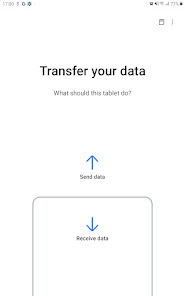
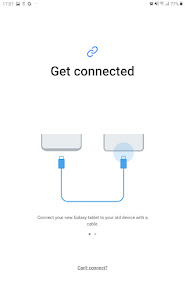
▣ Smart Switch gives you the freedom to move your contacts, music, photos, calendar, text messages, device settings and more to your new Galaxy device. Plus, Smart Switch™ helps you find your favorite apps or suggest similar ones on Google Play™.
▣ Who can transfer?
• Android™ owners
- Android 5.0 or higher
• iOS™ owners - use the option that’s best for you:
- Wired transfer from your iOS device to your Galaxy: iOS 5.0 or above, iOS device cable (lightning or 30 pin), and a USB connector
- Import from iCloud™: iOS 4.2.1 or higher and Apple ID
- PC/Mac transfer using iTunes™: Smart Switch PC/Mac software – Get started http://www.samsung.com/smartswitch
▣ What can be transferred?
- Contacts, calendar(Device content only), messages, photos, music (DRM free content only, Not supported for iCloud), videos (DRM free content only), call logs, memos, alarms, Wi-Fi, wallpapers, documents, app data (Galaxy devices only), home layouts (Galaxy devices only)
- You can send app data and home layouts by upgrading your Galaxy device to M OS (Galaxy S6 or higher).
* Note: Smart Switch scans and transfers content stored on the device and from the SD card (if used).
▣ Which devices are supported?
• Galaxy: Recent Galaxy mobile devices and tablets (From Galaxy S2)
• Other Android devices:
- HTC, LG, Sony, Huawei, Lenovo, Motorola, PANTECH, Panasonic, Kyocera, NEC, SHARP, Fujitsu, Xiaomi, Vivo, OPPO, Coolpad, RIM, YotaPhone, ZTE, Gionee, LAVA, MyPhone, Cherry Mobile, Google
* For reasons such as compatibility between devices, it may not be possible to install and use Smart Switch on certain devices.
1. To transfer data, both devices must have a minimum of 500 MB free space in their internal memory.
2. If you have a non-Samsung device that constantly disconnects from the wireless network, go to Advanced Wi-Fi on your device, turn off the “Wi-Fi initialise” and “Disconnect low Wi-Fi signal” options, and try again.
(The options described above may not be available, depending on your device manufacturer and OS version.)
The following permissions are required for the app service. For optional permissions, the default functionality of the service is turned on, but not allowed.
[ Required permissions ]
. Phone: Used to confirm your phone number (Android 12 or lower)
. Call logs: Used to transfer call log data (Android 9 or higher)
. Contacts: Used to transfer contacts data
. Calendar: Used to transfer calendar data
. Camera: Used to scan QR codes to connect to Galaxy phones and tablets
. SMS: Used to transfer SMS data
. Storage: Used to save the files necessary for data transfer (Android 11 or lower)
. Files and media: Used to save the files necessary for data transfer(Android 12)
. Photos and Videos: Used to save the files necessary for data transfer (Android 13 or higher)
. Nearby devices: Used to search for nearby devices using Wi-Fi or Bluetooth (Android 12 or higher)
. Location: Used to connect to devices using Wi-Fi Direct, which makes your location available to nearby devices (Android 12 or lower)
. Notifications: Used to provide information about the progress of data transfers (Android 13 or higher)
If your system software version is lower than Android 6.0, please update the software to configure App permissions.
Previously allowed permissions can be reset on Apps menu in device settings after software update.
▣ Who can transfer?
• Android™ owners
- Android 5.0 or higher
• iOS™ owners - use the option that’s best for you:
- Wired transfer from your iOS device to your Galaxy: iOS 5.0 or above, iOS device cable (lightning or 30 pin), and a USB connector
- Import from iCloud™: iOS 4.2.1 or higher and Apple ID
- PC/Mac transfer using iTunes™: Smart Switch PC/Mac software – Get started http://www.samsung.com/smartswitch
▣ What can be transferred?
- Contacts, calendar(Device content only), messages, photos, music (DRM free content only, Not supported for iCloud), videos (DRM free content only), call logs, memos, alarms, Wi-Fi, wallpapers, documents, app data (Galaxy devices only), home layouts (Galaxy devices only)
- You can send app data and home layouts by upgrading your Galaxy device to M OS (Galaxy S6 or higher).
* Note: Smart Switch scans and transfers content stored on the device and from the SD card (if used).
▣ Which devices are supported?
• Galaxy: Recent Galaxy mobile devices and tablets (From Galaxy S2)
• Other Android devices:
- HTC, LG, Sony, Huawei, Lenovo, Motorola, PANTECH, Panasonic, Kyocera, NEC, SHARP, Fujitsu, Xiaomi, Vivo, OPPO, Coolpad, RIM, YotaPhone, ZTE, Gionee, LAVA, MyPhone, Cherry Mobile, Google
* For reasons such as compatibility between devices, it may not be possible to install and use Smart Switch on certain devices.
1. To transfer data, both devices must have a minimum of 500 MB free space in their internal memory.
2. If you have a non-Samsung device that constantly disconnects from the wireless network, go to Advanced Wi-Fi on your device, turn off the “Wi-Fi initialise” and “Disconnect low Wi-Fi signal” options, and try again.
(The options described above may not be available, depending on your device manufacturer and OS version.)
The following permissions are required for the app service. For optional permissions, the default functionality of the service is turned on, but not allowed.
[ Required permissions ]
. Phone: Used to confirm your phone number (Android 12 or lower)
. Call logs: Used to transfer call log data (Android 9 or higher)
. Contacts: Used to transfer contacts data
. Calendar: Used to transfer calendar data
. Camera: Used to scan QR codes to connect to Galaxy phones and tablets
. SMS: Used to transfer SMS data
. Storage: Used to save the files necessary for data transfer (Android 11 or lower)
. Files and media: Used to save the files necessary for data transfer(Android 12)
. Photos and Videos: Used to save the files necessary for data transfer (Android 13 or higher)
. Nearby devices: Used to search for nearby devices using Wi-Fi or Bluetooth (Android 12 or higher)
. Location: Used to connect to devices using Wi-Fi Direct, which makes your location available to nearby devices (Android 12 or lower)
. Notifications: Used to provide information about the progress of data transfers (Android 13 or higher)
If your system software version is lower than Android 6.0, please update the software to configure App permissions.
Previously allowed permissions can be reset on Apps menu in device settings after software update.
Date de mise à jour
La sécurité, c'est d'abord comprendre comment les développeurs collectent et partagent vos données. Les pratiques concernant leur confidentialité et leur protection peuvent varier selon votre utilisation, votre région et votre âge. Le développeur a fourni ces informations et peut les modifier ultérieurement.

Aucune donnée partagée avec des tiers
En savoir plus sur la manière dont les développeurs déclarent le partage

Cette appli peut recueillir ces types de données
Activité dans l'application, Infos et performance des applis, Appareil ou autres ID

Les données ne sont pas chiffrées
Impossible de supprimer les données
Notes et avis
3,8
482K avis
Nouveautés
- Fixed bugs and improved stability
Assistance de l'appli
À propos du développeur
삼성전자(주)
mobile.biz@samsung.com
대한민국 16677 경기도 수원시
영통구 삼성로 129 (매탄동)
+82 1588-3366


