
AutoTextify
In-App-Käufe

Jedes Alter
info
100+
Downloads

Jedes Alter
Weitere Informationen





Über diese App
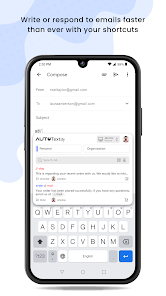
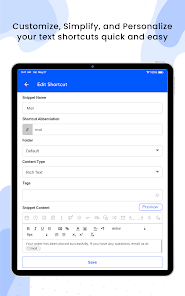
AutoTextify is an application that eliminates repetitive typing, transforming your workflow with powerful, time-saving shortcuts. Whether you're a professional, student, or anyone who types frequently, AutoTextify saves you time by effortlessly expanding your most-used phrases. With dynamic variables, folder organization, and extensive customization, AutoTextify is your key to efficient, hassle-free typing.
Features:
Easy Shortcuts: Create and use custom shortcuts for your most-used phrases.
Universal Compatibility: Works seamlessly with any keyboard and text input field.
Instant Expansion: Type a shortcut and watch it transform into a complete phrase.
Highly Customizable: Personalize your shortcuts to suit your needs.
Date & Time Insertion: Quickly add the current date and time to your text.
Dynamic Variables: Automatically adjust your responses with variables like gender, time, email, first name, last name, and more.
Organized Snippets: Sort your snippets into folders for easy access and organization.
Use Cases:
Personalized Responses: Use dynamic variables for custom responses.
Efficiency Boost: Handle common customer queries with pre-defined shortcuts.
Tailored Emails: Create customized sales messages with variables
Customer Support: Quickly respond to common customer inquiries with pre-defined shortcuts.
E-commerce: Automate product descriptions, order confirmations, or customer follow-ups.
Experience the future of typing with AutoTextify and watch your efficiency soar as you type less and accomplish more.
AutoTextify requires app accessibility service to detect text input across apps. This permission allows AutoTextify to expand shortcuts and insert responses directly into text fields, streamlining your workflow.
Features:
Easy Shortcuts: Create and use custom shortcuts for your most-used phrases.
Universal Compatibility: Works seamlessly with any keyboard and text input field.
Instant Expansion: Type a shortcut and watch it transform into a complete phrase.
Highly Customizable: Personalize your shortcuts to suit your needs.
Date & Time Insertion: Quickly add the current date and time to your text.
Dynamic Variables: Automatically adjust your responses with variables like gender, time, email, first name, last name, and more.
Organized Snippets: Sort your snippets into folders for easy access and organization.
Use Cases:
Personalized Responses: Use dynamic variables for custom responses.
Efficiency Boost: Handle common customer queries with pre-defined shortcuts.
Tailored Emails: Create customized sales messages with variables
Customer Support: Quickly respond to common customer inquiries with pre-defined shortcuts.
E-commerce: Automate product descriptions, order confirmations, or customer follow-ups.
Experience the future of typing with AutoTextify and watch your efficiency soar as you type less and accomplish more.
AutoTextify requires app accessibility service to detect text input across apps. This permission allows AutoTextify to expand shortcuts and insert responses directly into text fields, streamlining your workflow.
Aktualisiert am
Was die Sicherheit angeht, solltest du als Erstes verstehen, wie Entwickler deine Daten erheben und weitergeben. Die Datenschutz- und Sicherheitspraktiken können je nach deiner Verwendung, deiner Region und deinem Alter variieren. Diese Informationen wurden vom Entwickler zur Verfügung gestellt und können jederzeit von ihm geändert werden.

Keine Daten werden mit Drittunternehmen oder -organisationen geteilt

Diese App kann die folgenden Datentypen erheben
Personenbezogene Daten und Fotos und Videos

Daten werden bei der Übertragung verschlüsselt

Du kannst das Löschen der Daten beantragen

Hat sich verpflichtet, den Google Play-Richtlinien für familienfreundliche Inhalte zu folgen
Neuerungen
IMPROVEMENTS
✅ UI Enhancements: Improved design for a smoother user experience.
BUG FIXES👇
- Minor bugs fixed and overall app stability improved.
✅ UI Enhancements: Improved design for a smoother user experience.
BUG FIXES👇
- Minor bugs fixed and overall app stability improved.
Jedes Alter
Weitere InformationenSupport für diese App
Informationen zum Entwickler
NETAXIS IT SOLUTIONS PRIVATE LIMITED
peter@netaxis.in
New No. 15, Old No. 151, 30Th Street, O Block,
Anna Nagar East
Chennai, Tamil Nadu 600102
India
+91 98842 33999


