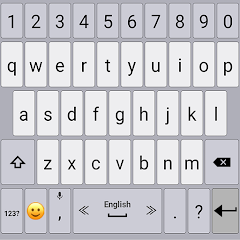
Classic Big Keyboard
Contains adsIn-app purchases
3.9star
135K reviews
10M+
Downloads

Mature 17+
info


About this app
⚙️ Keyboard Customization
• Adjust the size of the keyboard keys and their font.
• Change the typing sound and vibration intensity to fit your style.
• Adjust the keyboard size and font for a more personalized experience.
📚 Dictionaries & Grammar
• Customize your dictionary, benefit from word predictions and auto-corrections.
• Improve typing accuracy with suggested typing corrections.
• Set up custom shortcuts to easily insert your favorite phrases.
⚡ Typing Features
• Type faster with swipe typing.
• Convert speech to text instantly with voice typing.
• Set up your typing preferences for faster and more efficient typing (e.g., adjust delete speed, use volume buttons to move the cursor backward and forward, double space to period and more).
😄 Emoji Keyboard Features
• Resize the emoji keyboard screen to your preference.
• Access the latest emojis with the emoji keyboard, always up-to-date.
• Quickly switch between typing and the emoji keyboard for fast emoji access.
• 🎨 Customizable Themes
• Personalize the look and theme of your keyboard design.
• Choose your favorite theme from a variety of unique themes in Classic Keyboard.
• Set a personal background photo (available for premium users) to make your keyboard truly unique.
🗣️ Gesture Controls
• Set up custom gestures to perform quick actions, like swiping the spacebar up to open a special utility keyboard.
💡 Tips
• Swipe the spacebar left or right to quickly switch between languages.
• Hold or double-tap the shift key for "caps lock."
• Hold the emoji button to open a text-based emoji popup.
• Show hidden symbols by long-pressing keys (enable in Settings → Themes → Show hidden symbols).
🌍 Multilingual Support
• Type in multiple languages and switch languages with ease:
Afrikaans (Afrikaans)
Arabic (العربية)
Armenian (հայերեն)
Basque (Euskara)
Belarusian (Беларуская)
Bengali (বাঙালি)
Bulgarian (български)
Catalan (Català)
Croatian (Hrvatski)
Czech (čeština)
Danish (Dansk)
Dutch (Nederlands)
English
Esperanto (Esperanto)
Finnish (Suomi)
French (Français)
Georgian (ქართული)
German (Deutsch)
Greek (ελληνικά)
Hebrew (עברית)
Hindi (हिन्दी)
Hungarian (Magyar)
Icelandic (íslensku)
Indonesian (bahasa Indonesia)
Italian (Italiano)
Kurdish (Kurdî, کوردی)
Latvian (Latviešu)
Lithuanian (Lietuvių)
Luxembourgish (lëtzebuergesch)
Malayalam (മലയാളം)
Norwegian (Nynorsk)
Persian (فارسی)
Polish (Polski)
Portuguese (Português)
Romanian (Română)
Russian (Pусский)
Serbian (српски / srpski)
Sinhala (සිංහල)
Slovak (Slovenčina)
Slovenian (Slovenščina)
Songhay (Songhay)
Spanish (Español)
Swedish (Svenska)
Tamil (தமிழ்)
Tatar (Tatarça)
Turkish (Türkçe)
Thai (ไทย)
Ukrainian (Українська)
Urdu (اردو)
• Adjust the size of the keyboard keys and their font.
• Change the typing sound and vibration intensity to fit your style.
• Adjust the keyboard size and font for a more personalized experience.
📚 Dictionaries & Grammar
• Customize your dictionary, benefit from word predictions and auto-corrections.
• Improve typing accuracy with suggested typing corrections.
• Set up custom shortcuts to easily insert your favorite phrases.
⚡ Typing Features
• Type faster with swipe typing.
• Convert speech to text instantly with voice typing.
• Set up your typing preferences for faster and more efficient typing (e.g., adjust delete speed, use volume buttons to move the cursor backward and forward, double space to period and more).
😄 Emoji Keyboard Features
• Resize the emoji keyboard screen to your preference.
• Access the latest emojis with the emoji keyboard, always up-to-date.
• Quickly switch between typing and the emoji keyboard for fast emoji access.
• 🎨 Customizable Themes
• Personalize the look and theme of your keyboard design.
• Choose your favorite theme from a variety of unique themes in Classic Keyboard.
• Set a personal background photo (available for premium users) to make your keyboard truly unique.
🗣️ Gesture Controls
• Set up custom gestures to perform quick actions, like swiping the spacebar up to open a special utility keyboard.
💡 Tips
• Swipe the spacebar left or right to quickly switch between languages.
• Hold or double-tap the shift key for "caps lock."
• Hold the emoji button to open a text-based emoji popup.
• Show hidden symbols by long-pressing keys (enable in Settings → Themes → Show hidden symbols).
🌍 Multilingual Support
• Type in multiple languages and switch languages with ease:
Afrikaans (Afrikaans)
Arabic (العربية)
Armenian (հայերեն)
Basque (Euskara)
Belarusian (Беларуская)
Bengali (বাঙালি)
Bulgarian (български)
Catalan (Català)
Croatian (Hrvatski)
Czech (čeština)
Danish (Dansk)
Dutch (Nederlands)
English
Esperanto (Esperanto)
Finnish (Suomi)
French (Français)
Georgian (ქართული)
German (Deutsch)
Greek (ελληνικά)
Hebrew (עברית)
Hindi (हिन्दी)
Hungarian (Magyar)
Icelandic (íslensku)
Indonesian (bahasa Indonesia)
Italian (Italiano)
Kurdish (Kurdî, کوردی)
Latvian (Latviešu)
Lithuanian (Lietuvių)
Luxembourgish (lëtzebuergesch)
Malayalam (മലയാളം)
Norwegian (Nynorsk)
Persian (فارسی)
Polish (Polski)
Portuguese (Português)
Romanian (Română)
Russian (Pусский)
Serbian (српски / srpski)
Sinhala (සිංහල)
Slovak (Slovenčina)
Slovenian (Slovenščina)
Songhay (Songhay)
Spanish (Español)
Swedish (Svenska)
Tamil (தமிழ்)
Tatar (Tatarça)
Turkish (Türkçe)
Thai (ไทย)
Ukrainian (Українська)
Urdu (اردو)
Updated on
Safety starts with understanding how developers collect and share your data. Data privacy and security practices may vary based on your use, region, and age. The developer provided this information and may update it over time.

No data shared with third parties
Learn more about how developers declare sharing

This app may collect these data types
App activity, App info and performance, and Device or other IDs

Data is encrypted in transit

Data can’t be deleted
Ratings and reviews
3.9
131K reviews

Arizona Coleman
- Flag inappropriate
- Show review history
January 9, 2026
Since the recent update on 01/07/2026, I can say this the only keyboard I use. However auto capitalisation has ceased functioning. It is the only one I have with keys this large & allows me to precisely navigate through the text documents I compose. the built-in calculator is a nice touch as well. I just wish autofill provided more than 3 options. At times the right form of the word I am typing is not present and I must manually type it in anyway.
40 people found this review helpful
Apps Technologies
January 9, 2026
Can you please send a sceenshot of the capitalization not working? Appstechinfo@gmail.com

Mia Carter
- Flag inappropriate
- Show review history
April 9, 2026
Took a while to find an app like this but my efforts paid off. I love this app. It's exactly what it's called "Classic" and easy to navigate. And I'm not dealing with ridiculous ads every 3 seconds. Thank you! Update: I had to take off a star because I noticed whenever I went to my emojis, there's an advertisement bar at the bottom of the keyboard. It's tacky and I don't like the Ads popping up at the bottom. Please fix that.

gregg wilson
- Flag inappropriate
- Show review history
November 2, 2020
So far perfect. I dont give demerits for spellchecking or emojis. I'm old. But being able to type in a password that contains lower and upper case letters, numbers, and symbols without switching keyboards is very cool beans. Later. I really like the ? too Right now I'm trying to see if the "Rate the app" on the top right goes away if I do this.
165 people found this review helpful
What’s new
1. Enhanced Auto-Correction: Improved accuracy for automatic text corrections. (Note: Please enable this feature in Settings).
2. Data Management: Added new Backup and Restore options, accessible via the three-dot menu on the Settings page.
3. Bug Fix: Resolved an issue where text suggestions remained active after being disabled.
4. Improve translations
2. Data Management: Added new Backup and Restore options, accessible via the three-dot menu on the Settings page.
3. Bug Fix: Resolved an issue where text suggestions remained active after being disabled.
4. Improve translations
App support
About the developer
Oren Shmiel
appstechinfo@gmail.com
Einstein Street 23
Ramat Gan, 5229576
Israel


