
JioSphere: Web Browser
広告が表示されます
3.7star
10.3万 件のレビュー
1,000万+
ダウンロード

全ユーザー対象
info


このアプリについて
私たちは世界をあなたに届けようとしています! JioPages は JioSphere になりました。名前は変わりましたが、私たちは依然として心はインド人です。再設計されたインドの Web ブラウザーで、まったく新しいレベルのブラウジングを発見してください。 JioSphere は、インド人特有のニーズに応えるために特別に開発されたインドのブラウザです。これはインドの文化的多様性を維持し、促進するための小さな一歩です。インドの多様な人口構成を考慮して、多くの安全性とプライバシー機能が追加されています。私たちは 1,500 万を超えるダウンロードで私たちに注がれた愛に圧倒されており、常にあなたの期待を超えるように努力します。
JioSphere (以前は JioPages) ブラウザ アプリの機能:
* VPN
* アンチトラッキング
* 広告ブロッカー
* PIN を使用したシークレット モード
* 複数の検索エンジン
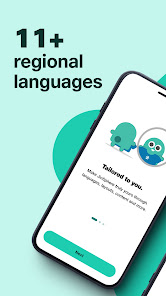
* 21 以上の地域言語
* 地域の言語でのニュース
* 音声検索
* QRコードスキャナー
* 時計
* ダークモード
* ゲーム
ハイライト
🔒 安全なブラウジング:
アンチトラッキングは、Web サイトによる個人データの収集をブロックすることで、データのプライバシーを保護します。
そのため、ユーザーとそのオンライン活動の詳細なプロフィールを作成できなくなります。
これは、ターゲットを絞った広告、価格差別、個人情報の盗難、その他の潜在的なリスクを回避するのに役立ちます。
アンチトラッキングは、トラッカーとそのソースを検出し、ソースがコンテンツを読み込まないようにすることでブロックします。
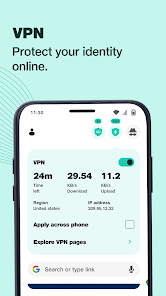
2) VPN 機能 – 高速 VPN に簡単に接続して、国際的なコンテンツを閲覧できます。 JioSphere (以前の JioPages) が提供する内蔵 VPN は無料です。
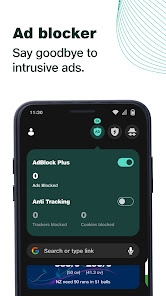
3) 広告ブロッカー機能 – 広告が煩わしい場合があるため、強化された内蔵広告ブロッカーを使用して、ブラウザーでのサーフィン中に Web サイト上の広告をブロックします。もうクリックベイトは必要ありません。
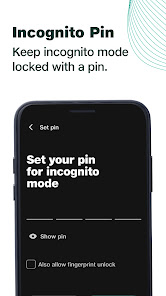
4) PIN を使用したシークレット モード: シークレット モードでは閲覧履歴は保存されません。さらに、シークレット モードで開いているタブをパスワードでロックすることもできます。これでタブは安全かつ非公開になりました。ここにプライベートブックマークを保存することもできるようになりました。
👤 パーソナライズされたホーム画面:
1) JioSphere (以前は JioPages) のホームページをニーズに合わせてカスタマイズします。ホーム画面上のコンテンツを固定/固定解除します。さまざまなコンテンツや検索エンジンから選択したり、お気に入りのサイトにすぐにアクセスできるクイック ページを作成したりできます
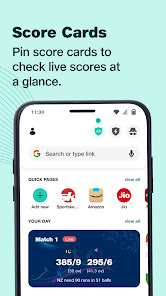
2) ライブアップデートとメイン画面上の情報を表示する「情報カード」。
🇮🇳 お住まいの地域の言語でインターネットを閲覧します:
1) 好みの言語でインターネットを閲覧: JioSphere ブラウザ アプリは 21 以上の地域言語をサポートしています。
自分の地域の言語でブラウザを使用することの簡単さと親しみやすさを体験してください。
2) 地域言語のニュース フィード: ニュース チャンネルが表示されませんか? JioSphere アプリ (以前は JioPages) に関するパーソナライズされた最新ニュースを常に入手してください。
📺 視聴: 英語および 10 以上の地域の言語でトレンド動画やバイラル動画を視聴します。
🚀 強化されたブラウジングエクスペリエンス:
1) ダウンロード マネージャー: 内蔵のダウンロード マネージャーは、ダウンロードされたファイルをファイル タイプ (画像、ビデオ、ドキュメント、ページ) に基づいて自動的に分類するため、コンテンツ管理が非常に簡単になります。
2) QR コード スキャナーと音声検索: 内蔵スキャナーで QR コードまたはバーコードをスキャンします。音声検索を使用して Web サイトを開くこともできます。マイクボタンを押してコマンドを与えるだけです。
3) 横向きビュー機能: 映画鑑賞やゲーム中に横向きビューに変更します。
4) 通知受信箱: 重要な通知を追跡します。
5) プログレッシブ Web アプリ: デバイスのホーム画面に任意の Web サイトからショートカットを作成し、アプリのようなエクスペリエンスを実現します。
6) ダークモード」により、ブラウザでストレスのない読書体験を実現します。快適な読書体験のために選択できる 2 つのテーマ。
JioSphere は、Jio Platforms Ltd が提供するモバイル Web ブラウザ アプリで、インド ユーザー向けのパーソナライゼーションとローカリゼーションに重点を置いています。
フィードバックをお待ちしております。までご連絡ください Facebook.JioSphere@gmail.com
JioSphere (以前は JioPages) ブラウザ アプリの機能:
* VPN
* アンチトラッキング
* 広告ブロッカー
* PIN を使用したシークレット モード
* 複数の検索エンジン
* 21 以上の地域言語
* 地域の言語でのニュース
* 音声検索
* QRコードスキャナー
* 時計
* ダークモード
* ゲーム
ハイライト
🔒 安全なブラウジング:
アンチトラッキングは、Web サイトによる個人データの収集をブロックすることで、データのプライバシーを保護します。
そのため、ユーザーとそのオンライン活動の詳細なプロフィールを作成できなくなります。
これは、ターゲットを絞った広告、価格差別、個人情報の盗難、その他の潜在的なリスクを回避するのに役立ちます。
アンチトラッキングは、トラッカーとそのソースを検出し、ソースがコンテンツを読み込まないようにすることでブロックします。
2) VPN 機能 – 高速 VPN に簡単に接続して、国際的なコンテンツを閲覧できます。 JioSphere (以前の JioPages) が提供する内蔵 VPN は無料です。
3) 広告ブロッカー機能 – 広告が煩わしい場合があるため、強化された内蔵広告ブロッカーを使用して、ブラウザーでのサーフィン中に Web サイト上の広告をブロックします。もうクリックベイトは必要ありません。
4) PIN を使用したシークレット モード: シークレット モードでは閲覧履歴は保存されません。さらに、シークレット モードで開いているタブをパスワードでロックすることもできます。これでタブは安全かつ非公開になりました。ここにプライベートブックマークを保存することもできるようになりました。
👤 パーソナライズされたホーム画面:
1) JioSphere (以前は JioPages) のホームページをニーズに合わせてカスタマイズします。ホーム画面上のコンテンツを固定/固定解除します。さまざまなコンテンツや検索エンジンから選択したり、お気に入りのサイトにすぐにアクセスできるクイック ページを作成したりできます
2) ライブアップデートとメイン画面上の情報を表示する「情報カード」。
🇮🇳 お住まいの地域の言語でインターネットを閲覧します:
1) 好みの言語でインターネットを閲覧: JioSphere ブラウザ アプリは 21 以上の地域言語をサポートしています。
自分の地域の言語でブラウザを使用することの簡単さと親しみやすさを体験してください。
2) 地域言語のニュース フィード: ニュース チャンネルが表示されませんか? JioSphere アプリ (以前は JioPages) に関するパーソナライズされた最新ニュースを常に入手してください。
📺 視聴: 英語および 10 以上の地域の言語でトレンド動画やバイラル動画を視聴します。
🚀 強化されたブラウジングエクスペリエンス:
1) ダウンロード マネージャー: 内蔵のダウンロード マネージャーは、ダウンロードされたファイルをファイル タイプ (画像、ビデオ、ドキュメント、ページ) に基づいて自動的に分類するため、コンテンツ管理が非常に簡単になります。
2) QR コード スキャナーと音声検索: 内蔵スキャナーで QR コードまたはバーコードをスキャンします。音声検索を使用して Web サイトを開くこともできます。マイクボタンを押してコマンドを与えるだけです。
3) 横向きビュー機能: 映画鑑賞やゲーム中に横向きビューに変更します。
4) 通知受信箱: 重要な通知を追跡します。
5) プログレッシブ Web アプリ: デバイスのホーム画面に任意の Web サイトからショートカットを作成し、アプリのようなエクスペリエンスを実現します。
6) ダークモード」により、ブラウザでストレスのない読書体験を実現します。快適な読書体験のために選択できる 2 つのテーマ。
JioSphere は、Jio Platforms Ltd が提供するモバイル Web ブラウザ アプリで、インド ユーザー向けのパーソナライゼーションとローカリゼーションに重点を置いています。
フィードバックをお待ちしております。までご連絡ください Facebook.JioSphere@gmail.com
最終更新日


評価とレビュー
3.7
10.2万 件のレビュー

Masumi St
- 不適切として報告
- レビュー履歴を表示
2025年6月2日
Youtube視聴用に。広告もなく概ね満足だが、アプリを開く度に新しいタブに誘導されるのが不便すぎる。英語で「最後に見てたタブに飛ぶか?」的なことを訊かれるが、そんなん訊くまでもなく最初からそうしてくれよと思う。それらしい設定項目もないし、しばらく使ってみて、面倒に感じるようなら無理だろうな。
Jio Platforms Limited
2025年6月13日
Dear User, If you are using any website extensively, i would suggest you create a Webapp for the same. You wont even have to open JioSphere to open access the website, it will be right on the home screen. To create a webapp open the desired website in JioSphere> hamburger menu (bottom right)> tap on Create web app. If you like this please rate us 5

木更津悠夜
- 不適切として報告
2025年7月2日
共有できないのが惜しいです。 広告◯ 動画バック再生◯
Jio Platforms Limited
2025年7月2日
We aim to deliver best experience on our app. If you are facing any issues, please write to us at jiosphere@gmail.com. We will definitely help you.

夕築郁
- 不適切として報告
2025年1月23日
動画バックグラウンド再生◯ 広告ブロック◯ スクロール時メニュー画面消える (消え方が少し癖がある)
3 人のユーザーが、このレビューが役立ったと評価しました
Jio Platforms Limited
2025年1月23日
Hi, could you please share a brief description of the problem at feedback.jiosphere@gmail.com to help us understand your concern. We will look forward to your updated review.
新機能
1. Maximize earning option for JioCoins introduced
2. UI enhancements
3. Bug fixes
2. UI enhancements
3. Bug fixes
アプリのサポート
デベロッパーについて
JIO PLATFORMS LIMITED
care@jio.com
Office- 101, Saffron, Near Centre Point, Panchwati
5 Rasta, Ambawadi,
Ahmedabad, Gujarat 380006
India
+91 93219 98645


