
VIP Access
3.4star
18.8K reviews

Everyone
info
1Cr+
Downloads

Everyone
Learn more


About this app
Symantec VIP Access helps protect your online accounts and transactions by using a strong authentication process when you sign in to your VIP-enabled accounts.
• Strong authentication: Provides strong, two-factor authentication when logging into your VIP-enabled accounts.
• QR/App Code: Scan a QR Code to generate site-specific security codes for strong two-factor authentication to your favorite websites or to migrate credentials to a new device.
Use VIP Access at participating organizations such as E*TRADE, Facebook, Google, or any one of the hundreds of sites within the VIP Network: https://vip.symantec.com
Features
Strong Authentication
VIP Access adds strong authentication to your normal login in one of the following ways:
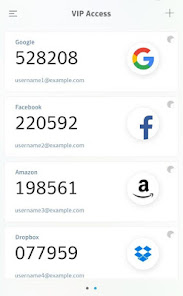
• Dynamically generate a one-time use security code on your mobile device. Use that code along with your username and password.
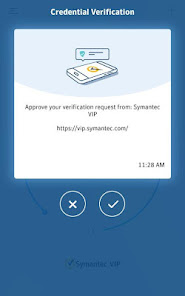
• Receive a push notification on your mobile device that you approve as authentication. If your organization requires you to define an additional device authentication mechanism to meet the security requirements, you are prompted for the additional local authentication such as PIN, pattern, password, or fingerprint.
• Enter a challenge number on your mobile device that you receive during authentication. The challenge number proves that you are physically present during authentication.
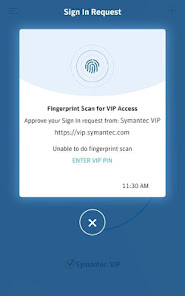
• Use fingerprint or your security code in a push notification to authenticate yourself on your mobile device.
Note: Fingerprint authentication requires that your mobile device is fingerprint capable and that you have registered a fingerprint on the device.
The strong authentication method you use depends on the method implemented by your participating organization.
You can generate a security code even if you do not have a network or mobile connection.
VIP Access is compatible with Android-based smart watches running Wear OS.
QR/App Codes
• Scan a QR Code at participating organizations such as Google, Facebook, Amazon, and more to generate a security code every 30 seconds to securely sign in. Enter this security code along with your password to add strong authentication to your favorite websites.
• Generate a QR code to migrate a VIP Access credential to a new mobile device.
Be sure to read the VIP End User Agreement after downloading VIP Access: https://docs.broadcom.com/doc/end-user-agreement-english
• Strong authentication: Provides strong, two-factor authentication when logging into your VIP-enabled accounts.
• QR/App Code: Scan a QR Code to generate site-specific security codes for strong two-factor authentication to your favorite websites or to migrate credentials to a new device.
Use VIP Access at participating organizations such as E*TRADE, Facebook, Google, or any one of the hundreds of sites within the VIP Network: https://vip.symantec.com
Features
Strong Authentication
VIP Access adds strong authentication to your normal login in one of the following ways:
• Dynamically generate a one-time use security code on your mobile device. Use that code along with your username and password.
• Receive a push notification on your mobile device that you approve as authentication. If your organization requires you to define an additional device authentication mechanism to meet the security requirements, you are prompted for the additional local authentication such as PIN, pattern, password, or fingerprint.
• Enter a challenge number on your mobile device that you receive during authentication. The challenge number proves that you are physically present during authentication.
• Use fingerprint or your security code in a push notification to authenticate yourself on your mobile device.
Note: Fingerprint authentication requires that your mobile device is fingerprint capable and that you have registered a fingerprint on the device.
The strong authentication method you use depends on the method implemented by your participating organization.
You can generate a security code even if you do not have a network or mobile connection.
VIP Access is compatible with Android-based smart watches running Wear OS.
QR/App Codes
• Scan a QR Code at participating organizations such as Google, Facebook, Amazon, and more to generate a security code every 30 seconds to securely sign in. Enter this security code along with your password to add strong authentication to your favorite websites.
• Generate a QR code to migrate a VIP Access credential to a new mobile device.
Be sure to read the VIP End User Agreement after downloading VIP Access: https://docs.broadcom.com/doc/end-user-agreement-english
Updated on
Safety starts with understanding how developers collect and share your data. Data privacy and security practices may vary based on your use, region and age. The developer provided this information and may update it over time.

No data shared with third parties
Learn more about how developers declare sharing

This app may collect these data types
Device or other IDs

Data isn’t encrypted
Data can’t be deleted
Ratings and reviews
3.4
18.1K reviews

Aaron Hamilton
- Flag inappropriate
2 March 2026
Completely useless app! There isn't any other way to describe it. Everytime I try to copy the confirmation number from this app to my work app, it says there was an error or it was the wrong number. Also the numbers change too fast, how is anybody supposed to get the numbers right on their first try?! It's like the makers of this app want you to mess up.
7 people found this review helpful

Jon Nelson
- Flag inappropriate
23 February 2026
On a up to date Pixel 10 with the app updated, I cannot click on the three lines for the menu. This is also true for the X when I am on the screen to add a new credential. Also the title "VIP Access" is cutoff by my camera lens. I have found that if I click below the icons I get them to work. It seems like the UI is too big for the screen.
4 people found this review helpful

ToasterKing
- Flag inappropriate
8 November 2022
On first launch, the app displays an error stating that there was a problem registering the app, which I can't get past. The error message offers an email address to message for help. I did so, and included plenty of detail on my configuration. After a week, there has been no response -- not even an auto-reply stating that they received my inquiry. Wasting the user's time by asking them to email nonexistent support just adds insult to injury.
211 people found this review helpful
What's new
This update has the following new features:
• Facial recognition support for push notifications on Android (where supported by the device)
• Bug fixes
• Facial recognition support for push notifications on Android (where supported by the device)
• Bug fixes
Everyone
Learn moreApp support
About the developer
Broadcom Inc.
jithin.mandhapalli@broadcom.com
3421 Hillview Ave
Palo Alto, CA 94304
United States
+91 77992 67573


