
SMS & MMS from Tablet
4.3star
19.9K reviews
1M+
Downloads

Everyone
info



About this app
SMS Text Messaging done easier, faster, & better!
Text from your Tablet, using your current Android phone number.
Named one of Time Magazine's "Best 50 Android Apps"
Save time; Increase productivity. Don't check your phone for every notification! See who's texting you from your tablet without having to look at your phone's messaging app over and over.
Great for online texting when busy working or in meetings. Manage your texts, picture messages & see Caller ID of incoming calls without looking at your phone. Turn off incoming notifications during presentations. Text meeting updates before leaving your desk.
Good for real estate agents, taxi dispatchers, and other businesses to send quick, professional messages to colleagues & clients
Students love messaging & group texting with friends discreetly. Text online while in class "taking notes" on your laptop. Many college students have called it "iMessage for Android".
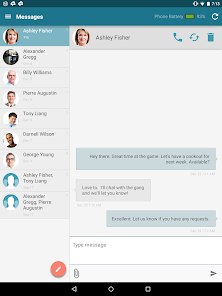
★ Turn your tablet into an SMS Messenger
★ Messages stay synced w/ your phone's messaging app
★ Instant Notifications on your tablet when text messages arrive on your phone
★ Schedule SMS Schedule Texts to send out in advance from your tablet
★ Low Battery Alerts: See your phone's battery level on your tablet. Get alerts when phone is low on battery.
★ Group Texting: You can also send MMS group texts (reply-all type) from your tablet (only if your Android phone supports Group texting)
★ Phone Call Alerts: See who's calling your phone - on tablet. Missed calls & incoming calls stored to an online call log
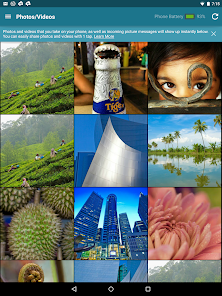
★ Sync your phone's photos & videos to your tablet Dead simple sharing of photos and videos taken on your phone. Easily save sync'd media to your tablet. (optional feature)
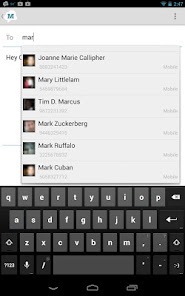
★ Contact Lists: Send bulk messages to up to 25 contacts at once. Send as one group message or to individual contacts
★ Send Picture Messages (MMS Picture Messaging) from tablet.
★ Quick set up - under 30 seconds
★ 100% Free (no additional charge from what your Carrier charges - text free)
★ Online Texting from PC too: In addition to your tablet, use MightyText on your Computer to SMS from PC or Mac. Text online from any internet-connected device!
Note: you must also have an Android phone & install the MightyText app ON YOUR ANDROID PHONE FIRST, before using the tablet app. If you don't have that yet, please download and set up MightyText on your PHONE, from Google Play:
https://play.google.com/store/apps/details?id=com.texty.sms
Additional Features:
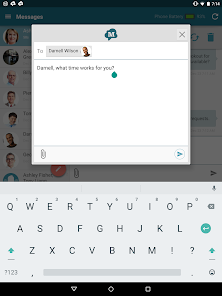
Quick Reply SMS Popup Option: On an incoming message, see a message popup on top of your current tablet app activity, and reply directly from the popup window to quickly get back to what you were doing. This is turned off by default, but can be enabled in settings.
Save Battery Life: MightyText saves battery on your Android phone, because your your phone's screen is off. Also, see a live battery indicator showing your phone's battery status on the tablet.
Phone Call Logs: Call Logs also stored to show history of missed calls as well as incoming & outgoing calls (Call logs turned off by default)
Phone Dialer on Tablet: Live dialer so you can dial your phone's contacts from your tablet (the dialer tells your phone to initiate the call)
Text from your Tablet, using your current Android phone number.
Named one of Time Magazine's "Best 50 Android Apps"
Save time; Increase productivity. Don't check your phone for every notification! See who's texting you from your tablet without having to look at your phone's messaging app over and over.
Great for online texting when busy working or in meetings. Manage your texts, picture messages & see Caller ID of incoming calls without looking at your phone. Turn off incoming notifications during presentations. Text meeting updates before leaving your desk.
Good for real estate agents, taxi dispatchers, and other businesses to send quick, professional messages to colleagues & clients
Students love messaging & group texting with friends discreetly. Text online while in class "taking notes" on your laptop. Many college students have called it "iMessage for Android".
★ Turn your tablet into an SMS Messenger
★ Messages stay synced w/ your phone's messaging app
★ Instant Notifications on your tablet when text messages arrive on your phone
★ Schedule SMS Schedule Texts to send out in advance from your tablet
★ Low Battery Alerts: See your phone's battery level on your tablet. Get alerts when phone is low on battery.
★ Group Texting: You can also send MMS group texts (reply-all type) from your tablet (only if your Android phone supports Group texting)
★ Phone Call Alerts: See who's calling your phone - on tablet. Missed calls & incoming calls stored to an online call log
★ Sync your phone's photos & videos to your tablet Dead simple sharing of photos and videos taken on your phone. Easily save sync'd media to your tablet. (optional feature)
★ Contact Lists: Send bulk messages to up to 25 contacts at once. Send as one group message or to individual contacts
★ Send Picture Messages (MMS Picture Messaging) from tablet.
★ Quick set up - under 30 seconds
★ 100% Free (no additional charge from what your Carrier charges - text free)
★ Online Texting from PC too: In addition to your tablet, use MightyText on your Computer to SMS from PC or Mac. Text online from any internet-connected device!
Note: you must also have an Android phone & install the MightyText app ON YOUR ANDROID PHONE FIRST, before using the tablet app. If you don't have that yet, please download and set up MightyText on your PHONE, from Google Play:
https://play.google.com/store/apps/details?id=com.texty.sms
Additional Features:
Quick Reply SMS Popup Option: On an incoming message, see a message popup on top of your current tablet app activity, and reply directly from the popup window to quickly get back to what you were doing. This is turned off by default, but can be enabled in settings.
Save Battery Life: MightyText saves battery on your Android phone, because your your phone's screen is off. Also, see a live battery indicator showing your phone's battery status on the tablet.
Phone Call Logs: Call Logs also stored to show history of missed calls as well as incoming & outgoing calls (Call logs turned off by default)
Phone Dialer on Tablet: Live dialer so you can dial your phone's contacts from your tablet (the dialer tells your phone to initiate the call)
Updated on
Safety starts with understanding how developers collect and share your data. Data privacy and security practices may vary based on your use, region, and age. The developer provided this information and may update it over time.


Ratings and reviews
4.4
4.68K reviews

A Google user
- Flag inappropriate
January 28, 2021
I"ve been using this app for several years now and it is one of my favorite tools. I can answer texts from my computer or my tablet. I can dismiss alerts without having to grab my phone. And since I use my cell phone for work, I can access it from Mighty Text and type easier, cut & paste to text, and view attachments on the full screen. It's a wonderful app 2021 update: Still have found nothing better for Android/Linux message syncing. Still using it on my Samsung tablet, Note 9 and Linux workstations.
2 people found this review helpful

TE Fizer
- Flag inappropriate
January 6, 2021
Would probably give MT a 4.85, but have to round it up to a 5. The only "con" I see with this app is that, as far as I can tell, the process of forwarding texts in email format is a little cumbersome. Otherwise, I think being able to text from my table or computer is great, not only because I can see it more easily, but also because the character limit is large, compared to other apps (and the native messaging app on my phone). The Pro version also provides more options, which I subscribe to because I use MT primarily for business. I also like that I can delete texts from my phone, and still have them available on the MT app.
8 people found this review helpful

Laura Brown
- Flag inappropriate
February 1, 2021
I particularly like having the version of this app that I can use on my computer. I have a very hard time typing on on-screen keyboards, and when the sync is working I can send texts from my computer keyboard, which is more intuitive for me as a long-time touch typist. My only beef is that frequently the app doesn't sync with either my computer or my tablet. Apparently they need to be close enough to my phone to send and receive texts. So I've learned to keep my phone close to the computer to avoid this problem. Otherwise I love this app. I would give it five stars if the developers could find a way to make it sync from greater distances- say the 100 feet from my living room to my home office, or the couple hundred from the living room (where I leave my phone overnight) to the bedroom, where my tablet lives.
15 people found this review helpful
MightyText: SMS Texting w/ PC - SMS Messaging
February 1, 2021
Hey Laura, we are sorry for the inconvenience and would like to work with you on the sending/receiving issue you mentioned. Can you please contact us via http://help.mightytext.net and we will get back to you right away. Mention this review in your message to us.
App support
About the developer
OPENPHONE INC.
info@mightytext.net
3964 Rivermark Plz
Santa Clara, CA 95054-4155
United States
+1 415-763-7999


