
FolderSync Pro
4.4star
25.4K reviewsinfo
100K+
Downloads

PEGI 3
info
About this app
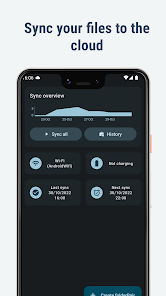
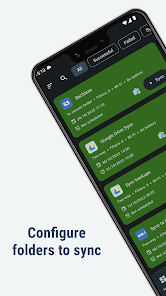
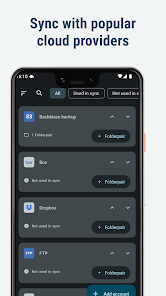
FolderSync enables simple sync to cloud based storage to and from local folders on the device SD cards. It support a wide range of different cloud providers and file protocols, and support for more platforms are added continuously. Root file access supported on rooted devices.
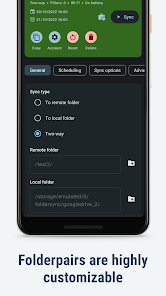
Effortlessly sync your files. Backup your music, pictures and other important files from the phone to your cloud storage or the other way around. It has never been easier. Automation support using Tasker and similar programs enables fine grained control of your syncs.
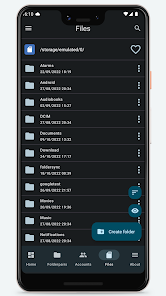
FolderSync contains a full file manager, that enables you to manage your files locally and in the cloud. Copy, move and delete your files in your cloud/remote accounts. Support for creation/deletion of buckets in Amazon S3. Upload and download files from the phone. It's all supported.
Supported cloud providers
- Amazon S3 Simple Storage Service
- Box
- CloudMe
- Dropbox
- Google Cloud Storage
- Google Drive
- HiDrive
- Kolab Now
- Koofr
- Livedrive Premium
- luckycloud
- MEGA
- MinIO
- MyDrive.ch
- NetDocuments
- NextCloud
- OneDrive
- OneDrive for Business
- OwnCloud
- pCloud
- Storegate
- SugarSync
- WEB.DE
- Yandex Disk
Supported protocols
- FTP
- FTPS (SSL/TLS implicit)
- FTPES (SSL/TLS explicit)
- SFTP (SSH File Transfer)
- SMB1/Samba/CIFS/Windows Share
- SMB2
- SMB3
- WebDAV (HTTPS)
Change log
https://foldersync.io/changelog
Support
https://foldersync.io/support
FAQ
https://foldersync.io/docs/faq
Permissions
ACCESS_FINE_LOCATION
Optional permission that can be granted if Foldersync should detect SSID name on Android 9 or newer.
ACCESS_NETWORK_STATE
Needed to determine current network state
ACCESS_WIFI_STATE
Needed to access info about the current WiFi state (SSID etc.)
CHANGE_NETWORK_STATE/CHANGE_WIFI_STATE
These two are needed to be allowed to turn WiFi on and off
CHANGE_WIFI_MULTICAST_STATE
Needed to autodiscover WebDAV, SMB, FTP and SFTP servers using Bonjour/UPNP protocol
INTERNET
Needed to access the internet connection to send and retrieve files
READ_EXTERNAL_STORAGE/WRITE_EXTERNAL_STORAGE
Needed to read and write files from and to SD card
RECEIVE_BOOT_COMPLETED
Needed to automatically start after reboot of device, so scheduled syncs will still run
WAKE_LOCK
Needed to keep the device running during a sync, so it doesn't enter sleep mode
Effortlessly sync your files. Backup your music, pictures and other important files from the phone to your cloud storage or the other way around. It has never been easier. Automation support using Tasker and similar programs enables fine grained control of your syncs.
FolderSync contains a full file manager, that enables you to manage your files locally and in the cloud. Copy, move and delete your files in your cloud/remote accounts. Support for creation/deletion of buckets in Amazon S3. Upload and download files from the phone. It's all supported.
Supported cloud providers
- Amazon S3 Simple Storage Service
- Box
- CloudMe
- Dropbox
- Google Cloud Storage
- Google Drive
- HiDrive
- Kolab Now
- Koofr
- Livedrive Premium
- luckycloud
- MEGA
- MinIO
- MyDrive.ch
- NetDocuments
- NextCloud
- OneDrive
- OneDrive for Business
- OwnCloud
- pCloud
- Storegate
- SugarSync
- WEB.DE
- Yandex Disk
Supported protocols
- FTP
- FTPS (SSL/TLS implicit)
- FTPES (SSL/TLS explicit)
- SFTP (SSH File Transfer)
- SMB1/Samba/CIFS/Windows Share
- SMB2
- SMB3
- WebDAV (HTTPS)
Change log
https://foldersync.io/changelog
Support
https://foldersync.io/support
FAQ
https://foldersync.io/docs/faq
Permissions
ACCESS_FINE_LOCATION
Optional permission that can be granted if Foldersync should detect SSID name on Android 9 or newer.
ACCESS_NETWORK_STATE
Needed to determine current network state
ACCESS_WIFI_STATE
Needed to access info about the current WiFi state (SSID etc.)
CHANGE_NETWORK_STATE/CHANGE_WIFI_STATE
These two are needed to be allowed to turn WiFi on and off
CHANGE_WIFI_MULTICAST_STATE
Needed to autodiscover WebDAV, SMB, FTP and SFTP servers using Bonjour/UPNP protocol
INTERNET
Needed to access the internet connection to send and retrieve files
READ_EXTERNAL_STORAGE/WRITE_EXTERNAL_STORAGE
Needed to read and write files from and to SD card
RECEIVE_BOOT_COMPLETED
Needed to automatically start after reboot of device, so scheduled syncs will still run
WAKE_LOCK
Needed to keep the device running during a sync, so it doesn't enter sleep mode
Updated on
Safety starts with understanding how developers collect and share your data. Data privacy and security practices may vary based on your use, region, and age. The developer provided this information and may update it over time.

No data shared with third parties
Learn more about how developers declare sharing

This app may collect these data types
App activity, App info and performance, and Device or other IDs

Data is encrypted in transit

Data can’t be deleted
Ratings and reviews
4.5
22.2K reviews

Jon Haack
- Flag inappropriate
November 16, 2025
This is a great, reliable sync app with outstanding technical support. I've had FolderSync Pro for years and used it without any problems. Recently, I ran into my first issue, which had to do with authentication in setting up a folder pair to a cloud account. The support team was very responsive and helpful in solving the problem, which ultimately came from an unusual android device system config. Would highly recommend FolderSync for the utility, the versatility, and the terrific support.
3 people found this review helpful

Jacob McDonald
- Flag inappropriate
December 26, 2025
Excellent app. I use it on vacation to backup my pictures and videos to my server at home. One feature request would make it perfect: allow setting the simultaneous transfers number per folder pair instead of globally. This will allow setting to 1 for optimum card to card transfer speed, or to a higher number for optimum Internet transfer speed. Thank you!

Curtis Fink
- Flag inappropriate
December 26, 2025
You have to set up an individual folder pair for every single folder that you want to sync. Why can't I just select a list of folders that I want to sync from my device to my nextcloud server? And what is with the stupid "left folder" versus "right folder"? Just use the standard terminology of source and destination instead of making it over complicated and unintuitive. This app is garbage.
1 person found this review helpful
What’s new
Bugfixes and UI optimizations
App support
About the developer
Tacit Dynamics ApS
support@tacit.dk
Trindsøvej 6, sal 1
8000 Aarhus C
Denmark
+45 93 80 80 74


