
Ginger Keyboard - Emoji, GIFs
Contains adsIn-app purchases
3.9star
1.85L reviews
1Cr+
Downloads

Everyone
info




About this app
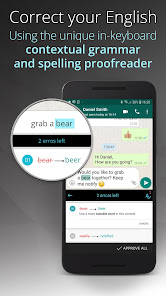
While other well-known keyboards such as Gboard and Swiftkey offer auto-correction on the current word only, Ginger Keyboard checks your whole sentences using a unique Contextual Grammar and Spell Check proofreader. Either you want to send a short fine chat message or long complex quality email, with Ginger Keyboard you are all covered!
From TechCrunch:
”Ginger Keyboard allows users to send better, less embarrassing texts and higher quality writing."
Support for over 50 languages. Swipe typing and even emoji prediction to accommodate your messages, emails, posts or texts. Watch how your typos, spelling mistakes and grammar errors disappear.
Key Features:
Languages support, including:
English (US, UK)
Esperanto
Español (ES, AL, US)
Dansk
Deutsch
Ελληνικά
Français (FR, CA)
Hebrew
Italiano
Norsk bokmål
Nederlands
In order to see the full list of supported languages go here:
http://help.gingersoftware.com/hc/en-us/articles/201930542-Which-input-languages-does-Ginger-support-
Join Ginger Beta Community:
Join our Beta to help form the future of Ginger Keyboard: https://goo.gl/4HgIaz
** Ginger corrections feature is a freemium feature - enjoy 8 corrections or upgrade for unlimited usage! **
Technical Support:
For more information and assistance, visit our Help Center, or open a support request: http://help.gingersoftware.com/hc/en-us/
Follow us on Facebook:
https://www.facebook.com/GingerProofreader/
Privacy and Security issues:
Ginger never stores or collects your personal information, including username, passwords or credit card info. All this information is completely handled by each third party service and can't be accessed by Ginger.
From TechCrunch:
”Ginger Keyboard allows users to send better, less embarrassing texts and higher quality writing."
Support for over 50 languages. Swipe typing and even emoji prediction to accommodate your messages, emails, posts or texts. Watch how your typos, spelling mistakes and grammar errors disappear.
Key Features:
- ▪ Grammar Checker and Spell Check
Ginger’s grammar check and spell checker correct your grammar, spelling, punctuation and capitalization mistakes quickly and efficiently. - ▪ Emoji, Emoji Art, stickers and Animated GIFs
Express yourself with our 1000+ beautiful emojis emoji art, emoticons, stickers and animated GIFs. - ▪ Word Prediction
Ginger Keyboard understands your writing and gives you accurate next-word predictions. See Ginger’s suggestions, and choose whether you want to accept them or not. - ▪ Emoji Prediction
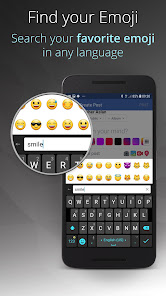
Ginger predicts which emoji you are about to use based on your most typed words and phrases, and suggests the best one accordingly. - ▪ Emoji & GIFs Search
Search for emoji and GIFs directly from Ginger keyboard. - ▪ Swipe
Write faster with Stream, by swiping your finger from key to key. - ▪ Smart Bar
Customize your keyboard with your favorite and most frequently used apps. Take notes, create events, send emails and chat for a truly optimized and productive mobile flow. - ▪ Keyboard in-app games
Make the most of your idle time and try one of our old-school games. Play a quick game of Snake, Squash (Pong-like), Copter, 2048 or Sliding Puzzle without leaving your keyboard - ▪ Translate
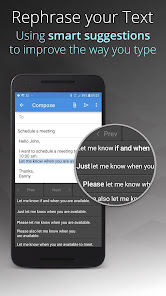
Express yourself with translations between more than 58 languages. - ▪ Advanced sentence rephrasing
Spice up your text with new variations for your sentences, and discover alternative ways to write your text. - ▪ Ginger Page
Ginger offers a better way to write in English. Tap into Ginger Page, and enjoy our powerful editing tools to quickly review your text for any grammar, spelling and punctuation issues, personalized dictionary, synonyms, translation and more.
Languages support, including:
English (US, UK)
Esperanto
Español (ES, AL, US)
Dansk
Deutsch
Ελληνικά
Français (FR, CA)
Hebrew
Italiano
Norsk bokmål
Nederlands
http://help.gingersoftware.com/hc/en-us/articles/201930542-Which-input-languages-does-Ginger-support-
Join Ginger Beta Community:
Join our Beta to help form the future of Ginger Keyboard: https://goo.gl/4HgIaz
** Ginger corrections feature is a freemium feature - enjoy 8 corrections or upgrade for unlimited usage! **
Technical Support:
For more information and assistance, visit our Help Center, or open a support request: http://help.gingersoftware.com/hc/en-us/
Follow us on Facebook:
https://www.facebook.com/GingerProofreader/
Privacy and Security issues:
Ginger never stores or collects your personal information, including username, passwords or credit card info. All this information is completely handled by each third party service and can't be accessed by Ginger.
Updated on
Safety starts with understanding how developers collect and share your data. Data privacy and security practices may vary based on your use, region and age. The developer provided this information and may update it over time.

No data shared with third parties
Learn more about how developers declare sharing

This app may collect these data types
Personal info, Financial info and 2 others

Data isn’t encrypted

You can request that data be deleted
Ratings and reviews
3.9
1.73L reviews

Jake E.
- Flag inappropriate
30 November 2025
Used to be a 5 star, but a month or so ago, something changed and it's gotten very difficult to type. Pressing and holding buttons to bring up the alternate options used to have the most used options already aligned with the key, which made things super easy. Now, those popups seem to change locations / get changed in size to fill the whole horizontal space. IE: Normally, the . key's alternate is ! but now is , because the popup has changed size. I can provide an example screenshot or two.

Barry Erickson
- Flag inappropriate
31 October 2023
About a year & half ago I had to stop using this app because of a problem with it. I'm glad the problem is fixed, and I'm able to use your app again. The last update no longer lets me install the themes that I was able to use before. Just wondering what happened. I paid for them, but I'm not able to install them anymore. PLEASE CORRECT THIS ISSUE!
7 people found this review helpful
GingerSoftware Inc.
2 November 2023
We no longer offer themes for Ginger Keyboard.

A Google user
- Flag inappropriate
29 August 2019
Facet keyboard. Word collection isn't that has, and for sure train, it didn't cumin words (like apologize). THE ABOVE WAS TYPED WITH THIS KEYBOARD. Now, this is what I really typed: Decent keyboard. Word correction isn't that great and for some reason, it doesn't recognize common words (like apologized). I've noticed it removes all tenses and plurals of a word, including the "S"s after a word, the "ed" after a word, etc. uninterrupted...UNINSTALLED because it became frustrating.
6 people found this review helpful
GingerSoftware Inc.
29 August 2019
Looks like you didn't use the grammar correction feature, try that by tapping on the A icon and you should get better results
What's new
Improvement in correction quality : more detection
AI-based synonyms dictionary integrated
Extended dictionary to cover modern words
AI-based synonyms dictionary integrated
Extended dictionary to cover modern words
App support
About the developer
Ginger Software, Inc.
cs@reverso.net
730 Columbus Ave APT 11C
New York, NY 10025-6665
United States
+33 7 59 55 23 83


