

BIG Launcher
In-app purchases

4.2star
7.9K reviews
10L+
Downloads

Everyone
info






About this app
A fast and simple Android home screen for seniors and people with vision problems.
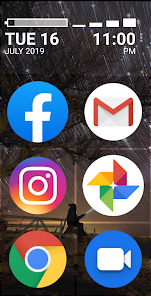
✔️ BIG Launcher makes the smartphone suitable for seniors, children, and people with eye diseases, motor problems or the legally blind.
✔️ Visually impaired and technically challenged users can use simple and easy-to-read interface with ease.
✔️ There is no fear of making a mistake and losing everything with stress-free navigation.
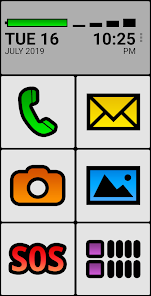
✔️ And it also features the SOS button which can save lives!
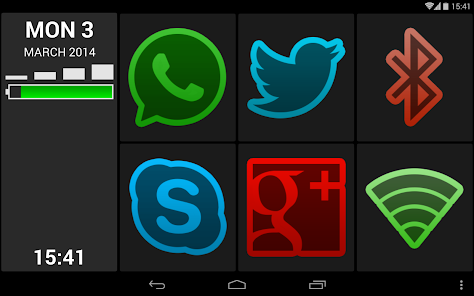
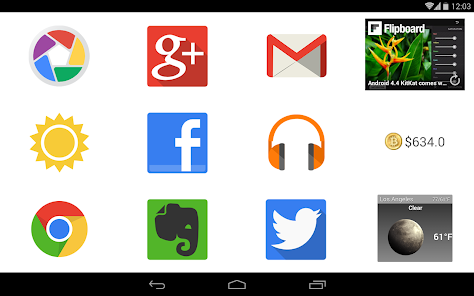
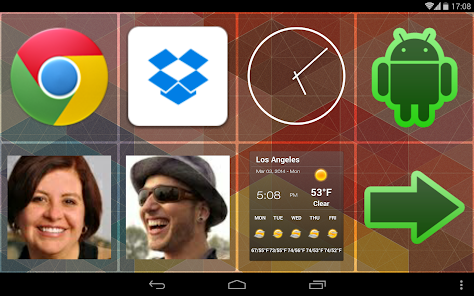
☎️ replaces the user interface of almost any Android phone or tablet with enlarged buttons and texts.
👴 designed in consideration with seniors and the visually impaired to provide maximum readability and easy use.
👉 controlled by single touches, leaving no room for errors.
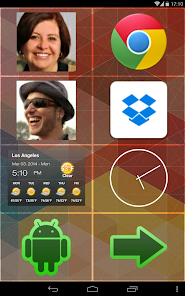
🛠️ easily customizable to match your needs.
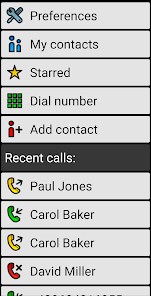
🌎 put the shortcuts for apps, websites, contacts, widgets and more directly on the home screen.
📺 add more screens and access them by swiping or pushing the buttons.
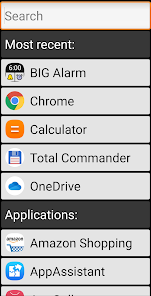
🔎 find the apps quickly with instant search or recent apps list on the top.
🔒 hide the apps you don’t want to use to protect users from getting lost in the navigation
📦 BIG Apps Suite
Simple apps for seniors and people with vision problems.
🔹 Android 10 and Android Go compatible
🔹 100% accessible
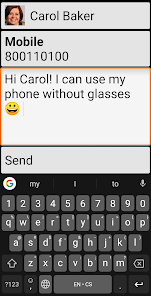
🔹 high contrast color schemes and three different font sizes allow you to use your phone without glasses.
🔹 additional color themes and icon packs are available for download
🔹 extended support for Talkback screen reader allows legally blind users to use their phone with ease and confidence
🔹 all the apps can also be controlled by a hardware keyboard or via the Tecla wheelchair interface, enabling users with paralysis to have full and precise control of the smartphone without touching the screen.
🔹 compatible with Android 2.2 or higher. BIG SMS requires Android 4.4 or higher
🔸 BIG Launcher - Your new home screen
🔸 BIG Phone - Easy to use phone and contacts
🔸 BIG SMS - Messaging editor with large fonts
🔸 BIG Alarm - Alarm as simple as possible
🔸 BIG Notifications - Make all the Android notifications really big
🆓 BIG Launcher free version limitations
- you can customize only the right column of buttons
- only 5 additional screens allowed
- password protection of the configuration and the preferences is not possible
- a screen reminding you to buy the full version is shown from time to time
🌟 Winner of the Vodafone Smart Accesibility Awards
🌏 69 languages: Afrikaans, Shqip, አማርኛ, العربية, հայերէն, Azərbaycan dili, বাংলা, български, မြန်မာစာ, Català, 简体中文, 繁體中文, hrvatski, česky, dansk, nederlands, english, eesti, Filipino, suomi, français, Galego, ქართული, deutsch, ελληνικά, ગુજરાતી, halshen hausa, עברית, हिन्दी, magyar, bahasa indonesia, italiano, 日本語, basa jawa, ಕನ್ನಡ, 한국어, Kurdî, latviešu, lietuvių, मैथिली, bahasa melayu, मराठी, norsk, ଓଡ଼ିଆ, فارسی, polski, português, português brasileiro, ਪੰਜਾਬੀ, پن٘جابی, română, русский, српски, srpski, سنڌي, slovenčina, slovenščina, español, svenska, Tagalog, தமிழ், తెలుగు, ภาษาไทย, türkçe, українська мова, اُردُو, Oʻzbekcha, tiếng việt, Yorùbá
✔️ BIG Launcher makes the smartphone suitable for seniors, children, and people with eye diseases, motor problems or the legally blind.
✔️ Visually impaired and technically challenged users can use simple and easy-to-read interface with ease.
✔️ There is no fear of making a mistake and losing everything with stress-free navigation.
✔️ And it also features the SOS button which can save lives!
☎️ replaces the user interface of almost any Android phone or tablet with enlarged buttons and texts.
👴 designed in consideration with seniors and the visually impaired to provide maximum readability and easy use.
👉 controlled by single touches, leaving no room for errors.
🛠️ easily customizable to match your needs.
🌎 put the shortcuts for apps, websites, contacts, widgets and more directly on the home screen.
📺 add more screens and access them by swiping or pushing the buttons.
🔎 find the apps quickly with instant search or recent apps list on the top.
🔒 hide the apps you don’t want to use to protect users from getting lost in the navigation
📦 BIG Apps Suite
Simple apps for seniors and people with vision problems.
🔹 Android 10 and Android Go compatible
🔹 100% accessible
🔹 high contrast color schemes and three different font sizes allow you to use your phone without glasses.
🔹 additional color themes and icon packs are available for download
🔹 extended support for Talkback screen reader allows legally blind users to use their phone with ease and confidence
🔹 all the apps can also be controlled by a hardware keyboard or via the Tecla wheelchair interface, enabling users with paralysis to have full and precise control of the smartphone without touching the screen.
🔹 compatible with Android 2.2 or higher. BIG SMS requires Android 4.4 or higher
🔸 BIG Launcher - Your new home screen
🔸 BIG Phone - Easy to use phone and contacts
🔸 BIG SMS - Messaging editor with large fonts
🔸 BIG Alarm - Alarm as simple as possible
🔸 BIG Notifications - Make all the Android notifications really big
🆓 BIG Launcher free version limitations
- you can customize only the right column of buttons
- only 5 additional screens allowed
- password protection of the configuration and the preferences is not possible
- a screen reminding you to buy the full version is shown from time to time
🌟 Winner of the Vodafone Smart Accesibility Awards
🌏 69 languages: Afrikaans, Shqip, አማርኛ, العربية, հայերէն, Azərbaycan dili, বাংলা, български, မြန်မာစာ, Català, 简体中文, 繁體中文, hrvatski, česky, dansk, nederlands, english, eesti, Filipino, suomi, français, Galego, ქართული, deutsch, ελληνικά, ગુજરાતી, halshen hausa, עברית, हिन्दी, magyar, bahasa indonesia, italiano, 日本語, basa jawa, ಕನ್ನಡ, 한국어, Kurdî, latviešu, lietuvių, मैथिली, bahasa melayu, मराठी, norsk, ଓଡ଼ିଆ, فارسی, polski, português, português brasileiro, ਪੰਜਾਬੀ, پن٘جابی, română, русский, српски, srpski, سنڌي, slovenčina, slovenščina, español, svenska, Tagalog, தமிழ், తెలుగు, ภาษาไทย, türkçe, українська мова, اُردُو, Oʻzbekcha, tiếng việt, Yorùbá
Updated on
Safety starts with understanding how developers collect and share your data. Data privacy and security practices may vary based on your use, region and age. The developer provided this information and may update it over time.

No data shared with third parties
Learn more about how developers declare sharing

No data collected
Learn more about how developers declare collection

Data is encrypted in transit

You can request that data be deleted
Ratings and reviews
4.3
7.35K reviews

Peter Dowding
- Flag inappropriate
23 June 2021
I don't need the "big" features (yet!) but enjoy using this launcher - clean, simple, reliable, well thought through & executed & fast too. Can now use any icons or images which was a much appreciated update. Surprisingly customisable once you learn your way around. They even provide a comprehensive users manual - who does that! Yes, it cost a bit, but I'm more than happy with my purchase.
63 people found this review helpful

John Addo
- Flag inappropriate
14 November 2023
My mother needs a simpler phone so I decided to try BIG Launcher. I must admit: it is good so I paid £8.99 for that. I needed the BIG Phone (£6.99) and BIG SMS (£4.49) to simplify things for her. I would have preferred it if I could pay one upfront payment for everything so I know how much I'm paying in total... ...but to be honest, the apps work well together. My mother does indeed find the phone a lot easier to use now. She can use the texts and calls easily. I can't complain about the apps.
17 people found this review helpful
BIG Launcher
14 November 2023
Hello, thank you. It's not possible to buy thee apps together in Play Store. It's the limitation of Store itself. Please rate the app with more stars if you like it, 3 stars meas not good app. Thank you.

Mark Welch
- Flag inappropriate
18 December 2020
I put this app on a elderly relative's tablet and it's fantastic. Big clear buttons and easy to configure. I normally search out free apps but this was well worth the purchase. It would be nice to see a couple of future enhancements. I would like the option to remove the signal strength graphic as it's pointless on a tablet. Second I would like to be able to configure the SOS button to email a number of recipients. This app fit my needs hence five stars..
37 people found this review helpful
BIG Launcher
18 December 2020
Hello, thank you for review. You can configure app a lot. Press three dots right top (it will open Preferences). You can hide signal in: Preferences | Appearance | Show big signal indicator. SOS email - It's good idea. We will think about it. You can download and set some advance SOS app to that button anyway. Thank you.
What's new
Set targetSDK=35 (Android 15) and fix what it needs:
+ added empty padding to screen under bars because A15's Edge to edge functionality
* fixed rare ANR when loading Starred contacts
* fixed rare crash on Motorola Potter when black navigation bar is enabled
- removed all components for old and legacy preferences
+ added empty padding to screen under bars because A15's Edge to edge functionality
* fixed rare ANR when loading Starred contacts
* fixed rare crash on Motorola Potter when black navigation bar is enabled
- removed all components for old and legacy preferences
App support
About the developer
2BIG s.r.o.
contact@biglauncher.com
686 Chelčického
533 51 Pardubice
Czechia
+420 734 803 710


