
Network Signal Info Pro

star
6.89K reviews

Rated for 3+
info
100K+
Downloads

Rated for 3+
Learn more


About this app
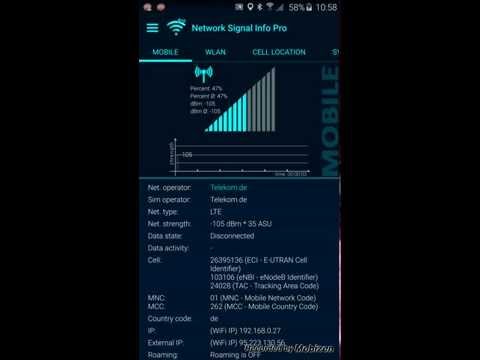
Network Signal Info Pro provides detailed information over the currently used network with accurate signal strength output, whether WiFi (WLAN) or cellular (mobile) connection and is easy to use.
Do you know ? Network Signal Info / Pro are UNIQUE
This type of software is ONLY available on Android smartphones - neither iOS nor Window Phones.
The Pro version (compared to the free version) has no ads, a NEW cell tower database with more than 80 million entries, a NEW MOBILE SIGNAL TRACKER function that generates a KML file for use with Google Earth, more widgets, a MOBILE SIGNAL LOST SERVICE and much more.
Three widget sizes: 1x1, 2x1 and 2x2 in different styles.
(If you can't find widgets, please copy the app back to phone memory)
I have especially worked on the visualization of the Wi-Fi and mobile signal strength. They have received special importance. Normally they are only divided into weak, good and excellent signals. Graphically there are mostly "only" three to five bars shown as a mobile signal and three "waves" shown as a Wi-Fi connection.
My app differentiates the signal strength into a total of 14 bars. This will give you a quick visualized and detailed information on your signal strength.
In addition to the more sophisticated graphical representation of the signal strength you will also be able to see some more interesting information.
Furthermore, there is a log function in csv-file format for wireless and mobile signal strength available (for e.g. Excel import).
With "Mobile Signal":
Network operators, sim provider, phone type, network type, network strength in dbm and ASU, data state, data activity, country code of the mobile phone, device ID, IP address (internal und external), roaming state.
In "Wi-Fi signal":
Wi-Fi-Name (SSID), BSSID, MAC address, maximum Wi-Fi speed, IP address, external IP address, net capability, net channel, subnet mask, Gateway IP address, DHCP server address, DNS1 and DNS2 address.
If you like this app, please give me a positive rating in the market.
Do you know ? Network Signal Info / Pro are UNIQUE
This type of software is ONLY available on Android smartphones - neither iOS nor Window Phones.
The Pro version (compared to the free version) has no ads, a NEW cell tower database with more than 80 million entries, a NEW MOBILE SIGNAL TRACKER function that generates a KML file for use with Google Earth, more widgets, a MOBILE SIGNAL LOST SERVICE and much more.
Three widget sizes: 1x1, 2x1 and 2x2 in different styles.
(If you can't find widgets, please copy the app back to phone memory)
I have especially worked on the visualization of the Wi-Fi and mobile signal strength. They have received special importance. Normally they are only divided into weak, good and excellent signals. Graphically there are mostly "only" three to five bars shown as a mobile signal and three "waves" shown as a Wi-Fi connection.
My app differentiates the signal strength into a total of 14 bars. This will give you a quick visualized and detailed information on your signal strength.
In addition to the more sophisticated graphical representation of the signal strength you will also be able to see some more interesting information.
Furthermore, there is a log function in csv-file format for wireless and mobile signal strength available (for e.g. Excel import).
With "Mobile Signal":
Network operators, sim provider, phone type, network type, network strength in dbm and ASU, data state, data activity, country code of the mobile phone, device ID, IP address (internal und external), roaming state.
In "Wi-Fi signal":
Wi-Fi-Name (SSID), BSSID, MAC address, maximum Wi-Fi speed, IP address, external IP address, net capability, net channel, subnet mask, Gateway IP address, DHCP server address, DNS1 and DNS2 address.
If you like this app, please give me a positive rating in the market.
An easy to use Wifi (WLAN) and Mobile network information app.
Updated on
Safety starts with understanding how developers collect and share your data. Data privacy and security practices may vary based on your use, region, and age. The developer provided this information and may update it over time.
- No data shared with third partiesLearn more about how developers declare sharing
- No data collectedLearn more about how developers declare collection


Ratings and reviews
6.47K reviews

Sio Whalen
- Flag inappropriate
January 28, 2025
I Love this app so much. Very detailed and Like the no Signal notification where you can see the dBM Live. I relie on it so I can try to get more closer to get more Cellular or Faster Speeds. Same with the Cell location very useful and helpful. Now I got a new phone which has 5G LTE instead of 4G LTE. It has some issues I hope you can address and fix it. Which is when I go and try to enable no signal notification it crashes and Cell Location says it has the wrong values or not in database.
6 people found this review helpful

Michael Hughes
- Flag inappropriate
- Show review history
August 25, 2023
I loved this app, would give it 5 stars however in the last month have had issues with saving the log files. I can access the location OK and the permissions are correct, just don't know what has happened. It truly is the best app for recording and analysing wifi signals Since writing this review have never been able to create logs, even after uninstall and reinstall. Really great app otherwise. So bummed as this was a go to app for our wifi stat's.
8 people found this review helpful

Mark O
- Flag inappropriate
January 22, 2023
Update January 2023: I've had this app for years and it's always worked great, but recently, I've noticed that the widget for mobile data no longer functions. Also, the cell tower that I am most frequently connected to (which is a new tower, installed about 6 months ago) does not show up on the mep. I assume it isn't in the database that the app is using.
14 people found this review helpful
What’s new
LTE 5G NR
Wi-Fi 7
Permission query added
bug fixes
performance improvements
stability improvements
Wi-Fi 7
Permission query added
bug fixes
performance improvements
stability improvements
Rated for 3+
Learn moreApp support
About the developer
KAIBITS Software GmbH
support@kaibits-software.com
Schloßpark 15 B
01796 Pirna
Germany
+49 163 1631964


