SMS Backup & Restore Pro
5.0star
2.12K reviewsinfo
100K+
Downloads

PEGI 3
info

About this app
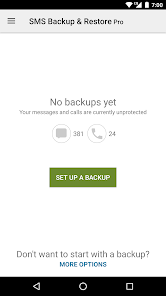
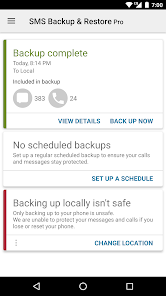
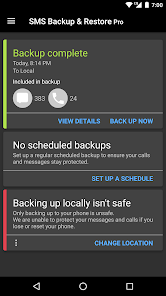
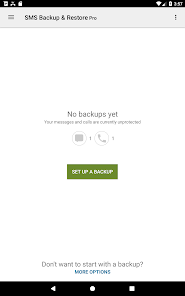
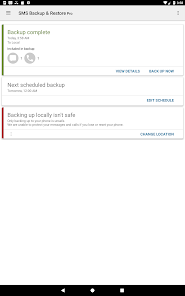
SMS Backup & Restore Pro is an app that backs up (creates a copy of) SMS & MMS messages and call logs currently available on the phone. It can also restore messages and call logs from already existing backups. This is a Paid no-ads version of the ad-supported free app.
Note: This app requires existing backups to be able to restore call logs and messages. It cannot recover anything without existing backups.
To view the contents of the backups, visit https://www.synctech.com.au/view-backup/
For questions or issues please visit our FAQ at: https://synctech.com.au/sms-faqs/
---------------------------------------------------------
APP FEATURES:
Additional features not in the free app:
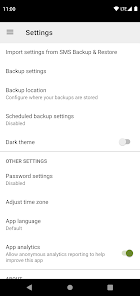
- Compress and encrypt backups.
- Use WebDAV as a backup location.
OTHER FEATURES:
- Backup SMS (text) messages, MMS and call logs in XML format.
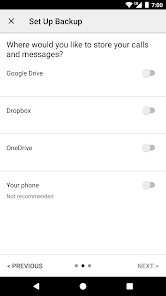
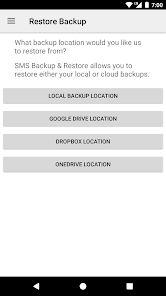
- Local device backup with options to automatically upload to Google Drive, Dropbox and OneDrive.
- Compress and encrypt backup files.
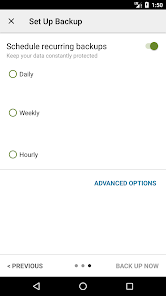
- Choose a recurring scheduled time to automatically backup.
- Option to select which conversations to backup or restore.
- View and drill into your local and cloud backups.
- Search backups.
- Restore/transfer backup to another phone. Backup format is independent of the Android version so the messages and logs can be easily transferred from one phone to another, irrespective of the version.
- Fast Transfer between 2 phones over WiFi direct
- Free up space on your phone. Delete all SMS messages or call logs on the Phone.
- Email a backup file.
- The XML backup can be viewed on a computer via the online viewer at https://SyncTech.com.au/view-backup/
Notes:
- Tested on Android 5.0 and higher
- App only restores backups made by this app
- Backup is created locally on the phone by default, but has options to upload to Google Drive, Dropbox, OneDrive or Email. At no time are the files sent to the developer.
- Please ensure there is a copy of the backup outside the phone before performing a factory reset on the phone.
This App needs access to the following:
* Your messages: Backup and Restore messages. Receive SMS permission needed to properly handle messages received while the app is the default messaging app.
* Your Calls and Contact information: Backup and Restore Call Logs.
* Network view and communication: Allows the app to connect to wifi for backup
* Your social information: To display and store the contact names in the Backup file.
* Run at start-up: Start scheduled Backups.
* Prevent Phone from Sleeping: To prevent the phone from going to sleep/suspended state while a Backup or Restore operation is in progress.
* Account Information: To authenticate with Google Drive and Gmail for cloud uploads.
* Location: Only requested and used during WiFi direct transfer due to a security requirement on Android.
Note: This app requires existing backups to be able to restore call logs and messages. It cannot recover anything without existing backups.
To view the contents of the backups, visit https://www.synctech.com.au/view-backup/
For questions or issues please visit our FAQ at: https://synctech.com.au/sms-faqs/
---------------------------------------------------------
APP FEATURES:
Additional features not in the free app:
- Compress and encrypt backups.
- Use WebDAV as a backup location.
OTHER FEATURES:
- Backup SMS (text) messages, MMS and call logs in XML format.
- Local device backup with options to automatically upload to Google Drive, Dropbox and OneDrive.
- Compress and encrypt backup files.
- Choose a recurring scheduled time to automatically backup.
- Option to select which conversations to backup or restore.
- View and drill into your local and cloud backups.
- Search backups.
- Restore/transfer backup to another phone. Backup format is independent of the Android version so the messages and logs can be easily transferred from one phone to another, irrespective of the version.
- Fast Transfer between 2 phones over WiFi direct
- Free up space on your phone. Delete all SMS messages or call logs on the Phone.
- Email a backup file.
- The XML backup can be viewed on a computer via the online viewer at https://SyncTech.com.au/view-backup/
Notes:
- Tested on Android 5.0 and higher
- App only restores backups made by this app
- Backup is created locally on the phone by default, but has options to upload to Google Drive, Dropbox, OneDrive or Email. At no time are the files sent to the developer.
- Please ensure there is a copy of the backup outside the phone before performing a factory reset on the phone.
This App needs access to the following:
* Your messages: Backup and Restore messages. Receive SMS permission needed to properly handle messages received while the app is the default messaging app.
* Your Calls and Contact information: Backup and Restore Call Logs.
* Network view and communication: Allows the app to connect to wifi for backup
* Your social information: To display and store the contact names in the Backup file.
* Run at start-up: Start scheduled Backups.
* Prevent Phone from Sleeping: To prevent the phone from going to sleep/suspended state while a Backup or Restore operation is in progress.
* Account Information: To authenticate with Google Drive and Gmail for cloud uploads.
* Location: Only requested and used during WiFi direct transfer due to a security requirement on Android.
Updated on
Safety starts with understanding how developers collect and share your data. Data privacy and security practices may vary based on your use, region, and age. The developer provided this information and may update it over time.

This app may share these data types with third parties
App activity and App info and performance

No data collected
Learn more about how developers declare collection

Data is encrypted in transit

Data can’t be deleted
Ratings and reviews
5.0
2.07K reviews

Charlia E
- Flag inappropriate
- Show review history
July 12, 2025
I can finally give this little helper the stars it deserves. I always set the Export to print and Include media (they show an incl emoji option, I don't have that function on my Samsung tablet nor Ultra 23+ cell) but all it collected was TEXT. Finally I gave the html button a try. Voila all the images were pulled but it took 40 minutes to find pdfsimpli to convert the file to pdf. No browser printer nor viewer on my devices could do it. Wish Developers bothered to write decent instructions.
30 people found this review helpful

I love America
- Flag inappropriate
- Show review history
September 6, 2025
Can't open the xml file usefully on computer. Word shows lists of sms but nothing clickable, no text. Not Edge, NotePad, Office XML Handler, nor XML Editor. Can only open the xml on the phone, but it doesn't show photos. I checked "Attachments & Media" is on. But no attachments show when opening the xml. ok, I see the attachments, but they only open full screen. not useful. Need thumbnail inline with the texts. No one ever mentioned this? Will update if I am able to see thumbnails inline.
3 people found this review helpful
SyncTech Pty Ltd
September 6, 2025
You can use the Web based viewer at https://www.synctech.com.au/sms-backup-restore/view-backup/ from your computer.

Jonathan Watmough
- Flag inappropriate
October 11, 2025
I'm making a spam filter, and needed to export all the sms messages and call logs off of my Android phone. Using SMS Backup & Restore Pro was easy. Just walk through the screens and answer some simple questions. The app is cautious about letting you save the backup just onto your phone, but does allow it. Then I just installed AndroidFileTransfer.dmg on my Macbook Air and configured my phone in settings to work with USB. Then copying the xml backup to my computer was easy!
2 people found this review helpful
What’s new
Updated to latest Dropbox library for upcoming Dropbox certificate changes.
App support
About the developer
SYNCTECH PTY LTD
support@synctech.com.au
Suite No 11 10-12 Flushcombe Rd
Blacktown NSW 2148
Australia
+61 2 8526 4611


