
TradeLocker
4.4star
3.31K reviewsinfo
100K+
Downloads

PEGI 3
info


About this app
TradeLocker is the next-gen trading platform built by listening to the needs and preferences of over 2.5 million traders.
It's designed to help both novice and experienced users make quick and accurate market decisions.
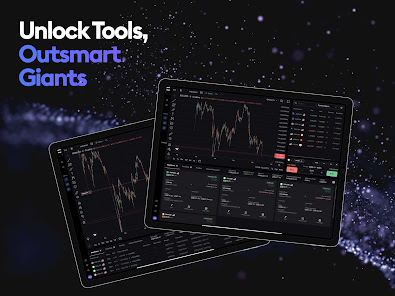
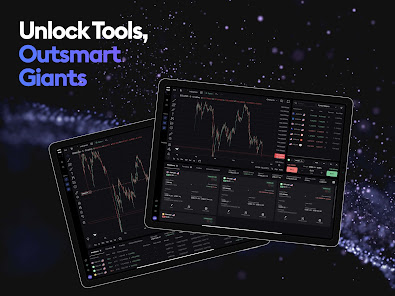
Experience the future of trading with TradeLocker, featuring high-quality charts and indicators for well-informed decisions, advanced risk management tools such as stop loss and take profit features, and a versatile platform for trading anytime, anywhere, and on any device.
TradeLocker Features:
- TradingView Charting
Gain access to hundreds of customizable charts and custom indicators with our TradingView integration.
- Risk Calculator
Set a SL price and specify the $ amount you are willing to risk and the platform will automatically calculate the order amount.
- SL&TP Calculator
Auto-calculate Stop Loss & Take Profit values in $, %, ticks or the market price.
- Trailing Stop Loss
Unlike a regular stop loss that remains at a set level, a trailing stop loss automatically adjusts if the trade moves in a favourable direction.
- On-Chart Trading
Execute trades directly on the chart for a more streamlined experience.
- One-Click Trading
Streamline your trading and open positions quicker with a single click.
- Micro Lot Trading
Trade a minimum lot size of 0.01 to spread high-volume trading risks.
- Trader-Friendly Interface
Easily navigate and perform trading activities on our clean, customizable and intuitive interface.
- 500+ Trading Assets
Choose your favorite instrument pairs, including Forex majors, crypto, stocks and shares, metals, indices and more.
How to start using TradeLocker:
Currently, TradeLocker is only accessible via a broker (both Demo and Live accounts) or through a prop firm challenge (Demo).
Not sure which broker to use? Simply go to tradelocker.com, fill out a form and choose available brokers or prop firms.
Once you've chosen a broker, select TradeLocker as your platform of choice and your broker will send you an email with your credentials.
If you're ready to take your trading to the next level, download TradeLocker and join the future of trading.
Let’s connect on Discord where you can chat with our team, discuss potential features, share feedback and exchange experiences with fellow traders.
Neither this app or its contents should be regarded as professional or financial advice. This app is a suite of trading tools, meant to be used in connection with an account held by a trader with their brokerage firm. If you intend on using this app for real trading, you should understand how various financial products work and the risks you will be undertaking on your own.
By using this app you will have access to information of a general nature (i.e., that does not address the circumstances of any particular individual). If you require further information, or otherwise a more comprehensive or complete statement of the related matters and regulations, you should seek the advice of a lawyer, your brokerage firm, or from a licensed financial service provider before you start trading."
It's designed to help both novice and experienced users make quick and accurate market decisions.
Experience the future of trading with TradeLocker, featuring high-quality charts and indicators for well-informed decisions, advanced risk management tools such as stop loss and take profit features, and a versatile platform for trading anytime, anywhere, and on any device.
TradeLocker Features:
- TradingView Charting
Gain access to hundreds of customizable charts and custom indicators with our TradingView integration.
- Risk Calculator
Set a SL price and specify the $ amount you are willing to risk and the platform will automatically calculate the order amount.
- SL&TP Calculator
Auto-calculate Stop Loss & Take Profit values in $, %, ticks or the market price.
- Trailing Stop Loss
Unlike a regular stop loss that remains at a set level, a trailing stop loss automatically adjusts if the trade moves in a favourable direction.
- On-Chart Trading
Execute trades directly on the chart for a more streamlined experience.
- One-Click Trading
Streamline your trading and open positions quicker with a single click.
- Micro Lot Trading
Trade a minimum lot size of 0.01 to spread high-volume trading risks.
- Trader-Friendly Interface
Easily navigate and perform trading activities on our clean, customizable and intuitive interface.
- 500+ Trading Assets
Choose your favorite instrument pairs, including Forex majors, crypto, stocks and shares, metals, indices and more.
How to start using TradeLocker:
Currently, TradeLocker is only accessible via a broker (both Demo and Live accounts) or through a prop firm challenge (Demo).
Not sure which broker to use? Simply go to tradelocker.com, fill out a form and choose available brokers or prop firms.
Once you've chosen a broker, select TradeLocker as your platform of choice and your broker will send you an email with your credentials.
If you're ready to take your trading to the next level, download TradeLocker and join the future of trading.
Let’s connect on Discord where you can chat with our team, discuss potential features, share feedback and exchange experiences with fellow traders.
Neither this app or its contents should be regarded as professional or financial advice. This app is a suite of trading tools, meant to be used in connection with an account held by a trader with their brokerage firm. If you intend on using this app for real trading, you should understand how various financial products work and the risks you will be undertaking on your own.
By using this app you will have access to information of a general nature (i.e., that does not address the circumstances of any particular individual). If you require further information, or otherwise a more comprehensive or complete statement of the related matters and regulations, you should seek the advice of a lawyer, your brokerage firm, or from a licensed financial service provider before you start trading."
Updated on
Safety starts with understanding how developers collect and share your data. Data privacy and security practices may vary based on your use, region, and age. The developer provided this information and may update it over time.

No data shared with third parties
Learn more about how developers declare sharing

This app may collect these data types
Personal info

Data is encrypted in transit

You can request that data be deleted
Ratings and reviews
4.4
3.21K reviews

Demetri Postway
- Flag inappropriate
October 19, 2024
As far as placing and executing trades, this app is better than MetaTrader since it can automatically calculate your lot size based on your risk parameters and you can just drag and drop your entry, SL, and TP levels directly on the chart. What I don't like is that the instruments are not in alphabetical order under the Markets tab and you can't reorder the list. I also don't receive any notifications on any of my Android phones, but I do on my iPhones.
15 people found this review helpful
TradeLocker
October 21, 2024
We're glad your enjoying our platform and it's features like risk calculator. We're working on adding custom order feature where you'll be able to put instruments in any order you want to. Please reach out to us at support@tradelocker.com with all details you have about your notifications for Android and we will help you resolve this. - Ante

Joel S
- Flag inappropriate
November 25, 2025
The app offers TradingView-style charts, is ad-free, and provides extra timeframes that you don’t get on the free version of TradingView. It’s great for advanced charting on the go. However, it feels laggy and slow when switching charts or scrolling—needs a smoother, faster experience.
TradeLocker
December 4, 2025
Thanks for the detailed feedback, glad to hear you're enjoying the charting features and ad-free experience. For the lag you're noticing, please reach out to support@tradelocker.com with your device details and a screen recording so we can review and help improve performance.

HILAL MEHBOOB
- Flag inappropriate
- Show review history
November 23, 2025
Amazing app with tradingview charts .but I think they haven't paid TRADINGVIEW well,I can share charts with missing candles and that too continuously..It annoys too much,what analysis can one do with a chart of missing candles..plz do something..rest is nice and smooth AFTER ABOUT 8 AND A HALF MONTH...Same problem..some candles are missing..in GOLD & ETH charts..
TradeLocker
April 2, 2025
Thanks for your feedback. We recommend reaching out to support@tradelocker.com with details and screenshots of the missing candles so our team can take a closer look. We’re glad to hear the rest of your experience has been smooth, and we appreciate you bringing this to our attention. - Ante
What’s new
Bug fixes and technical improvements.
App support
About the developer
TRADELOCKER LIMITED
admin@tradelocker.com
CENTURY HOUSE HAROLD'S CROSS ROAD
DUBLIN
D6W P993
Ireland
+385 99 638 5463


