
OneSync: Autosync for OneDrive
Contains adsIn-app purchases
4.6star
19.1K reviewsinfo
1M+
Downloads

PEGI 3
info

About this app
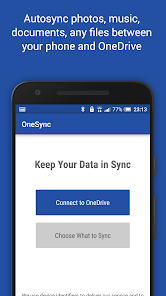
This app is an automatic file sync and backup tool. It lets you automatically synchronize files and folders with Microsoft OneDrive cloud storage and with your other devices. It is an ideal tool for photo sync, document and file backup, automatic file transfer, automatic file sharing between devices,...
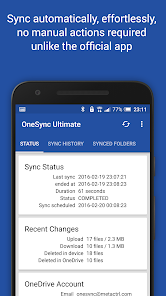
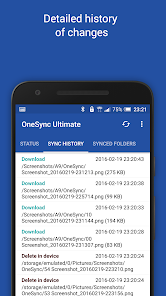
New files in your cloud account are automatically downloaded onto your device. New files in your device are uploaded. If you delete a file on one side, it will be deleted on the other side. It works across multiple devices (your phone and your tablet). If their folders are synced with the same cloud account, they will be kept in sync with each other.
This is how OneDrive works on computers but not on Android. Two-way automatic synchronization should be an essential function of the official app. For whatever reason, it is not the case. OneSync is here to fill the gap.
All file transfers and communications between user devices and cloud storage servers are securely encrypted and do not go through our servers. No outsiders will be able to decrypt, see or modify any file contents.
MAIN FEATURES
• Full two-way automatic synchronization of files and folders
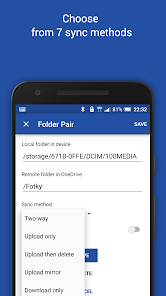
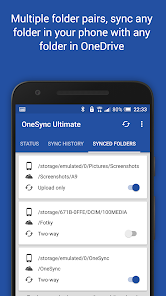
• Many sync modes. Not only two-way, you can also choose Upload only, Upload then delete, Download only, Download mirror,...
• Very efficient, consumes almost no battery
• Easy to set up. Once set up files will be kept in sync without any effort from users
• Works reliably under ever changing network conditions on your phone
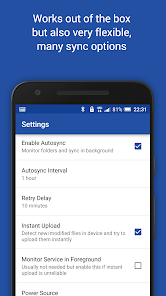
• Monitors battery level, WiFi/3G/4G/LTE connectivity and adapts its behavior according to user preferences
• Configurable autosync interval: 15 minutes, 30 minutes, every hour,...
If you like this app, please consider upgrading to premium version. By doing so you support the development efforts and get access to premium features. You can upgrade via in-app purchase.
PREMIUM FEATURES
• Sync multiple pairs of folders
• Upload files larger than 10 MB
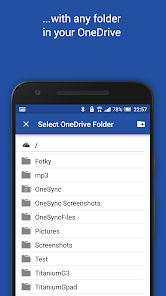
• Sync your entire cloud account with a folder in your device
• Sync with multiple accounts
• Sync with SharePoint sites
• Protect app settings with passcode
• No ads displayed in the app
• Email support by developer
SUPPORT
Please check out our website (http://metactrl.com/) for more information about the app, including User's Guide (http://metactrl.com/userguide/) and FAQ (http://metactrl.com/faq/). If you run into any issues or have suggestions for improvements, don't hesitate to email us at onesync@metactrl.com. We will do our best to assist you.
New files in your cloud account are automatically downloaded onto your device. New files in your device are uploaded. If you delete a file on one side, it will be deleted on the other side. It works across multiple devices (your phone and your tablet). If their folders are synced with the same cloud account, they will be kept in sync with each other.
This is how OneDrive works on computers but not on Android. Two-way automatic synchronization should be an essential function of the official app. For whatever reason, it is not the case. OneSync is here to fill the gap.
All file transfers and communications between user devices and cloud storage servers are securely encrypted and do not go through our servers. No outsiders will be able to decrypt, see or modify any file contents.
MAIN FEATURES
• Full two-way automatic synchronization of files and folders
• Many sync modes. Not only two-way, you can also choose Upload only, Upload then delete, Download only, Download mirror,...
• Very efficient, consumes almost no battery
• Easy to set up. Once set up files will be kept in sync without any effort from users
• Works reliably under ever changing network conditions on your phone
• Monitors battery level, WiFi/3G/4G/LTE connectivity and adapts its behavior according to user preferences
• Configurable autosync interval: 15 minutes, 30 minutes, every hour,...
If you like this app, please consider upgrading to premium version. By doing so you support the development efforts and get access to premium features. You can upgrade via in-app purchase.
PREMIUM FEATURES
• Sync multiple pairs of folders
• Upload files larger than 10 MB
• Sync your entire cloud account with a folder in your device
• Sync with multiple accounts
• Sync with SharePoint sites
• Protect app settings with passcode
• No ads displayed in the app
• Email support by developer
SUPPORT
Please check out our website (http://metactrl.com/) for more information about the app, including User's Guide (http://metactrl.com/userguide/) and FAQ (http://metactrl.com/faq/). If you run into any issues or have suggestions for improvements, don't hesitate to email us at onesync@metactrl.com. We will do our best to assist you.
Updated on
Safety starts with understanding how developers collect and share your data. Data privacy and security practices may vary based on your use, region, and age. The developer provided this information and may update it over time.


Ratings and reviews
4.7
16.1K reviews

Koenigs Bier
- Flag inappropriate
November 13, 2025
As much as I'd like to like this app, I can't really anymore. I can't tell exactly when but more than a year ago the app started losing the information of the Synced Folder every day. So when I want to synchronize my folder, I need to set it up like the very first time every single time. This is so annoying and leaving me with conflicts to deal with very often. Definitely not buying the pro version until I'm sure this issue is fixed !

Karel Fonseca
- Flag inappropriate
October 5, 2025
Excellent app!!! If I could give it a sixth star, I definitely would. I’ve trusted this synchronization service ever since I became a OneDrive user. This app came to complement OneDrive, since unfortunately it doesn’t offer these valuable features that OneSync does. Every day I sleep peacefully knowing that my data has been synced just as I planned — every file in its proper folder. Simple and brilliant!! My congratulations and gratitude to the developers for making my life easier.
1 person found this review helpful

Kris Gielen
- Flag inappropriate
November 27, 2025
I've been using this app for years now and it is much more convenient and reliable than Microsoft's own OneDrive app. I have a large number of folders that I synchronize and I love the fact that I can choose whether this is a 2-way sync, or whether it's a download or upload only. Great app, recommended!
What’s new
- Fixed an issue with OneDrive login that happened to some users
If you like our app, please give it a nice 5-star rating. If you run into issues or have questions, don't hesitate to email us at onesync@metactrl.com. We'll follow up.
If you like our app, please give it a nice 5-star rating. If you run into issues or have questions, don't hesitate to email us at onesync@metactrl.com. We'll follow up.
App support
About the developer
MetaCtrl s.r.o.
android@metactrl.com
1053/21 Týnská
110 00 Praha
Czechia
+420 797 832 262


