Screen Mirroring & TV Cast
Contains adsIn-app purchases
4.0star
20.1K reviews
5M+
Downloads

Everyone
info




About this app
🚀 Upgrade your smart viewing with our Screen Mirroring & TV Cast app!
💡 Effortlessly cast media to TV, mirror your screen, and remote control your TV—all in one app.
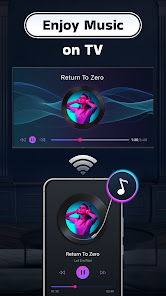
⚡️ Instantly stream your favorite movies, web videos, and music from phone to all TV and share screen for gaming or presentations with our Cast to TV app.
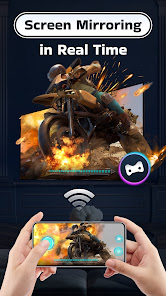
Our app lets youcast media files to all Smart TVs and mirror screen in real time . Whether you want to play mobile games, share photos, or enjoy TV shows, the TV casting feature and screen sharing feature can display your phone's content in stunning Full HD quality on a larger screen.
With just a few taps, you can quickly cast videos and audio to your Smart TVs in high quality and real time. Additionally, you can mirror your phone's screen and even take full control of your TV using the remote control feature.
Highlight Features:
- TV Casting: cast movies, web videos, slideshows, and more to all TV.
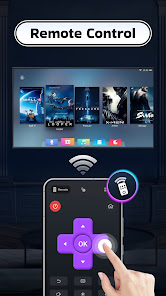
- Remote Control: fast forward, rewind, pause, volume, etc.
- Screen Mirroring: mirror your smartphone screen in real time to Roku, Chromecast, Samsung and other devices.
- Automatically recognize and cast video, audio, and photos from your device and SD card.
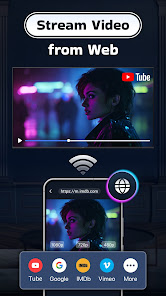
- Watch web videos directly through the built-in browser.
- Create playlists and choose shuffle, loop, or repeat modes.
- Quick access to your watching history.
- Enjoy high-quality HD video playback.
🎉 Enjoy Large Screen
Cast your favorite online movies, live streams, web videos, TV shows, games, and more directly to all TV. Turn your smartphone into a remote control, and enjoy media or content in full HD on your biggest screen.
✨ Cast Anywhere, Anytime
Enjoy seamless TV casting on multiple devices. From Chromecast and Smart TVs (Sony, Samsung, LG), to Roku TV, Apple TV, Fire TV, Xbox, web browsers, PCs, and PS4, our app lets you share screen or cast media to TV effortlessly. Watch and share your favorites on the big screen whenever and wherever you like.
📺 Easy Screen Sharing
Share your device's screen on your TV, whether you want to showcase a presentation, quick share photos and videos with friends and family, or collaborate on projects, our screen-sharing feature puts it all on the big screen easily, instantly and smoothly.
📶 Stable & Fast TV Casting
Our Cast to TV app offers a lightning-fast and stable connection between your device and TV. With just a few taps, you can cast content to big screen in real-time.
Upgrade your mobile experience and make the most of your TV with the Cast to TV app. Say goodbye to small screens and hello to a world of big-screen entertainment! If you have any suggestions or issues, please don't hesitate to contact us at feedback.videoteam@gmail.com.
Disclaimer: Our app is not affiliated with Google, Roku, or any other brands mentioned above. While our application has undergone rigorous testing on numerous TV models, we cannot guarantee its compatibility with all TV models.
💡 Effortlessly cast media to TV, mirror your screen, and remote control your TV—all in one app.
⚡️ Instantly stream your favorite movies, web videos, and music from phone to all TV and share screen for gaming or presentations with our Cast to TV app.
Our app lets youcast media files to all Smart TVs and mirror screen in real time . Whether you want to play mobile games, share photos, or enjoy TV shows, the TV casting feature and screen sharing feature can display your phone's content in stunning Full HD quality on a larger screen.
With just a few taps, you can quickly cast videos and audio to your Smart TVs in high quality and real time. Additionally, you can mirror your phone's screen and even take full control of your TV using the remote control feature.
Highlight Features:
- TV Casting: cast movies, web videos, slideshows, and more to all TV.
- Remote Control: fast forward, rewind, pause, volume, etc.
- Screen Mirroring: mirror your smartphone screen in real time to Roku, Chromecast, Samsung and other devices.
- Automatically recognize and cast video, audio, and photos from your device and SD card.
- Watch web videos directly through the built-in browser.
- Create playlists and choose shuffle, loop, or repeat modes.
- Quick access to your watching history.
- Enjoy high-quality HD video playback.
🎉 Enjoy Large Screen
Cast your favorite online movies, live streams, web videos, TV shows, games, and more directly to all TV. Turn your smartphone into a remote control, and enjoy media or content in full HD on your biggest screen.
✨ Cast Anywhere, Anytime
Enjoy seamless TV casting on multiple devices. From Chromecast and Smart TVs (Sony, Samsung, LG), to Roku TV, Apple TV, Fire TV, Xbox, web browsers, PCs, and PS4, our app lets you share screen or cast media to TV effortlessly. Watch and share your favorites on the big screen whenever and wherever you like.
📺 Easy Screen Sharing
Share your device's screen on your TV, whether you want to showcase a presentation, quick share photos and videos with friends and family, or collaborate on projects, our screen-sharing feature puts it all on the big screen easily, instantly and smoothly.
📶 Stable & Fast TV Casting
Our Cast to TV app offers a lightning-fast and stable connection between your device and TV. With just a few taps, you can cast content to big screen in real-time.
Upgrade your mobile experience and make the most of your TV with the Cast to TV app. Say goodbye to small screens and hello to a world of big-screen entertainment! If you have any suggestions or issues, please don't hesitate to contact us at feedback.videoteam@gmail.com.
Disclaimer: Our app is not affiliated with Google, Roku, or any other brands mentioned above. While our application has undergone rigorous testing on numerous TV models, we cannot guarantee its compatibility with all TV models.
Updated on
Safety starts with understanding how developers collect and share your data. Data privacy and security practices may vary based on your use, region, and age. The developer provided this information and may update it over time.

No data shared with third parties
Learn more about how developers declare sharing

This app may collect these data types
Personal info, App info and performance, and Device or other IDs

Data is encrypted in transit
Ratings and reviews
4.1
19.6K reviews

Richie Mendes
- Flag inappropriate
November 30, 2025
First of all the ad is 100% misleading they add makes it look like it turns your phone into a projector which is so far from the truth it's ridiculous it's not a projector it's a simple casting app that automatically comes with most phones for free. You can't even use the app because you have to pay before you use (12.99 per month or 49.99 for lifetime) this company should be ashamed of themselves for blatant BS ad.
83 people found this review helpful

Chris Rodriguez
- Flag inappropriate
July 8, 2025
so it tells you to watch an ad so you can use the screen mirroring feature. only afterwards when you think it's working it suddenly says network error and you go back to check the app and you have to start over and watch another ad, then it repeats. don't waste your time. and to the person who works for this app don't bother responding to this comment like you generically do to save face.
39 people found this review helpful

Nathan Hancock
- Flag inappropriate
- Show review history
July 10, 2024
I installed this on two devices thinking that I can connect to my older tablet... After watching ads going through the steps, watching ads, clicking on allow to connect to device and watching ads, it opens up my stupid phone settings to mirror onto a screen. I could have done that myself WITHOUT THE ADS. Don't waste your time or money. Also it chose the first device it could find and auto connected with asking first.
251 people found this review helpful
What’s new
Supports mirroring on more devices.
Enables full-screen mirroring to web browsers.
Casting optimization and bug fixes.
Enables full-screen mirroring to web browsers.
Casting optimization and bug fixes.
App support
About the developer
MEER LIMITED
meer20221121@gmail.com
Rm 1101 11/F SAN TOI BLDG
139 CONNAUGHT RD C
上環
Hong Kong
+86 173 6706 8307


