Remotify
In-app purchases
4.1star
8.44K reviews
100K+
Downloads

Everyone
info
About this app
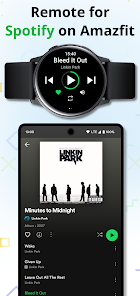
Remotify enables you to remotely control music playback and browse playlists from Spotify app on your phone with Amazfit smart watch. Remotify works even when your phone is offline or Spotify in offline mode.
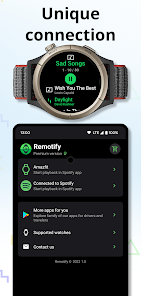
Premium version of Remotify enables you to manage your favorite songs in Spotify app and start playback of song or playlist right from your Amazfit smart watch.
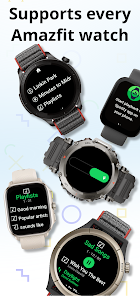
Supported Amazfit watches
* Amazfit Balance
* Amazfit Cheetah (Square and Round)
* Amazfit Bip 5
* Amazfit Cheetah Pro
* Amazfit T-Rex Ultra
* Amazfit GTR Mini
* Amazfit GTR 4
* Amazfit GTS 4
* Amazfit GTS 4 mini
* Amazfit Falcon
* Amazfit Band 7
* Amazfit GTR 3 Pro
* Amazfit GTR 3
* Amazfit GTS 3
* Amazfit T-Rex 2
All trademarks belong to their respective owners. Spotify app is used in screenshots for demonstration purposes only. Spotify is a trademark of Spotify AB. Remotify is in no way affiliated with Spotify AB. This app will not give you any premium features of the official Spotify client.
Premium version of Remotify enables you to manage your favorite songs in Spotify app and start playback of song or playlist right from your Amazfit smart watch.
Supported Amazfit watches
* Amazfit Balance
* Amazfit Cheetah (Square and Round)
* Amazfit Bip 5
* Amazfit Cheetah Pro
* Amazfit T-Rex Ultra
* Amazfit GTR Mini
* Amazfit GTR 4
* Amazfit GTS 4
* Amazfit GTS 4 mini
* Amazfit Falcon
* Amazfit Band 7
* Amazfit GTR 3 Pro
* Amazfit GTR 3
* Amazfit GTS 3
* Amazfit T-Rex 2
All trademarks belong to their respective owners. Spotify app is used in screenshots for demonstration purposes only. Spotify is a trademark of Spotify AB. Remotify is in no way affiliated with Spotify AB. This app will not give you any premium features of the official Spotify client.
Updated on
Safety starts with understanding how developers collect and share your data. Data privacy and security practices may vary based on your use, region, and age. The developer provided this information and may update it over time.

No data shared with third parties
Learn more about how developers declare sharing

No data collected
Learn more about how developers declare collection
Ratings and reviews
4.1
8.37K reviews

Vít Zapletal
- Flag inappropriate
- Show review history
October 1, 2025
I miss option to add Remodify to quick access. I solved it by mapping Remotify on one of the buttons, but that might not be convenient for everyone. I would also prefer to scroll through all my favorite songs in a list and not have to change pages to see another few songs. Would be nice to also have the option to turn of vibrations and reorder playlists, now it includes the Spotify recommendations, which I have to scroll through to get to what I'm looking for. The premium is must.
1 person found this review helpful

Yegor
- Flag inappropriate
- Show review history
October 25, 2025
Doesn't allow you to see the queue of songs currently playing and doesn't allow to access your playlists directly - only the recent. There is no way to quickly jump back to the control screen if you're browsing playlists. And for every interaction with the app you get a vibration it's overwhelming. I only want to keep using the app to quickly add songs to liked and to access my recent playlists

Laurence
- Flag inappropriate
- Show review history
November 16, 2025
I was interested in purchasing. However, it's painfully slow to launch playlists (and the navigation is unintuitive - my 'liked songs' being in a menu called 'good evening'). Good to have some support - but too slow for my needs. (Bip 6 + OnePlus 7 Pro)
What’s new
* Updated to target latest Android SDK
App support
About the developer
navcode s. r. o.
feedback@navigationwear.app
911/3 Lermontovova
81105 Bratislava
Slovakia
+421 950 407 704


