

Zoho Sheet: Spreadsheet App

3.9star
6.42K reviews
500K+
Downloads

Everyone
info






About this app
Create, edit, share, and collaborate on your spreadsheets using the Zoho Sheet app for Android devices—smartphones and tablets—for free. Work both offline and online.
As a standalone spreadsheet application, we don't ask you to link your credit or debit cards and introduce hidden costs later—it's a fully free experience.
You only need to sign up if you want to work online. Prefer working offline? Get started right away—no signup needed.
With Zoho Sheet, you can:
1. Create spreadsheets from scratch and manage them completely within the app.
2. Access files in the cloud or work offline on your device as needed.
3. Open and edit MS Excel files (XLSX, XLS, XLSM, and XLTM), as well as CSV, TSV, ODS, and more stored on your device and cloud apps like Box and DropBox.
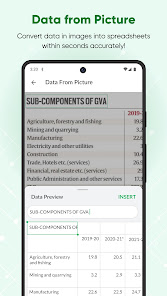
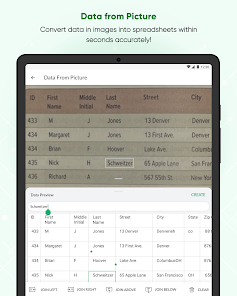
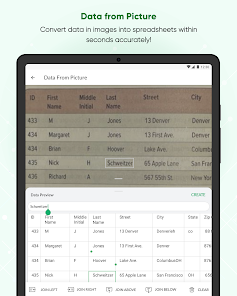
4. Create spreadsheets for bills, invoices, and receipts using Data from Picture. Just scan your paper records and turn them into spreadsheets in seconds.
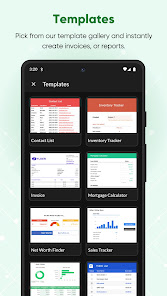
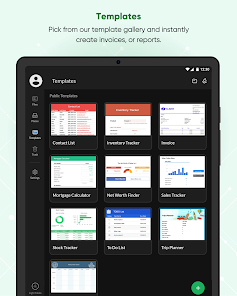
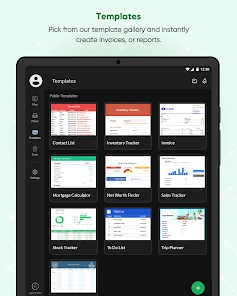
5. Set up your timesheets, budget spreadsheets and more in no time using our ready-made spreadsheet templates.
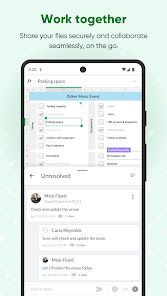
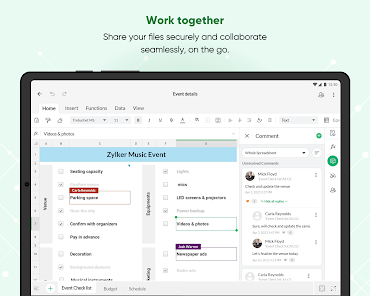
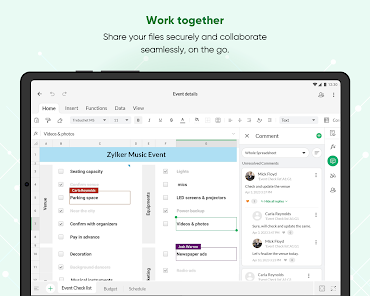
6. Share your spreadsheets with collaborators, set different permission levels, and work together in real time.
7. Add comments—at a cell or range level—and use @mentions to tag collaborators for improved teamwork.
8. Ensure accurate data entry with various data validation tools.
Format your cells with all the fundamental tools, sort and filter, and apply conditional formatting.
9. Crunch numbers with more than 350 functions and formulas—from VLOOKUP and XLOOKUP to IF and more.
10. Visualize your findings with more than 35 types of charts.
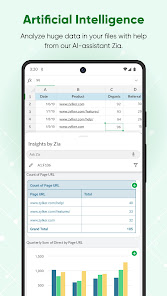
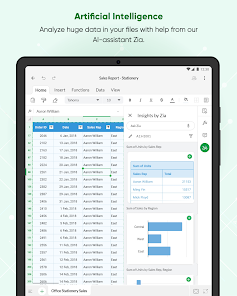
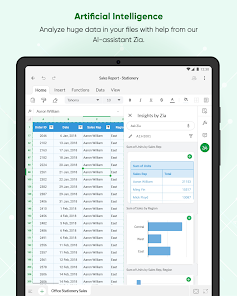
11. Let Zia, our in-house artificial intelligence, do the heavy lifting—get smart data analysis suggestions, automatically generate charts and pivot tables, and even ask questions using voice commands.
12. Rest assured that every bit of work you do is saved automatically and securely.
Keep your data in sync across platforms
Zoho Sheet is also available on the web and iOS. The best part? The data syncs instantaneously and automatically, so you can switch between platforms anytime.
Zoho's privacy promise
Respecting your privacy has always been central to our philosophy as a company. In our history of 25+ years, we have never sold our users' information to anyone for advertising or earned revenue by showing third-party ads. Your spreadsheet data stays yours.
The Zoho advantage for businesses
Zoho Sheet is the spreadsheet software in the Zoho office suite, which also includes Zoho Writer for word processing and Zoho Show for presentations. When you sign up for Zoho Sheet, you get a variety of tools to create and manage your sheets, presentations, and word documents in one place. It's also part of Zoho WorkDrive, an online file storage and collaboration tool and, Zoho Workplace, an email and collaboration suite.
Zoho's single sign-on account makes it easier to access all the Zoho apps you need. Our ecosystem currently offers 55+ apps across business categories—sales, marketing, email and collaboration, finance, HR, and more.
For more details visit: https://www.zoho.com/sheet/mobile.html
If you have questions before you try the app or while using it, please write to us at android-support@zohosheet.com.
As a standalone spreadsheet application, we don't ask you to link your credit or debit cards and introduce hidden costs later—it's a fully free experience.
You only need to sign up if you want to work online. Prefer working offline? Get started right away—no signup needed.
With Zoho Sheet, you can:
1. Create spreadsheets from scratch and manage them completely within the app.
2. Access files in the cloud or work offline on your device as needed.
3. Open and edit MS Excel files (XLSX, XLS, XLSM, and XLTM), as well as CSV, TSV, ODS, and more stored on your device and cloud apps like Box and DropBox.
4. Create spreadsheets for bills, invoices, and receipts using Data from Picture. Just scan your paper records and turn them into spreadsheets in seconds.
5. Set up your timesheets, budget spreadsheets and more in no time using our ready-made spreadsheet templates.
6. Share your spreadsheets with collaborators, set different permission levels, and work together in real time.
7. Add comments—at a cell or range level—and use @mentions to tag collaborators for improved teamwork.
8. Ensure accurate data entry with various data validation tools.
Format your cells with all the fundamental tools, sort and filter, and apply conditional formatting.
9. Crunch numbers with more than 350 functions and formulas—from VLOOKUP and XLOOKUP to IF and more.
10. Visualize your findings with more than 35 types of charts.
11. Let Zia, our in-house artificial intelligence, do the heavy lifting—get smart data analysis suggestions, automatically generate charts and pivot tables, and even ask questions using voice commands.
12. Rest assured that every bit of work you do is saved automatically and securely.
Keep your data in sync across platforms
Zoho Sheet is also available on the web and iOS. The best part? The data syncs instantaneously and automatically, so you can switch between platforms anytime.
Zoho's privacy promise
Respecting your privacy has always been central to our philosophy as a company. In our history of 25+ years, we have never sold our users' information to anyone for advertising or earned revenue by showing third-party ads. Your spreadsheet data stays yours.
The Zoho advantage for businesses
Zoho Sheet is the spreadsheet software in the Zoho office suite, which also includes Zoho Writer for word processing and Zoho Show for presentations. When you sign up for Zoho Sheet, you get a variety of tools to create and manage your sheets, presentations, and word documents in one place. It's also part of Zoho WorkDrive, an online file storage and collaboration tool and, Zoho Workplace, an email and collaboration suite.
Zoho's single sign-on account makes it easier to access all the Zoho apps you need. Our ecosystem currently offers 55+ apps across business categories—sales, marketing, email and collaboration, finance, HR, and more.
For more details visit: https://www.zoho.com/sheet/mobile.html
If you have questions before you try the app or while using it, please write to us at android-support@zohosheet.com.
Updated on
Safety starts with understanding how developers collect and share your data. Data privacy and security practices may vary based on your use, region, and age. The developer provided this information and may update it over time.

No data shared with third parties
Learn more about how developers declare sharing

This app may collect these data types
Personal info, Photos and videos and 3 others

Data is encrypted in transit

You can request that data be deleted
Ratings and reviews
4.0
5.83K reviews

Russell Sheridan
- Flag inappropriate
- Show review history
May 2, 2021
Don't get used to it. They suddenly required a workdrive team account to use the app, an extra $10 per month at least, after you get used to it on your regular account that you pay yearly for. Ridiculous. They even have extortive language about your files being safe if you pay up... But if you go into sheets on your regular login account, on a computer, your files are there still to use. -- Edit: Even more useless than I thought after this. It forces you to save to a whole new sheet when offline
39 people found this review helpful
Zoho Corporation
May 3, 2021
Hi Russell, please write to us at android-support@zohosheet.com with your account details. We can check if the trial has expired, and enable the free edition of Zoho Docs if you prefer. Thank you!

wsupnet
- Flag inappropriate
August 2, 2023
The new UI update is awesome! I love the new changes since I used to almost avoid using the app to record things in spreadsheets and mostly do it for quick tasks. But now the newest update makes it so much easier to use! One bug I found is that I'm trying to put a value into a cell and it closes/crashes the app when I tap the text box at the top. The cell I'm trying to type in is referenced in a formula but does not hold any data.
19 people found this review helpful
Zoho Corporation
August 3, 2023
Thank you for the detailed feedback about our latest app! We're glad to know you like our new UI. We will check the mentioned issues and fix them at the earliest. Feel free to contact us at android-support@zohosheet.com for any further assistance.

sohil saifi
- Flag inappropriate
October 17, 2025
I started exploring options for personal use to replace google suite. I loved the way Zia helps with quick pull up on charts. Something I noticed, if I skip column name in selection, there is error in sum where first row value ignored in calculation which it doesn't miss if I select the column name too. Could be a bug. I will keep exploring. Also, can't find option to add pie chats manually in mobile app. I feel ashamed for not looking beyond MS/Google there years! Love your work! Keep up!
37 people found this review helpful
What’s new
Create new spreadsheets, or open and edit your device files without internet connection.
We've smashed a few bugs and improved the app performance.
We've smashed a few bugs and improved the app performance.
App support
About the developer
Zoho Corporation
mobileapp-support@zohocorp.com
4141 Hacienda Dr
Pleasanton, CA 94588-8566
United States
+1 903-221-2616


