
Universal AC Remote Control
বিজ্ঞাপনযুক্তএপৰ ভিতৰত ক্ৰয় সুবিধা
৪.২star
২১.৭ হাজাৰ টা পৰ্যালোচনা
১ নিযুত+
ডাউনল’ড

সকলো
info
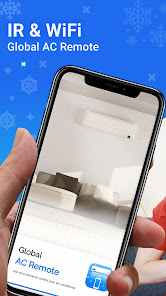





এই এপ্টোৰ বিষয়ে
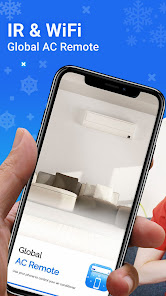
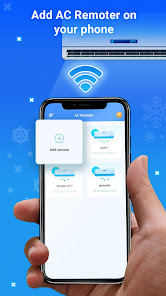
Imagine being able to use your smartphone or tablet to control air conditioners. Our Universal Air Conditioner Remote Control app offers a new method to control your air conditioner with Aircon Remote Control.
• Tired of having to search for your physical air conditioner remote control every time you need it? 🔎
• What if your physical remote somehow disappeared or didn't work properly? ❓
• What if your home has several different types of air conditioners installed? Do you need to buy several air conditioner remote controls? 🏠
With AC Remote Control you can stop worrying about all these problems by downloading our air conditioner remote control app. In fact, you can get rid of your classic air conditioner remote control from now on, because our app gives you everything you need to control almost any air conditioner in the world today.
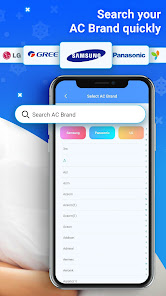
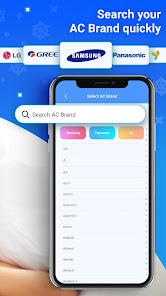
With the help of our app, you can control air conditioners anywhere within a few seconds. This air conditioner remote control allows you to manage a variety of air conditioning devices from various brands. All you need to do is choose the brand that meets your requirements, test it, and then configure it to your preferences so that you can easily distinguish it from other devices. In particular, almost all air conditioner brands in the world are supported by our universal AC remote control app. Download this application and enjoy the air conditioner remote now. We guarantee that it will make your life much easier. 🎉
🔹 Characteristics - AC Remote Control:
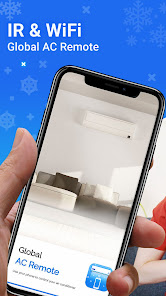
• Universal AC remote control smart IR Blaster for air conditioners. 🌬️
• One For All Air Conditioner Control, control multiple air conditioner devices with a single multi-remote control application. 🌐
• Control air conditioning anywhere with just a few touches. 📲❄️
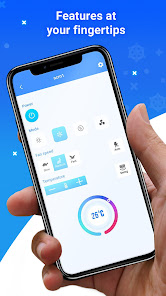
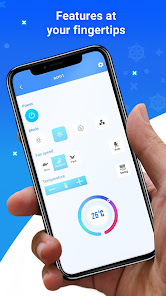
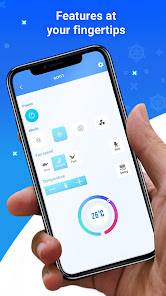
• Get the temperature you want, change the operating mode, turn on/off, set the timer, adjust the speed of the AC fan, etc. ❄️⏰💨
🔹 How to use - AC Remote Control:
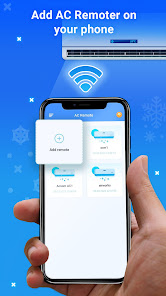
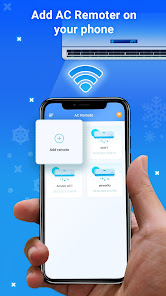
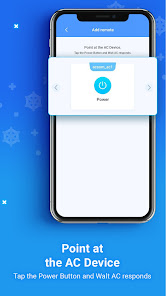
1. Add the air conditioner brand you want to control with Aircon Remote Control.
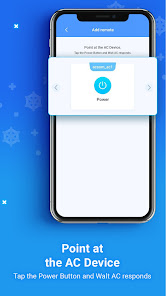
2. Press the test button to check if the air conditioner remote is working properly with that conditioner remote.
3. Set up your IR smart remote air conditioner remote controller.
4. The configured controller is ready to use and is now visible on the home screen when you open the Unremote app. 📱✅
🔹 Compatible brands with this air conditioner remote control:
• Samsung
• Panasonic
• LG
• Mitsubishi
• Lloyd AC Remote
• Onida
• Haier AC Remote
• Sanyo
• Kenwood
• Aircon Remote Control
• Green / Gree AC Remote Control
• Aux
• Green electric
• Daikin AC Remote
• Daewoo Air Conditioner Remote
• Midea
• Sharp
• TCL
• Toshiba
• Bluestar
• Bosch
• Beko Air Conditioner Remote
• Carrier
• Chigo AC Remote Control
• Electrolux AC Remote Control
• Friedrich
• Frigidaire AC Remote Control
• Fujitsu Air Conditioner Remote
• General Electric
• GE
• Godrej AC Remote
• Voltas AC Remote Control
• LLoyd AC Remote
• Hisense / Hinsense AC
• Hitachi - Hitachi AC Remote
• Hyundai
• NEO
• O-General
• Olympia-Splendid
• Osaka
• Pioneer
• Sansui
• Sanyo AC Remote Control
• Siemens
• Singer
• Trane
• Uni-air
So what are you waiting for? Download our universal air conditioner remote control app now and enjoy full control of your air conditioner from the comfort of your smartphone or tablet. No more searching for physical remotes or having to deal with multiple remotes for different air conditioning devices. With our multi-remote app, you can control them all! Download now and experience the smartest, easiest, and most convenient air conditioning remote control you've ever used. 📱❄️✨
REQUIREMENT: In order to control your air conditioner from your phone, it requires an IR Blaster. Please make sure your mobile phone supports Infrared (IR) emitter.
🚩 DISCLAIMER:
Universal Air Conditioner Remote Control is not an official universal air conditioner remote control product and is not affiliated with the above brands in any way.
• Tired of having to search for your physical air conditioner remote control every time you need it? 🔎
• What if your physical remote somehow disappeared or didn't work properly? ❓
• What if your home has several different types of air conditioners installed? Do you need to buy several air conditioner remote controls? 🏠
With AC Remote Control you can stop worrying about all these problems by downloading our air conditioner remote control app. In fact, you can get rid of your classic air conditioner remote control from now on, because our app gives you everything you need to control almost any air conditioner in the world today.
With the help of our app, you can control air conditioners anywhere within a few seconds. This air conditioner remote control allows you to manage a variety of air conditioning devices from various brands. All you need to do is choose the brand that meets your requirements, test it, and then configure it to your preferences so that you can easily distinguish it from other devices. In particular, almost all air conditioner brands in the world are supported by our universal AC remote control app. Download this application and enjoy the air conditioner remote now. We guarantee that it will make your life much easier. 🎉
🔹 Characteristics - AC Remote Control:
• Universal AC remote control smart IR Blaster for air conditioners. 🌬️
• One For All Air Conditioner Control, control multiple air conditioner devices with a single multi-remote control application. 🌐
• Control air conditioning anywhere with just a few touches. 📲❄️
• Get the temperature you want, change the operating mode, turn on/off, set the timer, adjust the speed of the AC fan, etc. ❄️⏰💨
🔹 How to use - AC Remote Control:
1. Add the air conditioner brand you want to control with Aircon Remote Control.
2. Press the test button to check if the air conditioner remote is working properly with that conditioner remote.
3. Set up your IR smart remote air conditioner remote controller.
4. The configured controller is ready to use and is now visible on the home screen when you open the Unremote app. 📱✅
🔹 Compatible brands with this air conditioner remote control:
• Samsung
• Panasonic
• LG
• Mitsubishi
• Lloyd AC Remote
• Onida
• Haier AC Remote
• Sanyo
• Kenwood
• Aircon Remote Control
• Green / Gree AC Remote Control
• Aux
• Green electric
• Daikin AC Remote
• Daewoo Air Conditioner Remote
• Midea
• Sharp
• TCL
• Toshiba
• Bluestar
• Bosch
• Beko Air Conditioner Remote
• Carrier
• Chigo AC Remote Control
• Electrolux AC Remote Control
• Friedrich
• Frigidaire AC Remote Control
• Fujitsu Air Conditioner Remote
• General Electric
• GE
• Godrej AC Remote
• Voltas AC Remote Control
• LLoyd AC Remote
• Hisense / Hinsense AC
• Hitachi - Hitachi AC Remote
• Hyundai
• NEO
• O-General
• Olympia-Splendid
• Osaka
• Pioneer
• Sansui
• Sanyo AC Remote Control
• Siemens
• Singer
• Trane
• Uni-air
So what are you waiting for? Download our universal air conditioner remote control app now and enjoy full control of your air conditioner from the comfort of your smartphone or tablet. No more searching for physical remotes or having to deal with multiple remotes for different air conditioning devices. With our multi-remote app, you can control them all! Download now and experience the smartest, easiest, and most convenient air conditioning remote control you've ever used. 📱❄️✨
REQUIREMENT: In order to control your air conditioner from your phone, it requires an IR Blaster. Please make sure your mobile phone supports Infrared (IR) emitter.
🚩 DISCLAIMER:
Universal Air Conditioner Remote Control is not an official universal air conditioner remote control product and is not affiliated with the above brands in any way.
আপডে’ট কৰা তাৰিখ
বিকাশকৰ্তাসকলে আপোনাৰ ডেটা কেনেকৈ সংগ্ৰহ আৰু শ্বেয়াৰ কৰে সেয়া বুজি পোৱাৰ জৰিয়তে সুৰক্ষা আৰম্ভ হয়। ডেটাৰ গোপনীয়তা আৰু সুৰক্ষা প্ৰণালী আপোনাৰ ব্যৱহাৰ, অঞ্চল আৰু বয়সৰ ওপৰত ভিত্তি কৰি ভিন্ন হ’ব পাৰে। বিকাশকৰ্তাগৰাকীয়ে এই তথ্যখিনি প্ৰদান কৰিছে আৰু সময়ৰ লগে লগে এয়া আপডে’ট কৰিব পাৰে।

তৃতীয় পক্ষৰ সৈতে কোনো ডেটা শ্বেয়াৰ কৰা নাই
বিকাশকৰ্তাই ডেটা শ্বেয়াৰ কৰাৰ বিষয়ে কেনেকৈ ঘোষণা কৰে সেই বিষয়ে অধিক জানক

এই এপ্টোৱে এই ধৰণৰ ডেটা সংগ্ৰহ কৰিব পাৰে
ডিভাইচ অথবা অন্য আইডি

ডেটা ট্ৰেনজিটত এনক্ৰিপ্ট কৰা হয়

ডেটা মচিব নোৱাৰি
মূল্যাংকন আৰু পৰ্যালোচনাসমূহ
৪.২
২১.৬ হাজাৰ টা পৰ্যালোচনা
নতুন কি আছে
🎉 It's here! We're excited to announce the biggest update yet! We've redesigned the entire app with a sleeker, more user-friendly interface. Plus, we've squashed those pesky bugs!
এপৰ সমৰ্থন
বিকাশকৰ্তাৰ বিষয়ে
NADAL SERRA POL
support@blastlystudio.com
LUGAR QUARTER PONENT 11
08460 SANTA MARIA DE PALAUTORDERA
Spain
+34 936 94 05 62


