
Workforce.com: Time Clock
3.5star
398 reviews
100K+
Downloads

Everyone
info
About this app
Welcome to Workforce.com, the #1 Time Clock and Workforce Management app. See how easy it is to build schedules, view and approve timesheets, and manage time off & unavailability. We're happy to answer any questions you have.
Create a new account or join an existing team for free using your login or your unique setup code available inside your Workforce.com account.
The app sends clock-ins in real time to your secure online dashboard - accessible from any computer where you can:
- Set up or import additional employees.
- Monitor all employee clock ins.
- Create your employee schedule for the week and SMS/email them to your team.
- Approve timesheets and export them to payroll.
Designed for any business with hourly employees - simply start clocking in and out to generate timesheets which can be exported directly into all popular accounting/payroll systems (Square, Quickbooks, ADP, Xero, Paychex, Excel and more).
Ideal for businesses working from one or more fixed locations. We regularly work with:
- Restaurants, Bars, and Cafes
- Retailers
- Medical Centers and Practices
- Franchise Groups
- Child Care Centers
- Manufacturing and Logistics Businesses
Need to compare against budgets? Build and send your schedules via SMS/email in the app for real-time variance reports and auto checking against shifts worked.
Need to keep track of overtime and keep part-timers within their contracted hours? We’ve got it solved! We build smart templates to automate overtime calculations. Employee time off requests, unavailability and much more can also be managed via the dashboard this app connects to.
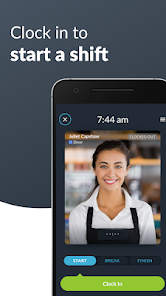
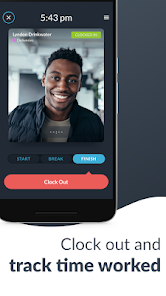
Employee attendance tracking and timesheets bundled into one simple app for your business. The Workforce.com Time Clock makes it extremely fast for employees to clock in & out of their work shifts.
Designed for businesses to eliminate the manual entry of timesheets, this app automatically creates employee timesheets from the Time Clock with many export options. Employees can clock in via a PIN code with added photo verification so you always have a record of who clocked in and out.
FEATURES
- Simple clock in/out
- Unlimited number of employees & locations
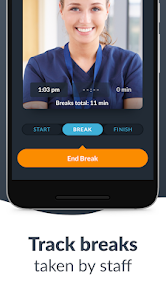
- Dedicated break buttons
- Team selector
- Portrait, landscape and even upside-down orientation options
- Intuitive clock in buttons
- Smart shift status reporting
- Create online timesheets
- PIN security
- Photo verification
- Facial detection
- Submit vacation/time off requests
- SMS/Email weekly schedule to employees or to the Tanda Mobile App
- Export directly to payroll software or CSV
- Calculate timesheets with multiple pay rates
"It's been a really easy app for me. The employees know how to clock in and clock out really straight forward." - Laura, The Canyon
“The staff are definitely a lot more punctual.” - Blaine, Venue Manager at Beach House Bar & Grill
“We’ve got a Time Clock for each venue and all information is sent back to head office instantly!” - Bianca, HR Officer at rawGROUP Hospitality
"Allowed me to cut down on the processing that I used to have to do for payroll." - Wren, Schneider & Williams,P.C
Create a new account or join an existing team for free using your login or your unique setup code available inside your Workforce.com account.
The app sends clock-ins in real time to your secure online dashboard - accessible from any computer where you can:
- Set up or import additional employees.
- Monitor all employee clock ins.
- Create your employee schedule for the week and SMS/email them to your team.
- Approve timesheets and export them to payroll.
Designed for any business with hourly employees - simply start clocking in and out to generate timesheets which can be exported directly into all popular accounting/payroll systems (Square, Quickbooks, ADP, Xero, Paychex, Excel and more).
Ideal for businesses working from one or more fixed locations. We regularly work with:
- Restaurants, Bars, and Cafes
- Retailers
- Medical Centers and Practices
- Franchise Groups
- Child Care Centers
- Manufacturing and Logistics Businesses
Need to compare against budgets? Build and send your schedules via SMS/email in the app for real-time variance reports and auto checking against shifts worked.
Need to keep track of overtime and keep part-timers within their contracted hours? We’ve got it solved! We build smart templates to automate overtime calculations. Employee time off requests, unavailability and much more can also be managed via the dashboard this app connects to.
Employee attendance tracking and timesheets bundled into one simple app for your business. The Workforce.com Time Clock makes it extremely fast for employees to clock in & out of their work shifts.
Designed for businesses to eliminate the manual entry of timesheets, this app automatically creates employee timesheets from the Time Clock with many export options. Employees can clock in via a PIN code with added photo verification so you always have a record of who clocked in and out.
FEATURES
- Simple clock in/out
- Unlimited number of employees & locations
- Dedicated break buttons
- Team selector
- Portrait, landscape and even upside-down orientation options
- Intuitive clock in buttons
- Smart shift status reporting
- Create online timesheets
- PIN security
- Photo verification
- Facial detection
- Submit vacation/time off requests
- SMS/Email weekly schedule to employees or to the Tanda Mobile App
- Export directly to payroll software or CSV
- Calculate timesheets with multiple pay rates
"It's been a really easy app for me. The employees know how to clock in and clock out really straight forward." - Laura, The Canyon
“The staff are definitely a lot more punctual.” - Blaine, Venue Manager at Beach House Bar & Grill
“We’ve got a Time Clock for each venue and all information is sent back to head office instantly!” - Bianca, HR Officer at rawGROUP Hospitality
"Allowed me to cut down on the processing that I used to have to do for payroll." - Wren, Schneider & Williams,P.C
Updated on
Safety starts with understanding how developers collect and share your data. Data privacy and security practices may vary based on your use, region, and age. The developer provided this information and may update it over time.


Ratings and reviews
3.5
322 reviews

A Google user
- Flag inappropriate
March 28, 2020
Tanda used to be such a great company. Now they only have call centres in Asia with poor communication and connectivity. Our time clock has been down for a week. Spent 9 hours yesterday on call centre chat with v pleasant people but issues appeared above their training levels. They got a local guy to ring me but still no result. I tried to ring the 1300 number hoping for local help to get a recorded message that the phone was disconnected. The call centre/ help line does not work on weekends. In frustration I asked how I could deactivate my account, I am still waiting for a reply. I have given up on them and will be spending my next 9 hours researching an alternate provider.
9 people found this review helpful
A Google user
- Flag inappropriate
- Show review history
October 12, 2018
Uninstalled as soon as opening. Why do you need access to our camera to "prove that I'm me"? I thought that's what the pin was for. I'm sure this is a really awesome app, but I'm not allowing it to take a picture of me every time I want to use it. Please change this feature.
33 people found this review helpful
Tanda
October 18, 2018
Hey Matt, we use the combination of Passcode and Camera to confirm the correct identity of employees. We understand that some businesses don't have a use for the Camera and it can be disabled within the Settings of the Time Clock. If you want further information or support, please contact support@tanda.co. Thanks.
A Google user
- Flag inappropriate
July 12, 2019
it asking me to leave a review was the only way I could get away from it... i force stopped it through the pull down android settings and it would instantly restart... might otherwise be great but a terrible design flaw... when it showed me to leave a review it was the only way i could have opened android and used it to uninstall... I won't be using it further
27 people found this review helpful
Tanda
July 12, 2019
Hey Elizabeth, thanks for your feedback. Based on the behaviour you're describing, it sounds like you have Kiosk Mode enabled which is overriding the Home Button. This might be a little difficult to disable on various Android devices. Please contact our 24hr support channel (support@tanda.co) so we can properly diagnose this issue for you. Thanks.
App support
About the developer
EPI CAPITAL PTY LTD
devn@tanda.co
LEVEL 4
108 WICKHAM STREET
FORTITUDE VALLEY QLD 4006
Australia
+61 434 988 828


