
MyDolphin Plus
4.8star
17K reviews
100K+
Downloads

Everyone
info
About this app
Welcome to Maytronics! You are the proud owner of the Dolphin robotic pool cleaner. Now let's make sure you enjoy the full experience.
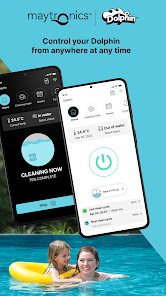
The Dolphin robotic pool cleaner is designed to make sure you have a clean pool, and crystal-clear pool water. The 'MyDolphin™ Plus' app gives you complete control over what the robot does and the way it does it.
The Dolphin robotic pool cleaner is connected to your mobile using Wi-Fi® and Bluetooth® so you can control it from anywhere at any time!
You can use your mobile, or voice control to send your robot out to clean and tell it when to stop.
The 'MyDolphin™ Plus App allows you to:
* Control your pool cleaner from anywhere at any time.
* Voice control it via Siri®
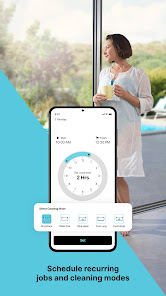
* Setup timer and cleaning modes
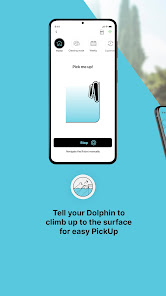
* Tell the robot to climb up to the surface for easy pickup
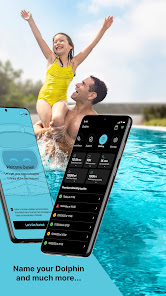
* Name your robot
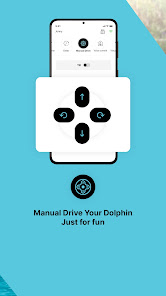
* Drive it around, just for fun
* Create an underwater LED show
* And much more.
Some features may vary between different Dolphin models.
Plus, we have the most fantastic customer care team that is always there for you. Contact us for anything you need.
The Dolphin robotic pool cleaner is designed to make sure you have a clean pool, and crystal-clear pool water. The 'MyDolphin™ Plus' app gives you complete control over what the robot does and the way it does it.
The Dolphin robotic pool cleaner is connected to your mobile using Wi-Fi® and Bluetooth® so you can control it from anywhere at any time!
You can use your mobile, or voice control to send your robot out to clean and tell it when to stop.
The 'MyDolphin™ Plus App allows you to:
* Control your pool cleaner from anywhere at any time.
* Voice control it via Siri®
* Setup timer and cleaning modes
* Tell the robot to climb up to the surface for easy pickup
* Name your robot
* Drive it around, just for fun
* Create an underwater LED show
* And much more.
Some features may vary between different Dolphin models.
Plus, we have the most fantastic customer care team that is always there for you. Contact us for anything you need.
Updated on
Safety starts with understanding how developers collect and share your data. Data privacy and security practices may vary based on your use, region, and age. The developer provided this information and may update it over time.

No data shared with third parties
Learn more about how developers declare sharing

This app may collect these data types
Location, Personal info and 3 others

Data is encrypted in transit

You can request that data be deleted
Ratings and reviews
4.8
16.6K reviews

Racheal C.
- Flag inappropriate
October 12, 2025
The robot is great. The App needs work as it seems to have communication errors. There will be a few times where the robot is done cleaning but the app says it's still going. No matter how many times I press the stop button, force stop the app, clear cache etc. the issue persists. The worst part is that I can't use the app to command the robot because it still thinks the robot is cleaning. The only way I found to resolve the issue is to uninstall the app and reinstall, which is a hassle.
2 people found this review helpful

Aaron Eady
- Flag inappropriate
- Show review history
January 13, 2026
UPDATE [01/2026]: Still terrible at staying connected almost 4 years later!! It's fine when it works but most of the time it struggles to stay connected via Wi-Fi. I have the power supply literally right next to my Wi-Fi access point and it can't stay connected. It's also a pain that you have to go through every step to try to get it connected again, like even the naming it step, why? Then when it fails to connect and you switch to Bluetooth, it resets the schedule, fun.
16 people found this review helpful
MaytronicsApps
October 6, 2022
Hey Aaron Eady,
We're sorry to learn of the issue you have encountered within the app.
We would like to discuss this further with you so that we could look deeper into the matter and provide assistance - could we ask you to reach out to us at Dolphin.app@maytronics.com?
Thank you!

Kimberly Gutierrez
- Flag inappropriate
October 13, 2025
This app is absolutely trash. I find it so much easier to just skip the app altogether and push the button manually. Everytime you try to use the app it can't find a connection. It even tells you to scan the qr code on the machine and then says it's not valid. You can't back out of the troubleshooting part of the app even though the machine is running as it should. And don't get me started on contacting customer service about this apps issues. They just tell you the same steps you've already tr
2 people found this review helpful
What’s new
• Discover our brand-new S-Line robots – now compatible with MyDolphin™ Plus!
• New Full Coverage mode: enjoy a spotless pool, including stairs and shallow lounging areas (on compatible models).
• Bug fixes and improvements.
• New Full Coverage mode: enjoy a spotless pool, including stairs and shallow lounging areas (on compatible models).
• Bug fixes and improvements.
App support
About the developer
MAYTRONICS LTD.
MobileAppsTeam@maytronics.com
Kibbutz
JEZREEL, 1935000
Israel
+972 76-569-0001


