Paint Art / Painting App
Contains adsIn-app purchases
4.2star
16.7K reviews
1M+
Downloads

Everyone
info




About this app
A simple and multi-functional painting app.
Designed for a wide range of users, from beginners to those familiar with illustration production.
With its intuitive operation, anyone can start drawing immediately.
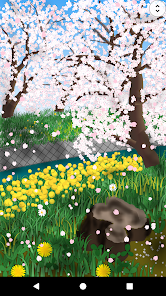
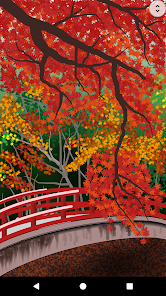
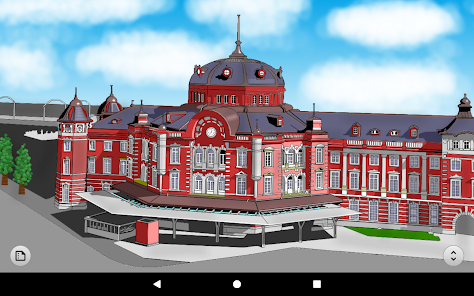
This app is recommended for those who find other apps difficult to use and those who want to draw natural landscapes.
Basic drawing functions
・Brush tools (pen, pencil, airbrush, wavy line, dotted line, shape, gradient, nature, flowers, rainbow, light, etc.)
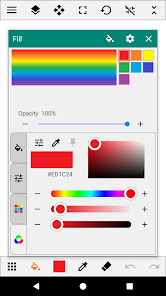
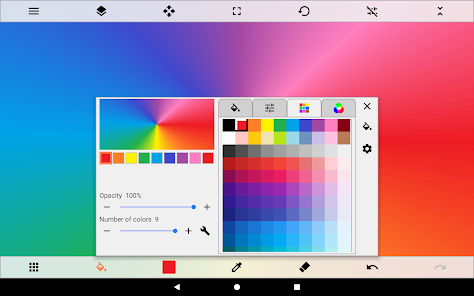
・Fill tool (solid color, gradient, border, net, design, pattern, nature, etc.)
・Eraser tool
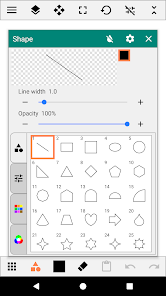
・Straight line/shape tool (straight line, square, circle, star, speech bubble, flower, etc.)
・Range selection tool (free, square, circle, circle, circle, auto, transform, copy/paste, collection registration)
・Text tool (solid color, gradient, design, font selection)
・Blur tool
・Color palette (color picker, eyedropper)
・Layer functions (multiple layers, layer blending mode, transparency, protection/lock, hue/saturation/brightness, inversion, blur)
Auxiliary/useful functions
・Ruler
・Grid line display
・Cursor drawing
・XY interval (drawing interval setting)
・Image stabilization
・Inserting images/photos
Saving/sharing
・Pecifying where to save data
・Exporting in PNG/JPEG format
・Sharing images between apps
Pen pressure detection *If pressure sensing is supported
For pen-type brushes, the thickness of the line changes depending on the pressure applied.
Please turn on pen pressure detection in the app settings before using.
Designed for a wide range of users, from beginners to those familiar with illustration production.
With its intuitive operation, anyone can start drawing immediately.
This app is recommended for those who find other apps difficult to use and those who want to draw natural landscapes.
Basic drawing functions
・Brush tools (pen, pencil, airbrush, wavy line, dotted line, shape, gradient, nature, flowers, rainbow, light, etc.)
・Fill tool (solid color, gradient, border, net, design, pattern, nature, etc.)
・Eraser tool
・Straight line/shape tool (straight line, square, circle, star, speech bubble, flower, etc.)
・Range selection tool (free, square, circle, circle, circle, auto, transform, copy/paste, collection registration)
・Text tool (solid color, gradient, design, font selection)
・Blur tool
・Color palette (color picker, eyedropper)
・Layer functions (multiple layers, layer blending mode, transparency, protection/lock, hue/saturation/brightness, inversion, blur)
Auxiliary/useful functions
・Ruler
・Grid line display
・Cursor drawing
・XY interval (drawing interval setting)
・Image stabilization
・Inserting images/photos
Saving/sharing
・Pecifying where to save data
・Exporting in PNG/JPEG format
・Sharing images between apps
Pen pressure detection *If pressure sensing is supported
For pen-type brushes, the thickness of the line changes depending on the pressure applied.
Please turn on pen pressure detection in the app settings before using.
Updated on
Safety starts with understanding how developers collect and share your data. Data privacy and security practices may vary based on your use, region, and age. The developer provided this information and may update it over time.

This app may share these data types with third parties
App activity, App info and performance, and Device or other IDs

No data collected
Learn more about how developers declare collection

Data is encrypted in transit

Data can’t be deleted
Ratings and reviews
4.4
13.2K reviews

Purrfect Gaming
- Flag inappropriate
- Show review history
July 29, 2023
Paint Art is literally the mobile version of Microsoft Paint. You can literally draw anything. And there's pretty much no ads! Also, I don't have much to recommend besides some more shapes. So, maybe add a plus sign, a minus sign, a multiplication sign, a division sign and a equals sign. But, overall this painting app is a 10/10. Definitely recommend installing.
70 people found this review helpful

Enny Vu
- Flag inappropriate
- Show review history
October 16, 2025
Good app, but when you select using automatic tool and do anything(for example, you move the selected area), for some reason, it erased everything that was on the canvas! maybe this bug occurs on my device or to every device. can you fix this bug? Overall, it's still a good app!
2 people found this review helpful

Jona Mangaron
- Flag inappropriate
December 20, 2021
I love this app, and i suggest this to EVERYONE!, Litterally NO LAG at all!, no adds showing or popping out, many kinds of features and brushes to asemble and use!, you can also add photos to edit! You can even have the feature to add as many layers/overlays you want! This is probably the best art/drawing app i've ever encountered to. 5/5! If your trying to find an app to draw and edit you should use THIS! This is the best app option in art, and in fact its easy to use.
93 people found this review helpful
App support
About the developer
野田哲也
noku.teku.soft@gmail.com
大市場町郷前298
メゾンホープ 201
岩倉市, 愛知県 482-0002
Japan
undefined


