
Android System Widgets +
4.8star
299 reviews
1K+
Downloads

Everyone
info
About this app
System Widgets Collection – Monitor & Customize Your Phone
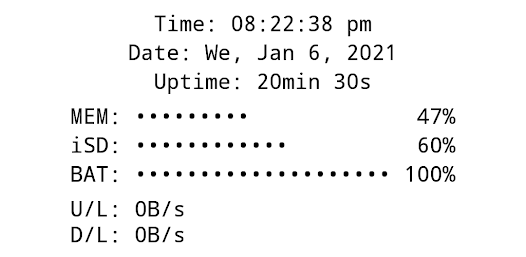
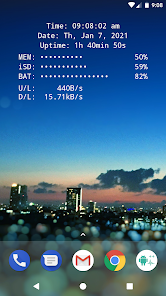
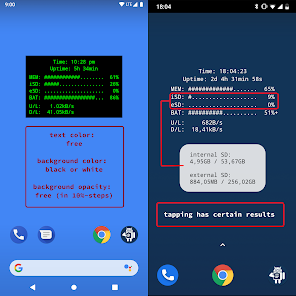
All essential info right on your home screen: Clock, Date, Uptime, RAM, Storage, Battery, Net Speed & Flashlight.
Included Widgets:
🕒 Clock / Date / Uptime
📈 Memory (RAM) Usage – monitor free & used RAM
💾 Storage / SD-Card Usage – available & used space
🔋 Battery – level + NEW: 🌡️ temperature (°C / °F)
🌐 Net Speed – current upload/download speed (NEW: switch Bytes/s ↔ Bits/s)
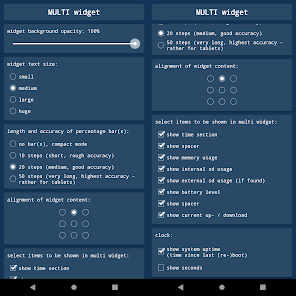
✨ Multi Widget – combine the above in one customizable widget
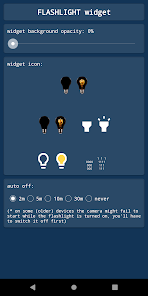
Flashlight Widget:
• Auto-off timer (2m, 5m, 10m, 30m, never)
• Choose from 4 flashlight icon sets
(Permission for camera & flashlight is required only to control the LED. The app cannot take pictures!)
Global Settings:
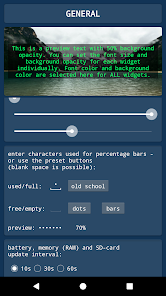
🎨 Font Color – free choice + NEW: color picker with HEX input
🖼️ Background Color – black or white
▓ Custom Characters – for percentage bar display
Widget Configuration Options:
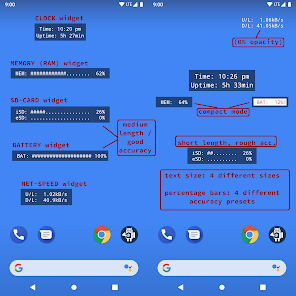
• Background opacity
• Font size
• Percentage bar length & accuracy (or compact mode)
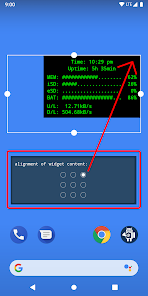
• Alignment of widget content (precise screen positioning)
Tapping Actions:
Tap on most widgets to see more details via toast/notification.
Example:
Internal SD:
753.22MB / 7.89GB
How To (Setup & Troubleshooting):
1. Open the app and adjust widget settings to your needs
2. Add the desired widgets to your home screen
👉 If widgets don’t load right after installation: restart your device or re-install the app.
👉 If widgets show "null" or don’t update: open the app once to initialize and make sure the Keep-Alive Service is enabled in General Settings.
Why Choose System Widgets?
✔️ All-in-one collection (RAM, Storage, Battery, Clock, Network/Internet Speed, Flashlight)
✔️ Highly customizable (colors, opacity, font size, alignment)
✔️ Lightweight, fast & no ads
📲 Get the System Widgets Collection now – make your Android home screen smarter and more useful!
All essential info right on your home screen: Clock, Date, Uptime, RAM, Storage, Battery, Net Speed & Flashlight.
Included Widgets:
🕒 Clock / Date / Uptime
📈 Memory (RAM) Usage – monitor free & used RAM
💾 Storage / SD-Card Usage – available & used space
🔋 Battery – level + NEW: 🌡️ temperature (°C / °F)
🌐 Net Speed – current upload/download speed (NEW: switch Bytes/s ↔ Bits/s)
✨ Multi Widget – combine the above in one customizable widget
Flashlight Widget:
• Auto-off timer (2m, 5m, 10m, 30m, never)
• Choose from 4 flashlight icon sets
(Permission for camera & flashlight is required only to control the LED. The app cannot take pictures!)
Global Settings:
🎨 Font Color – free choice + NEW: color picker with HEX input
🖼️ Background Color – black or white
▓ Custom Characters – for percentage bar display
Widget Configuration Options:
• Background opacity
• Font size
• Percentage bar length & accuracy (or compact mode)
• Alignment of widget content (precise screen positioning)
Tapping Actions:
Tap on most widgets to see more details via toast/notification.
Example:
Internal SD:
753.22MB / 7.89GB
How To (Setup & Troubleshooting):
1. Open the app and adjust widget settings to your needs
2. Add the desired widgets to your home screen
👉 If widgets don’t load right after installation: restart your device or re-install the app.
👉 If widgets show "null" or don’t update: open the app once to initialize and make sure the Keep-Alive Service is enabled in General Settings.
Why Choose System Widgets?
✔️ All-in-one collection (RAM, Storage, Battery, Clock, Network/Internet Speed, Flashlight)
✔️ Highly customizable (colors, opacity, font size, alignment)
✔️ Lightweight, fast & no ads
📲 Get the System Widgets Collection now – make your Android home screen smarter and more useful!
Updated on
Safety starts with understanding how developers collect and share your data. Data privacy and security practices may vary based on your use, region, and age. The developer provided this information and may update it over time.

No data shared with third parties
Learn more about how developers declare sharing

No data collected
Learn more about how developers declare collection
Ratings and reviews
4.9
273 reviews

Isaac Cady
- Flag inappropriate
September 4, 2022
It does exactly what I need and I appreciate how simple and straight forward it is, but I feel like it's a little too simple. I'd like a few more customization options. Nothing drastic, but being able to choose from a few different monospace typefaces would be hugely appreciated. I like the old-school look of a seriffed, monospaced font monitoring stuff, but it does quite fit my "theme." Also, why can't we just enter an exact number for the width of progress bars, instead of only 10, 20, 50?
15 people found this review helpful

Cătălin Becherescu
- Flag inappropriate
- Show review history
January 10, 2026
very useful widget - I use it on a daily basis since years now :)... Thanks for the update.
1 person found this review helpful
Benjamin Laws
December 12, 2025
It even got an Android 16 update now ;) enjoy! Ben

Dave Williams
- Flag inappropriate
October 18, 2025
I paid for plus in order to get ram usage every 10 secs. So far so good, though I wish updates could be faster. Also you have done well displaying text in widgets. I would appreciate a simple text widget for which I could set the text via an intent. That would allow me to set the text from Tasker.
What’s new
App support
About the developer
Benjamin Laws
support@android-co.de
Am Hüning 22
46414 Rhede
Germany


