
Universal TV Remote Control
Contains adsIn-app purchases
3.9star
1.34K reviews
5L+
Downloads

Everyone
info




About this app
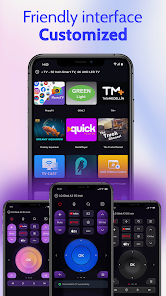
Take control of your entertainment system with Universal TV Remote Control, the all-in-one solution to manage all smart TVs. Whether you own a Roku remote, LG TV remote, Samsung, TCL, ONN, or another popular TV brand, this app simplifies your TV experience. Now, control your smart TV with ease, right from your phone!
Key Features:
⚡ Universal TV Remote: Supports all smart TVs, including Roku, LG, Samsung, TCL, ONN, and more, all through one app.
⚡ Roku Remote: Seamlessly control your Roku TV or devices using the built-in Roku remote features. Adjust channels, volume, and navigate apps effortlessly.
⚡ LG TV Remote: Full support for LG TVs with the app's dedicated LG TV remote functionality.
⚡ Samsung TV Remote: Easily control your Samsung smart TV with full functionality from the app.
⚡ Not only are Roku, LG, and Samsung TVs supported, but the app also works with all major TV brands, including TCL, ONN, and many more.
⚡ TV Buttons: Control essential TV functions like Power, Volume Up/Down, Mute, Channel navigation, and more directly from your phone.
⚡ Keyboard and Touchpad: Easily type using the built-in keyboard or control your TV using the touchpad for a smoother browsing experience.
⚡ Launch TV Apps: Instantly open apps on your TV such as Netflix, YouTube, and more with one tap.
⚡ Chromecast & Miracast: Stream your favorite content to your TV via Chromecast or Miracast, enhancing your viewing experience.
⚡ Screen Mirroring: Use screen mirroring to cast your smartphone’s display directly onto your smart TV for videos, apps, and more.
⚡ Simple Setup: Quick and easy connection with your smart TV over Wi-Fi or IR for older models.
Our Universal TV Remote Control app works with popular TV brands like Roku, LG, Samsung, TCL, and ONN, providing a complete TV remote solution for your home. Whether you're using a Roku remote, LG TV remote, or controlling a Samsung, Sony or TCL TV, this app is designed to make your TV experience seamless. With added features like controlling Power and Volume, using a keyboard or touchpad, and instantly launching your favorite TV apps, this app is more powerful than ever.
How to Use:
1. Download and install the Universal TV Remote Control app.
2. Ensure your phone and TV are connected to the same Wi-Fi network.
3. Select your TV brand (e.g., Roku, LG, Samsung, TCL, ONN) and start controlling your TV right away!
No more hassle of managing multiple TV remotes. The Universal TV Remote Control app allows you to control your Roku remote, LG TV remote, Samsung, TCL, ONN, and more from your smartphone. Plus, with built-in Chromecast, Miracast, and features like screen mirroring, using a touchpad, and launching TV apps, you’ll have everything you need for an enhanced TV experience.
Download Universal TV Remote Control today and experience total control of your smart TV. Whether you need a Roku remote, an LG TV remote, or a Samsung or TCL remote, this app has everything you need for a simplified and enjoyable TV experience!
Key Features:
⚡ Universal TV Remote: Supports all smart TVs, including Roku, LG, Samsung, TCL, ONN, and more, all through one app.
⚡ Roku Remote: Seamlessly control your Roku TV or devices using the built-in Roku remote features. Adjust channels, volume, and navigate apps effortlessly.
⚡ LG TV Remote: Full support for LG TVs with the app's dedicated LG TV remote functionality.
⚡ Samsung TV Remote: Easily control your Samsung smart TV with full functionality from the app.
⚡ Not only are Roku, LG, and Samsung TVs supported, but the app also works with all major TV brands, including TCL, ONN, and many more.
⚡ TV Buttons: Control essential TV functions like Power, Volume Up/Down, Mute, Channel navigation, and more directly from your phone.
⚡ Keyboard and Touchpad: Easily type using the built-in keyboard or control your TV using the touchpad for a smoother browsing experience.
⚡ Launch TV Apps: Instantly open apps on your TV such as Netflix, YouTube, and more with one tap.
⚡ Chromecast & Miracast: Stream your favorite content to your TV via Chromecast or Miracast, enhancing your viewing experience.
⚡ Screen Mirroring: Use screen mirroring to cast your smartphone’s display directly onto your smart TV for videos, apps, and more.
⚡ Simple Setup: Quick and easy connection with your smart TV over Wi-Fi or IR for older models.
Our Universal TV Remote Control app works with popular TV brands like Roku, LG, Samsung, TCL, and ONN, providing a complete TV remote solution for your home. Whether you're using a Roku remote, LG TV remote, or controlling a Samsung, Sony or TCL TV, this app is designed to make your TV experience seamless. With added features like controlling Power and Volume, using a keyboard or touchpad, and instantly launching your favorite TV apps, this app is more powerful than ever.
How to Use:
1. Download and install the Universal TV Remote Control app.
2. Ensure your phone and TV are connected to the same Wi-Fi network.
3. Select your TV brand (e.g., Roku, LG, Samsung, TCL, ONN) and start controlling your TV right away!
No more hassle of managing multiple TV remotes. The Universal TV Remote Control app allows you to control your Roku remote, LG TV remote, Samsung, TCL, ONN, and more from your smartphone. Plus, with built-in Chromecast, Miracast, and features like screen mirroring, using a touchpad, and launching TV apps, you’ll have everything you need for an enhanced TV experience.
Download Universal TV Remote Control today and experience total control of your smart TV. Whether you need a Roku remote, an LG TV remote, or a Samsung or TCL remote, this app has everything you need for a simplified and enjoyable TV experience!
Updated on
Safety starts with understanding how developers collect and share your data. Data privacy and security practices may vary based on your use, region and age. The developer provided this information and may update it over time.

This app may share these data types with third parties
Device or other IDs

No data collected
Learn more about how developers declare collection

Data is encrypted in transit

Data can’t be deleted
Ratings and reviews
3.9
1.32K reviews

Roger The Artful Dodger
- Flag inappropriate
17 November 2024
Ridiculous amount of Ads every button you click, an ad pops up. I couldn't even test the app since every button I press opens another ad. A bit of advice to the Devs: don't overkill on the adds. At least let a user get to try some functionality. I uninstalled this app after less than 5 minutes.
65 people found this review helpful

Wicked
- Flag inappropriate
29 November 2024
Absolutely disgusting app, the amount of adds on it are actually astonishing, it's like the dev knows that you won't be keeping the app so they try to squeeze in as much add revenue as they can.
3 people found this review helpful

Gav J Braithwaite
- Flag inappropriate
5 August 2024
Gets you to sign up for a free trial, takes your payment info but has no place on the app to unsubscribe. If my card is charged I will charge back with an official complaint.
22 people found this review helpful
App support
About the developer
Quantumtech Ltd.
support@walletpasses.me
Leshem 26
Mevaseret Zion, 9077520
Israel
+1 231-800-8469


