
Microsoft Launcher
4.7star
1.72M reviews
50M+
Downloads

Everyone
info


About this app
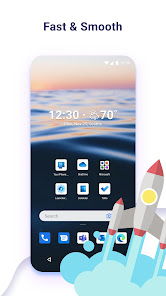
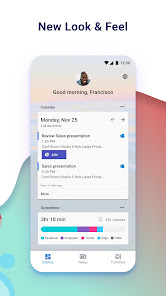
Microsoft Launcher provides a new home screen experience that empowers you to be more productive on your Android device. Microsoft Launcher is highly customisable, allowing you to organise everything on your phone. Your personalised feed makes it easy to view your calendar, to do lists, and more. Sticky Notes on the go. When you set up Microsoft Launcher as your new home screen, you can either start fresh with your favourite apps or import your current home screen layout. Need to switch back to your previous home screen? You can do that, too!
This version of Microsoft Launcher has been rebuilt on a new codebase to make new features possible, including dark mode, personalised news, and numerous performance improvements (improved load time, less memory use, better battery performance, and fluent animation).
MICROSOFT LAUNCHER FEATURES
Personalised news:
· Stay informed with a personalised news reading experience that is consistent across all your devices.
Customisable icons:
· Give your phone a consistent look and feel with custom icon packs and adaptive icons.
Beautiful wallpapers:
· Enjoy a fresh new image from Bing every day or choose your own photos.
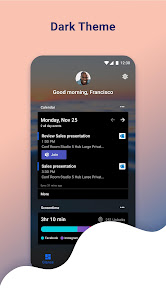
Dark theme:
· Comfortably use your phone at night or in low light environments with Microsoft Launcher’s new dark theme. This feature is compatible with Android’s dark mode settings.
Improved performance:
· Microsoft Launcher now loads faster, uses less memory, is more battery efficient, and offers fluent animations.
Landscape mode:
· Microsoft Launcher supports vertical and horizontal orientations to enhance your viewing preference.
Microsoft Launcher asks for the following optional permissions:
· Microphone: Used for speech-to-text functionality for Launcher features, such as Bing Search, Bing Chat, To Do, and Sticky Notes.
· Photo and video: Used for getting features, such as your wallpaper, Blur Effect, and Bing Chat Visual Search, and to show recent activities and backups. On Android 13 and higher, these permissions are replaced with the ‘All file’ access permissions.
· Notifications: Needed to notify you of any update or app activity.
· Contacts: Used for searching contacts on Bing Search.
· Location: Used for the Weather widget.
· Phone: Allows you to call your contacts with a swipe in Launcher.
· Camera: Used to create image notes for the Sticky Notes card and to search for images in Bing Search.
· Calendar: Used to show calendar info for the Calendar card in your Launcher feed.
You can still use Microsoft Launcher even if you do not consent to these permissions, but some functions may be restricted.
TERM OF USE
By installing this app, you agree to the Terms of Use (http://go.microsoft.com/fwlink/?LinkID=246338) and Privacy Policy (http://go.microsoft.com/fwlink/?LinkID=248686).
Downloading Microsoft Launcher gives the option to replace the default launcher or to toggle between device launchers. Microsoft Launcher does not replicate the user’s PC home screen on the Android phone. Users must still purchase and/or download any new apps from Google Play. Requires Android 7.0+.
This version of Microsoft Launcher has been rebuilt on a new codebase to make new features possible, including dark mode, personalised news, and numerous performance improvements (improved load time, less memory use, better battery performance, and fluent animation).
MICROSOFT LAUNCHER FEATURES
Personalised news:
· Stay informed with a personalised news reading experience that is consistent across all your devices.
Customisable icons:
· Give your phone a consistent look and feel with custom icon packs and adaptive icons.
Beautiful wallpapers:
· Enjoy a fresh new image from Bing every day or choose your own photos.
Dark theme:
· Comfortably use your phone at night or in low light environments with Microsoft Launcher’s new dark theme. This feature is compatible with Android’s dark mode settings.
Improved performance:
· Microsoft Launcher now loads faster, uses less memory, is more battery efficient, and offers fluent animations.
Landscape mode:
· Microsoft Launcher supports vertical and horizontal orientations to enhance your viewing preference.
Microsoft Launcher asks for the following optional permissions:
· Microphone: Used for speech-to-text functionality for Launcher features, such as Bing Search, Bing Chat, To Do, and Sticky Notes.
· Photo and video: Used for getting features, such as your wallpaper, Blur Effect, and Bing Chat Visual Search, and to show recent activities and backups. On Android 13 and higher, these permissions are replaced with the ‘All file’ access permissions.
· Notifications: Needed to notify you of any update or app activity.
· Contacts: Used for searching contacts on Bing Search.
· Location: Used for the Weather widget.
· Phone: Allows you to call your contacts with a swipe in Launcher.
· Camera: Used to create image notes for the Sticky Notes card and to search for images in Bing Search.
· Calendar: Used to show calendar info for the Calendar card in your Launcher feed.
You can still use Microsoft Launcher even if you do not consent to these permissions, but some functions may be restricted.
TERM OF USE
By installing this app, you agree to the Terms of Use (http://go.microsoft.com/fwlink/?LinkID=246338) and Privacy Policy (http://go.microsoft.com/fwlink/?LinkID=248686).
Downloading Microsoft Launcher gives the option to replace the default launcher or to toggle between device launchers. Microsoft Launcher does not replicate the user’s PC home screen on the Android phone. Users must still purchase and/or download any new apps from Google Play. Requires Android 7.0+.
Updated on
Safety starts with understanding how developers collect and share your data. Data privacy and security practices may vary based on your use, region and age. The developer provided this information and may update it over time.

No data shared with third parties
Learn more about how developers declare sharing

This app may collect these data types
Personal info, App activity and 2 others

Data is encrypted in transit
Ratings and reviews
4.7
1.63M reviews

Joe Kilbreth
- Flag inappropriate
28 December 2024
This was an absolute game changer for me. My old phone broke, and I had to use an old Samsung phone with an interface that I didn't particularly like. When I discovered this app, I was a little skeptical at first, but then I was pleasantly surprised with how well you can customize all of the options and layout. It doesn't just use your phone's layout options, it provides a lot of improvements, such as allowing way more apps in the dock than the Samsung allows by default.
676 people found this review helpful

Benjamin Valpey
- Flag inappropriate
22 December 2025
I like this launcher. But it needs to be taught a lesson. no means no. when I tell it that I don't want bing as my default search, and I don't want edge as my default browser, it needs to shut up afterwards. one no, that's it. fix it, and this is 5* It works well, it really does. it's much better than the Pixel launcher and gives you the freedom to actually change defaults (which Google doesn't). However, it's still annoying as hell about them.

The Grez
- Flag inappropriate
10 December 2025
Microsoft really got this app right. I'm on a Google Pixel 10 Pro XL, and formerly had a 7 Pro. I've used this app on both. While both Google and Samsung have pretty good launcher UIs, the MS one has more options and is more organized. Little things like the jump-list letters along the right hand side of the "all apps" menu and number indicators for all app notifications mean that I get to the important information faster. The MS Launcher has become a must-have app for my Android life.
1 person found this review helpful
App support
About the developer
Microsoft Corporation
Appservices@microsoft.com
1 Microsoft Way
Redmond, WA 98052
United States
+1 800-642-7676


