
Trend Micro ID Protection
In-app purchases
4.5star
995 reviews
50k+
Downloads

Everyone
info
About this app
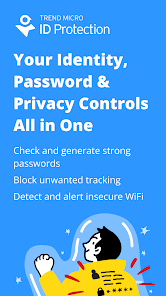
Trend Micro ID Protection shields your personal information and online accounts from identity theft, fraud, and unauthorized access. Stay ahead of identity and privacy risks. Enjoy peace of mind knowing your identity is secure and protected.
Lock down your digital security with data leak alerts, dark web monitoring, social media monitoring, and secure password management. Try it free for 7 days. Unlock Trend Micro ID Protection with Touch ID or Face ID.
Trend Micro ID Protection includes:
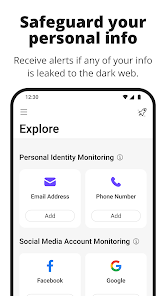
· Personal Identity Monitoring: Monitors the internet and dark web to check if any of your personal data is leaked, reducing your risk of identity theft and account takeover attacks.
· Social Media Monitoring: Monitors your Facebook, Google, and Instagram accounts for suspicious activity and potential hacks.
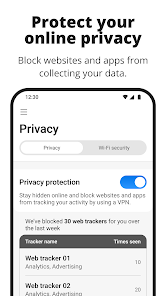
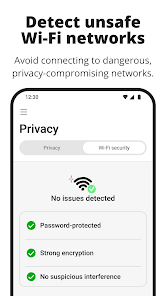
· Anti-tracking and Privacy Controls: Prevents unwanted tracking on mobile devices and notifies you if you are in an unsafe Wi-Fi environment.
· Privacy Protection with VPN: Safeguard your online activity with built-in local VPN technology that ensures a secure, private connection.
- Encrypts all network traffic to prevent data interception
- Protects your browsing privacy on public WiFi networks
- Prevents DNS leaks and unauthorized tracking
- Auto-activates when protection is needed
· Cloud Sync: Synchronizes your information across all your devices.
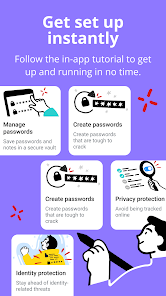
Trend Micro ID Protection also offers comprehensive password management functions, including:
· Autofill: Saves the usernames and passwords of your favorite websites so you can sign in with just one click.
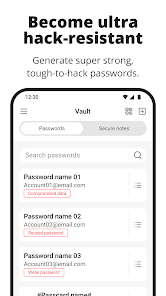
· Password Check: Notifies you when you have weak, reused, or compromised passwords.
· Password Generator: Creates strong, tough-to-hack passwords.
· Import Passwords: Quickly import passwords from your browser or another password manager.
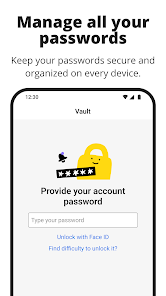
· Vault and Secure Notes: Stores not only your passwords but also other personal information in a secure, easily accessible location.
· Smart Security: Automatically locks your ID Protection app when you are away from your device.
· Trusted Sharing: Enables secure password sharing with your friends and family.
Trend Micro ID Protection safeguards you not only on mobile devices. You can use the same Trend Micro Account to access ID Protection on your computer and to download the ID Protection browser extension.
Trend Micro ID Protection requires the following permissions:
· Accessibility: This permission enables the Autofill feature.
· View all packages: Trend Micro ID Protection supports Single-Sign-On and obtains access tokens by calling getInstalledPackages. ID Protection also checks the Content Providers package to detect if other Trend Micro applications are installed.
· Draw over other apps: This permission allows Trend Micro ID Protection to display the Autofill UI on other apps.
· VPN Service: This permission is required for the Privacy Protection feature to establish secure network connections and help protect your online privacy. The VPN service is used solely for security purposes and does not collect or store any personal data.
Lock down your digital security with data leak alerts, dark web monitoring, social media monitoring, and secure password management. Try it free for 7 days. Unlock Trend Micro ID Protection with Touch ID or Face ID.
Trend Micro ID Protection includes:
· Personal Identity Monitoring: Monitors the internet and dark web to check if any of your personal data is leaked, reducing your risk of identity theft and account takeover attacks.
· Social Media Monitoring: Monitors your Facebook, Google, and Instagram accounts for suspicious activity and potential hacks.
· Anti-tracking and Privacy Controls: Prevents unwanted tracking on mobile devices and notifies you if you are in an unsafe Wi-Fi environment.
· Privacy Protection with VPN: Safeguard your online activity with built-in local VPN technology that ensures a secure, private connection.
- Encrypts all network traffic to prevent data interception
- Protects your browsing privacy on public WiFi networks
- Prevents DNS leaks and unauthorized tracking
- Auto-activates when protection is needed
· Cloud Sync: Synchronizes your information across all your devices.
Trend Micro ID Protection also offers comprehensive password management functions, including:
· Autofill: Saves the usernames and passwords of your favorite websites so you can sign in with just one click.
· Password Check: Notifies you when you have weak, reused, or compromised passwords.
· Password Generator: Creates strong, tough-to-hack passwords.
· Import Passwords: Quickly import passwords from your browser or another password manager.
· Vault and Secure Notes: Stores not only your passwords but also other personal information in a secure, easily accessible location.
· Smart Security: Automatically locks your ID Protection app when you are away from your device.
· Trusted Sharing: Enables secure password sharing with your friends and family.
Trend Micro ID Protection safeguards you not only on mobile devices. You can use the same Trend Micro Account to access ID Protection on your computer and to download the ID Protection browser extension.
Trend Micro ID Protection requires the following permissions:
· Accessibility: This permission enables the Autofill feature.
· View all packages: Trend Micro ID Protection supports Single-Sign-On and obtains access tokens by calling getInstalledPackages. ID Protection also checks the Content Providers package to detect if other Trend Micro applications are installed.
· Draw over other apps: This permission allows Trend Micro ID Protection to display the Autofill UI on other apps.
· VPN Service: This permission is required for the Privacy Protection feature to establish secure network connections and help protect your online privacy. The VPN service is used solely for security purposes and does not collect or store any personal data.
Updated on
Safety starts with understanding how developers collect and share your data. Data privacy and security practices may vary based on your use, region and age. The developer provided this information and may update it over time.


Ratings and reviews
4.5
951 reviews

Lee Miller
- Flag inappropriate
- Show review history
23 January 2026
I do not like ID Protection, especially on my laptop. It asks you to login more than once before taking you to the menu screen. It is more complicated to use than the previous Password Manager.

Gerald Rech
- Flag inappropriate
25 January 2026
Confusion as to what is happening. No help with Compermised Passwords, such as what is Compermised, how to fix, what are options, etc. Fairly typical of Trend Micro lately, like the "Scam" name change, the Messageing App that is only halfway useful or even explainable to their Tech Support. No one can explain how the App is supposed to work. No user friendly manual with any actual explainable information on how to use the unfriendly App? As normal they did not use actual Users for testing.

Patrick
- Flag inappropriate
1 December 2025
Can't use the app when you're offline. Example: If I'm on a plane and in the air with no signal I can't use the app to login for airline Wi-Fi because it requires an internet connection to load the username and password in the app...
3 people found this review helpful
What's new
Upgraded our app to enhance your experience and resolve issues.
App support
About the developer
Trend Micro Incorporated
tmets.apps.global@trend.com.tw
225 E John Carpenter Fwy Ste 1500
Irving, TX 75062
United States
+86 138 5148 7626


