
System App Manager Device Info
Contains adsIn-app purchases
2.4star
5.3K reviews
1M+
Downloads

Everyone
info






About this app
Apps & Device Info – System Tools
A reliable utility for users who want to manage installed apps and get full device information on Android — no fake promises, no hidden tricks.
What you can do:
• Uninstall user apps manually — free up storage space fast
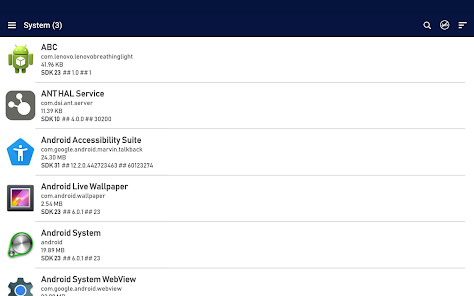
• View all system apps (pre-installed by manufacturer)
• Sort apps by name, size, or last update — easily spot unwanted apps
• See detailed app info: name, package ID, size
• Manually remove adware or suspicious apps — those that install silently, show pop-up ads, or run in background
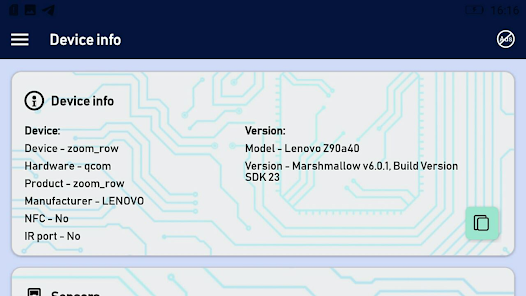
• Explore comprehensive Android device specs:
• Model (e.g. SM-N985F), manufacturer, hardware (SoC: Exynos, Snapdragon)
• Android version and SDK
• RAM and internal storage (total / free)
• Display details: resolution, screen size, density (dpi)
• NFC, IR blaster, sensors
Useful for:
– Cleaning phone from unused apps
– Diagnosing device performance and system apps
– Finding apps that slow down Android or consume memory
– Technical inspection before selling or customizing your device
Important:
• System apps cannot be uninstalled without root — this is an Android OS restriction, not a limitation of our app.
• On older rooted devices, system app removal may work if allowed by the system.
• The app works offline — no internet required.
Privacy:
We do NOT collect personal data: no contacts, files, cloud content, or accounts.
The only data possibly collected are anonymous crash reports, used solely to improve stability. These contain no personally identifiable information and are not shared with third parties.
📩 Support: help.atools@gmail.com
If something is unclear, please contact us before leaving a low rating. We read every message.
A reliable utility for users who want to manage installed apps and get full device information on Android — no fake promises, no hidden tricks.
What you can do:
• Uninstall user apps manually — free up storage space fast
• View all system apps (pre-installed by manufacturer)
• Sort apps by name, size, or last update — easily spot unwanted apps
• See detailed app info: name, package ID, size
• Manually remove adware or suspicious apps — those that install silently, show pop-up ads, or run in background
• Explore comprehensive Android device specs:
• Model (e.g. SM-N985F), manufacturer, hardware (SoC: Exynos, Snapdragon)
• Android version and SDK
• RAM and internal storage (total / free)
• Display details: resolution, screen size, density (dpi)
• NFC, IR blaster, sensors
Useful for:
– Cleaning phone from unused apps
– Diagnosing device performance and system apps
– Finding apps that slow down Android or consume memory
– Technical inspection before selling or customizing your device
Important:
• System apps cannot be uninstalled without root — this is an Android OS restriction, not a limitation of our app.
• On older rooted devices, system app removal may work if allowed by the system.
• The app works offline — no internet required.
Privacy:
We do NOT collect personal data: no contacts, files, cloud content, or accounts.
The only data possibly collected are anonymous crash reports, used solely to improve stability. These contain no personally identifiable information and are not shared with third parties.
📩 Support: help.atools@gmail.com
If something is unclear, please contact us before leaving a low rating. We read every message.
Updated on
Safety starts with understanding how developers collect and share your data. Data privacy and security practices may vary based on your use, region and age. The developer provided this information and may update it over time.


Ratings and reviews
2.4
5.06K reviews

Jody Both
- Flag inappropriate
30 January 2024
Exactly what does this app do. Except of course to run ads on top of the app. Which is confusing because the ads are showing the information that the user is expecting to get from the app. While the app itself only seems to throw a bubble on top of the buttons to choose from for the option given but the bubble butt blocks the options, to inform you that your looking at an ad. There are no options or actions being given to you by the app. I can find my own list of system apps. Thanks
28 people found this review helpful

JoAnn Graham
- Flag inappropriate
8 January 2023
It diddent erase any system app and I noticed things in my cloud are gone as well. It has zero, 0, privacy and 3rd party collects PERSONAL, info of mine/ yourz!!!!! It did absolutely nothing except expose my personal info and erase important stuff out of my cloud!! I DO NOT RECOMEND THIS APP!!!
49 people found this review helpful

David Boyd
- Flag inappropriate
9 July 2022
Doesn't appear to do anything as didn't remove system apps or other apps, I think just a fake scam app or have to pay to get anything to work. It claims over a million downloads but no reviews except mine.
17 people found this review helpful
What's new
🔧 correction of minor bugs
App support
About the developer
Vladimir Timofeev
help.atools@gmail.com
Баянгол 17 хороо
"Твин хорс" буудал 301 тоот
Улаанбатар
Mongolia
undefined


