CAPTCHA for Sleep as Android

4.7star
3.84K reviews
100K+
Downloads

Everyone
info
About this app
CAUTION: This app is an add-on for Sleep as Android and it only works with latest Sleep as Android.
+10 additional CAPTCHAs - Official CAPTCHA Pack for Sleep as Android.
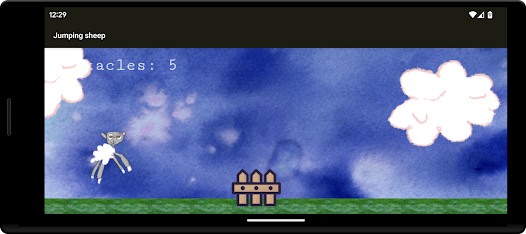
NEW: Jumping sheep!
CAPTCHA help you to wake up in the morning by performing a short task to stop the alarm.
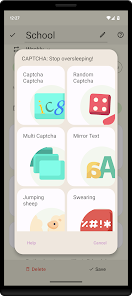
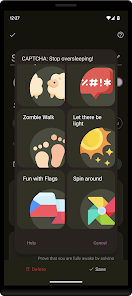
This pack bring more CAPTCHA to wake up in funny, educative or brutal way:
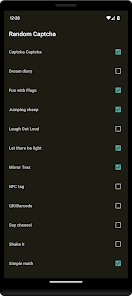
- Random CAPTCHA - get 1-5 random CAPTCHAs out of your favourite selection
- Multi CAPTCHA - complete several CAPTCHAs in a row
- Jumping sheep game
- Spin around
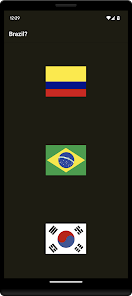
- Fun with Flags - recognize flags
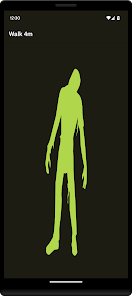
- Zombie Walk - walk X meters
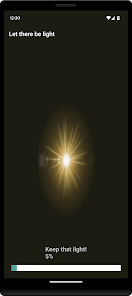
- Let it be light - put your phone to a light source
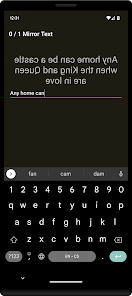
- Mirror Text - read and write mirror flipped wisdom texts
- CAPTCHA CAPTCHA - the ultimate CAPTCHA requires you to solve a web-like-CAPTCHA
and more to come
+10 additional CAPTCHAs - Official CAPTCHA Pack for Sleep as Android.
NEW: Jumping sheep!
CAPTCHA help you to wake up in the morning by performing a short task to stop the alarm.
This pack bring more CAPTCHA to wake up in funny, educative or brutal way:
- Random CAPTCHA - get 1-5 random CAPTCHAs out of your favourite selection
- Multi CAPTCHA - complete several CAPTCHAs in a row
- Jumping sheep game
- Spin around
- Fun with Flags - recognize flags
- Zombie Walk - walk X meters
- Let it be light - put your phone to a light source
- Mirror Text - read and write mirror flipped wisdom texts
- CAPTCHA CAPTCHA - the ultimate CAPTCHA requires you to solve a web-like-CAPTCHA
and more to come
Updated on
Safety starts with understanding how developers collect and share your data. Data privacy and security practices may vary based on your use, region, and age. The developer provided this information and may update it over time.

No data shared with third parties
Learn more about how developers declare sharing

No data collected
Learn more about how developers declare collection
Ratings and reviews
4.7
3.77K reviews

Thano
- Flag inappropriate
- Show review history
June 4, 2023
Useful add-ons, I just wish you could string multiple tasks of your choice together, for example, zombie walk, flags, and math, and allow for multiple sets of math or other problem-solving tasks. It does have a multi-catchpa, but it is only 2 pre-selected tasks. I also would like a difficulty mode for some tasks, ex. harder math, or more sheep etc.
34 people found this review helpful
Petr Nálevka (Urbandroid)
June 5, 2023
Hello Thano, the Multi CAPTCHA has two pre-selected tasks, but it is fully configurable. Go to Settings → Alarms → Captcha → Settings, and choose the tasks you wish to have for Multi. For more details, please contact support@urbandroid.org. Thank you.

A Google user
- Flag inappropriate
July 14, 2019
So far it's been alright, but I would like assistance on the zombie walk, because for whatever reason, when it went off it didn't seem to want to register any movement as "meters traveled" so I was just stuck for an hour trying to turn my alarm off. Also, I think the LUX one is a bit overkill because it only works some of the time. I am using a OnePlus 7 Pro, permissions have been given to the app, and the walk seemed to briefly work. If I resolve my issue, I'll give it a 5 star.
6 people found this review helpful
Petr Nálevka (Urbandroid)
July 15, 2019
Hello Nicolas, could you please reproduce the issue and send us your log (Report a bug from Left menu) right away? We will investigate the issue.
Many thanks and sorry for the troubles.

Ahmet F
- Flag inappropriate
- Show review history
March 29, 2021
Edit: It was my mistake. Difficulty levels can be set separately. -- There are wide variety of options. However, difficulty level cannot be set for different methods. Let there be light turns into a torture when the difficulty is medium but fun with flags is too easy for first level. You may want to consider setting the difficulty for each method separately.
59 people found this review helpful
Petr Nálevka (Urbandroid)
March 29, 2021
Hello Ahmet, difficulty of all Captcha task can be set up individually. For more information, please contact support@urbandroid.org. Thank you.
What’s new
Targeting Android 16
App support
About the developer
Petr Nálevka
petr@nalevka.com
1447/26 Klausova
155 00 Praha
Czechia
+420 777 685 008


