

Auto Redial | call timer
Contains ads

3.0star
12.7K reviews
1M+
Downloads

Everyone
info

About this app
A popular app that make calls and hang up calls automatically.It can automaic dial to a specific number and hang up.
2,000,000 Downloads!
Tutorial video:
1.how to Start/Stop auto dial
https://youtu.be/cDNy4c-x0iw
2.how to switch to 2 SIMs
https://youtu.be/jabUJxbmfjw
3.Show stop hang up timer
https://youtu.be/IhbaK49JHhA
Support Dual SIM Phone(2 SIMs card phone)
●Support version
Android 5 to 14
●Description:
-Auto redial phone number again and again in a very easy way.
-Make your phone automatically hang up with the timer you setting.
●The main features includes:
-Support Dual SIM Phone(2 SIMs card phone)
-Auto hang up
-Auto redial
-Fast redial
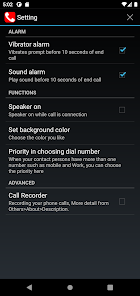
-Speaker on/off
-Vibration alert
-Sound alert
-dial extension number
●Unique features:
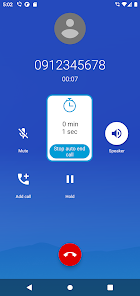
-When the number you dialed entering voice mail, for this case, you could enable "stop auto end call button" ,then enable the permission.
And set a shorter end call time(suggest 10-15 secs) and enable speaker on, then When someone answers the call, press the button to prevent automatic hang-up and keep the call going
●How to use this application:
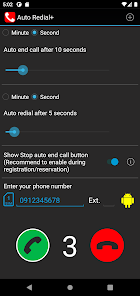
-drag first bar to set hang up time
-drag second bar to set redial interval
-Switch your sim card(for 2 SIMs phone)
-Enter the phone number or enter contact with click icon
-press green button to start auto redial
-press red button to stop auto redial
●Support language.
繁體中文,簡體,日本語,English,français,Română,русский,Deutsch,العربية,แบบไทย,Türkçe,bahasa Indonesia,Polski,हिंदी,italiano,Português,español
2,000,000 Downloads!
Tutorial video:
1.how to Start/Stop auto dial
https://youtu.be/cDNy4c-x0iw
2.how to switch to 2 SIMs
https://youtu.be/jabUJxbmfjw
3.Show stop hang up timer
https://youtu.be/IhbaK49JHhA
Support Dual SIM Phone(2 SIMs card phone)
●Support version
Android 5 to 14
●Description:
-Auto redial phone number again and again in a very easy way.
-Make your phone automatically hang up with the timer you setting.
●The main features includes:
-Support Dual SIM Phone(2 SIMs card phone)
-Auto hang up
-Auto redial
-Fast redial
-Speaker on/off
-Vibration alert
-Sound alert
-dial extension number
●Unique features:
-When the number you dialed entering voice mail, for this case, you could enable "stop auto end call button" ,then enable the permission.
And set a shorter end call time(suggest 10-15 secs) and enable speaker on, then When someone answers the call, press the button to prevent automatic hang-up and keep the call going
●How to use this application:
-drag first bar to set hang up time
-drag second bar to set redial interval
-Switch your sim card(for 2 SIMs phone)
-Enter the phone number or enter contact with click icon
-press green button to start auto redial
-press red button to stop auto redial
●Support language.
繁體中文,簡體,日本語,English,français,Română,русский,Deutsch,العربية,แบบไทย,Türkçe,bahasa Indonesia,Polski,हिंदी,italiano,Português,español
Updated on
Safety starts with understanding how developers collect and share your data. Data privacy and security practices may vary based on your use, region, and age. The developer provided this information and may update it over time.

No data shared with third parties
Learn more about how developers declare sharing

This app may collect these data types
Contacts and Device or other IDs

Data is encrypted in transit

Data can’t be deleted
Ratings and reviews
3.0
12.5K reviews

Yosh Gregory
- Flag inappropriate
May 7, 2020
Not sure about the one star issues, haven't had them myself. The app is easy to use. If you want to hear the calls on a speaker, use Bluetooth or headphone adapter to a speaker. Set the auto hang up for however long it will take you to get to your phone and close the app if you don't want it to hang up once you get through. Set auto redial for one second . So far in 2 hours this app has made 278 calls for me without fail. Don't use other apps while calling. It will interfere with the hang up
86 people found this review helpful

Samantha G
- Flag inappropriate
September 14, 2020
I use this app to get through to my GP practice when the phone lines are busy. It's fantastic - what used to take up to an hour of me manually redialling, now is completely effortless. I usually get through in a matter of minutes. Another reviewer has said that you have to manually hang up when receiving a busy tone but I haven't found that. Brilliant app!
44 people found this review helpful

Paddy Landau
- Flag inappropriate
March 8, 2022
The function to redial automatically on a busy line works perfectly. But. (1) The app should turn the speaker on, because the only way for me to know whether the line is engaged or has been answered is to watch the phone or hold it to my ear. That's unproductive. (2) There isn't a way to turn off the "Auto end call". That means that, having got through, I can't spend more than 60 minutes on the phone. For this app to get to 5 stars, it needs to automatically turn on the speaker (or at least give an option to do so), and to allow the option to turn off "Auto end call".
56 people found this review helpful
What’s new
- Add Ukrainian.
- Performance Optimization.
- Performance Optimization.
App support
About the developer
陳正鴻
chenkanzo@gmail.com
仁愛路152巷65號
汐止區
新北市, Taiwan 221


