2.3star
1.18K reviews
500K+
Downloads

Everyone
info

About this app
With OVpay, you can use your contactless card or phone to check in and out of Dutch public transport. This is the accompanying app—perfect for both seasoned travellers and first-timers.
Meet the OVpay app:
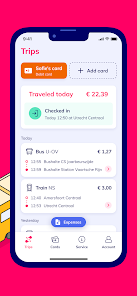
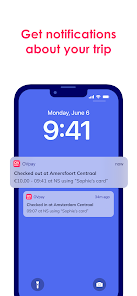
• Confirm check-ins and check-outs
Not sure if you’ve checked in or out? Find out under ‘Journeys’. You can also opt to get a notification every time you check in or out.
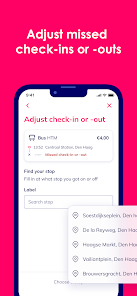
• Adjust missed check-ins or check-outs
Forgotten to check in or out? No problem! You can adjust missed check-ins and check-outs in the app. Up to 60 days after your journey.
• All journeys and travel costs in a one overview
View all your journeys and travel costs from the past 18 months under ‘Journeys’.
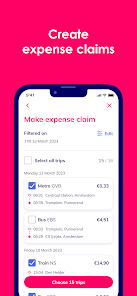
• Create travel expense overviews
Send travel expense overviews to your employer straight from the app. Or have it email you a PDF. All you need to do is select the month and trips—the app will take care of the rest!
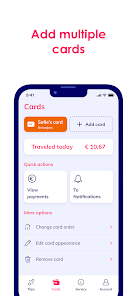
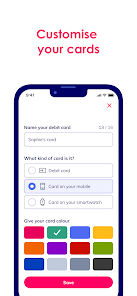
• Add multiple cards
You can now add up to 10 cards to the app. Give them a name and colour so you can easily keep them apart. Perfect if you use different cards for travel.
• Add your age-based discount
If you qualify for a 34% age-based discount, you can add it to your card. In the app, share your name, date of birth and a photo and you’re good to go.
We’re always working to add new features. Keep an eye on our website, Instagram or Facebook for the latest news.
About OVpay
OVpay is a collaboration between Translink, all major Dutch banks, and Dutch public transport operators: Arriva, EBS, GVB, HTM, Keolis, NS, Qbuzz, RET, and Transdev.
This is the accompanying app for OVpay. With OVpay, you can check in and out with your contactless card or phone instead of an OV-chipkaart.
Privacy
With OVpay, you choose how you want to check in and out. We need some of your personal details to make it work, but we believe you should be the one who decides how your details are used, and who uses them. Learn how we process and protect your personal details in your privacy statement (www.ovpay.nl/privacy).
Meet the OVpay app:
• Confirm check-ins and check-outs
Not sure if you’ve checked in or out? Find out under ‘Journeys’. You can also opt to get a notification every time you check in or out.
• Adjust missed check-ins or check-outs
Forgotten to check in or out? No problem! You can adjust missed check-ins and check-outs in the app. Up to 60 days after your journey.
• All journeys and travel costs in a one overview
View all your journeys and travel costs from the past 18 months under ‘Journeys’.
• Create travel expense overviews
Send travel expense overviews to your employer straight from the app. Or have it email you a PDF. All you need to do is select the month and trips—the app will take care of the rest!
• Add multiple cards
You can now add up to 10 cards to the app. Give them a name and colour so you can easily keep them apart. Perfect if you use different cards for travel.
• Add your age-based discount
If you qualify for a 34% age-based discount, you can add it to your card. In the app, share your name, date of birth and a photo and you’re good to go.
We’re always working to add new features. Keep an eye on our website, Instagram or Facebook for the latest news.
About OVpay
OVpay is a collaboration between Translink, all major Dutch banks, and Dutch public transport operators: Arriva, EBS, GVB, HTM, Keolis, NS, Qbuzz, RET, and Transdev.
This is the accompanying app for OVpay. With OVpay, you can check in and out with your contactless card or phone instead of an OV-chipkaart.
Privacy
With OVpay, you choose how you want to check in and out. We need some of your personal details to make it work, but we believe you should be the one who decides how your details are used, and who uses them. Learn how we process and protect your personal details in your privacy statement (www.ovpay.nl/privacy).
Updated on
Safety starts with understanding how developers collect and share your data. Data privacy and security practices may vary based on your use, region, and age. The developer provided this information and may update it over time.


Ratings and reviews
2.3
1.15K reviews

Bas Aalderink
- Flag inappropriate
November 29, 2025
Unable to add my virtual debit cards (phone and smartwatch, both Google Pay) due to the "Sorry, something went wrong on our side. Please try again later" error. i know i typed it all right, the NLOV and payment amount, cause if i intentionally type the amount wrong it gives me the error about an incorrect / nonexistent / expired NLOV or payment amount instead. This has been going on for weeks on my end, making this app useless as i can't even make use of it. (Both on Wi-Fi and cellular data)
1 person found this review helpful

SY Goh
- Flag inappropriate
September 24, 2025
my first 1 star review for an app. it's unbelievable. after a long update on their side where the app was unusable, nothing for the better changes. in fact now I have to relogin to the app each time I open it. with a corporate credit card added to the app, it never once successfully deducted anything. after a tram or metro ride, I'd get an notification that I can't travel anymore because they failed to process the payment. I'd have to make a manual payment to use that card again.
5 people found this review helpful
Translink Customer Care
September 24, 2025
Hi! We are very sorry for the current performance of the app. We are working on it 24/7. Concerning your credit card: please take notice that a plastic and digital version of the same card are 2 different cards for OVpay. If the cost for traveling can't be collected, you will have to settle the required amount first before traveling again.

Judit Kovacs
- Flag inappropriate
September 20, 2025
Unusable. Was told to reset my password. Which is of course possible on the website. So I went to the app where there is only a create account option. No option to log in with an existing account or to reset the password (like I was told to do). The FAQ/Help section of their website tells you to open the app and log in. While there is no such button in the app itself. Insane levels of incompetence, as usual, from OV.
7 people found this review helpful
What’s new
We tweaked some things that are probably too small to notice. But the app should work a bit better now.
App support
About the developer
Trans Link Systems B.V.
rzoteam@translink.nl
Stationsplein 151
3818 LE Amersfoort
Netherlands
+31 6 58839286


