Bicycle Speedometer
May mga ad
4.2star
865 review
100K+
Mga Download

Lahat
info
Tungkol sa app na ito
Main display contents
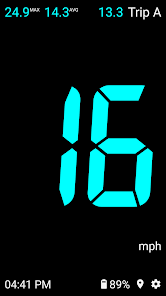
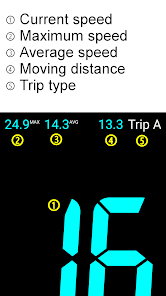
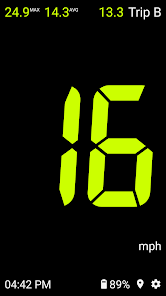
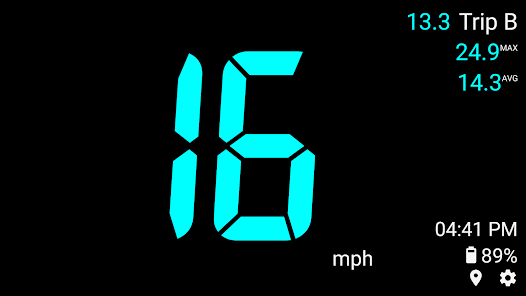
✓ Current speed, maximum speed, average speed, moving distance(mileage), etc.
Characteristic
✓ Neat screen composition that can grasp key data at a glance
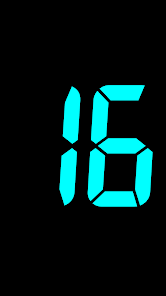
✓ Provides a simple view mode that displays only the current speed
✓ Convenient screen movement through swipe gesture
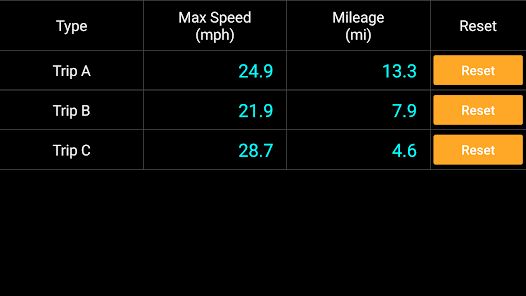
✓ 3 types of trip: A, B, C
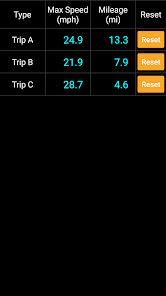
✓ Provides statistical information of Trip A, B, C
How to move the screen
✓ You can move between screens by swiping (sliding while touching).
✓ When swiping left or right, it cycles through the speedometer general mode, speedometer simple mode, and trip statistics screen.
✓ Swipe left : Speedometer general mode → Speedometer simple mode → Trip statistics → Speedometer general mode → ...
✓ Swipe right : Speedometer general mode → Trip statistics → Speedometer simple mode → Speedometer general mode → ...
Trip conversion
✓ When the trip name is touched on the main screen, data is displayed in the order of Trip A → B → C
✓ Trip reset: If you long touch the trip name, you can initialize that trip. (Trip reset button availvale in the statistics screen also.)
Settings
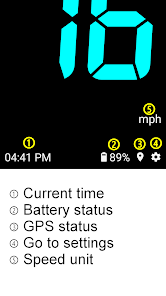
✓ Go to the settings screen by clicking setting icon on the main screen.
✓ Speed Unit : mph, km/h
✓ Speed Color : 12 colors
✓ Burn-in Prevention : Occasionally blinks some elements on the main screen
✓ Bell Sound : select bell and volume
Caution
✓ Burn-in Prevention feature does not guarantee that screen burn-in will never occur.
✓ Do not stare at the screen for a long time while riding.
✓ Current speed, maximum speed, average speed, moving distance(mileage), etc.
Characteristic
✓ Neat screen composition that can grasp key data at a glance
✓ Provides a simple view mode that displays only the current speed
✓ Convenient screen movement through swipe gesture
✓ 3 types of trip: A, B, C
✓ Provides statistical information of Trip A, B, C
How to move the screen
✓ You can move between screens by swiping (sliding while touching).
✓ When swiping left or right, it cycles through the speedometer general mode, speedometer simple mode, and trip statistics screen.
✓ Swipe left : Speedometer general mode → Speedometer simple mode → Trip statistics → Speedometer general mode → ...
✓ Swipe right : Speedometer general mode → Trip statistics → Speedometer simple mode → Speedometer general mode → ...
Trip conversion
✓ When the trip name is touched on the main screen, data is displayed in the order of Trip A → B → C
✓ Trip reset: If you long touch the trip name, you can initialize that trip. (Trip reset button availvale in the statistics screen also.)
Settings
✓ Go to the settings screen by clicking setting icon on the main screen.
✓ Speed Unit : mph, km/h
✓ Speed Color : 12 colors
✓ Burn-in Prevention : Occasionally blinks some elements on the main screen
✓ Bell Sound : select bell and volume
Caution
✓ Burn-in Prevention feature does not guarantee that screen burn-in will never occur.
✓ Do not stare at the screen for a long time while riding.
Na-update noong
Nagsisimula ang kaligtasan sa pag-unawa kung paano kinokolekta at ibinabahagi ng mga developer ang iyong data. Posibleng mag-iba ang mga kagawian sa privacy at seguridad ng data batay sa iyong paggamit, rehiyon, at edad. Ang developer ang nagbigay ng impormasyong ito at posibleng i-update niya ito sa paglipas ng panahon.

Walang data na ibinabahagi sa mga third party
Matuto pa tungkol sa kung paano inihahayag ng mga developer ang pagbabahagi

Posibleng kolektahin ng app na ito ang mga ganitong uri ng data
Impormasyon at performance ng app at Device o iba pang ID

Ine-encrypt ang data habang inililipat

Hindi puwedeng i-delete ang data
Mga rating at review
4.2
853 review
Ano'ng bago
- Improved app stability
Suporta sa app
Tungkol sa developer
박종진
ecogeo.dev@gmail.com
중동 중동로254번길 78
에코지오, 6층 C22호
원미구, 부천시, 경기도 14548
South Korea
undefined


