
3C All-in-One Toolbox
Contains adsIn-app purchases

star
15.7K reviews

Everyone
info
1M+
Downloads

Everyone
Learn more


About this app
The ENTIRE 3C collection in just one package! *
* Except 3C Sensitive Backups and 3C Legacy Stats which are not allowed by Google to be included in this app.
3C All-in-One Toolbox combines many features into one giant toolbox with a modern and easy-to-use interface. Every tool you need to monitor, control and fine-tune all your Android devices.
Fastest and most friendly support on Play Store. Feel free to send a request from app settings, help and support mentioning your concerns.
Permissions detailed here
Some features may require root or using 3C Companion app for PC starting with Android 6+.
This app offers 2 accessibility services to help you stop apps easily or backup apps' data automatically, both of which will never ever collect any information. Privacy Policy
★ Go pro or use in-app purchases to unlock the following features
Hide any tabs or any menu item
Edit main screen buttons up-to 4x6 grid
Multi/auto-select and sort apps
Auto backup and new app notification
Recording items and options
Create multiple schedules, watchers and profiles
Automatic battery markers and manage multiple batteries
Notification shortcut to access any features from status notification
Many extra widgets
Here are some of the app features:
★ Device manager offers very powerful profiles, task scheduling and device watchdog
★ File manager is a very simple, yet very powerful explorer with thumbnails, folder size and more. Stream your videos and photo directly to your favorite player. Both locally or from any Samba, FTP, WebDAV, Google Drive or Dropbox locations.
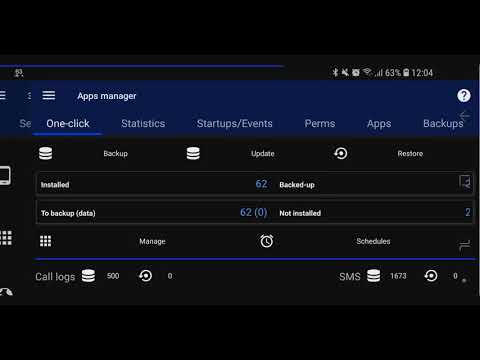
★ Application manager provides backup/restore of all your favorites apps, including ability to import Titanium Backup! Also allows you to secure and customize your apps' events, orientation, full-screen and control permissions with Xposed framework.
★ Battery manager helps you analyze and improve your consumption. Complete data (including mA) and charge cycles history, custom statistics based on profiles, consumption estimates in use or standby. Special support for dual battery devices, battery changes and LG Quick Circle and Samsung Edge notifications
★ Network manager allows configuring and monitoring your network traffic.
★ Task manager offers a simple UI yet very effective in sorting apps by various usage and getting rid of unwanted apps
★ CPU manager controls single to octacore CPUs, thermal, multi-core and most custom kernel settings
★ System manager allows configuring Linux kernel settings.
★ ROM manager allows configuring Android OS settings.
★ Monitoring and recording all applications, and hardware components activities. Includes status bar notifications with historical graphics.
★ System component switches in app, in widgets or using profiles allows switching on/off about 20+ device components (WiFi, Bluetooth, etc)
★ Information notifications allowing to display key information in status bar.
★ Line indicators displaying simple information visually on top of everything.
★ Quick settings to quickly access app features or toggle various system components.
★ Toolbox integration allows for battery management, controlling hardware and managing apps from anywhere.
★ Highly configurable UI allows you to transform the app into something you really like
★ Highly configurable widgets, from a simple gauge to more complex data display, component toggles, and historical graphics
For advanced debugging/investigations:
★ Terminal Emulator & Script Editor allows sharing and running scripts optionally on boot
★ System Logcat and Kernel Reader* provides advanced filtering and search.
* Except 3C Sensitive Backups and 3C Legacy Stats which are not allowed by Google to be included in this app.
3C All-in-One Toolbox combines many features into one giant toolbox with a modern and easy-to-use interface. Every tool you need to monitor, control and fine-tune all your Android devices.
Fastest and most friendly support on Play Store. Feel free to send a request from app settings, help and support mentioning your concerns.
Permissions detailed here
Some features may require root or using 3C Companion app for PC starting with Android 6+.
This app offers 2 accessibility services to help you stop apps easily or backup apps' data automatically, both of which will never ever collect any information. Privacy Policy
★ Go pro or use in-app purchases to unlock the following features
Hide any tabs or any menu item
Edit main screen buttons up-to 4x6 grid
Multi/auto-select and sort apps
Auto backup and new app notification
Recording items and options
Create multiple schedules, watchers and profiles
Automatic battery markers and manage multiple batteries
Notification shortcut to access any features from status notification
Many extra widgets
Here are some of the app features:
★ Device manager offers very powerful profiles, task scheduling and device watchdog
★ File manager is a very simple, yet very powerful explorer with thumbnails, folder size and more. Stream your videos and photo directly to your favorite player. Both locally or from any Samba, FTP, WebDAV, Google Drive or Dropbox locations.
★ Application manager provides backup/restore of all your favorites apps, including ability to import Titanium Backup! Also allows you to secure and customize your apps' events, orientation, full-screen and control permissions with Xposed framework.
★ Battery manager helps you analyze and improve your consumption. Complete data (including mA) and charge cycles history, custom statistics based on profiles, consumption estimates in use or standby. Special support for dual battery devices, battery changes and LG Quick Circle and Samsung Edge notifications
★ Network manager allows configuring and monitoring your network traffic.
★ Task manager offers a simple UI yet very effective in sorting apps by various usage and getting rid of unwanted apps
★ CPU manager controls single to octacore CPUs, thermal, multi-core and most custom kernel settings
★ System manager allows configuring Linux kernel settings.
★ ROM manager allows configuring Android OS settings.
★ Monitoring and recording all applications, and hardware components activities. Includes status bar notifications with historical graphics.
★ System component switches in app, in widgets or using profiles allows switching on/off about 20+ device components (WiFi, Bluetooth, etc)
★ Information notifications allowing to display key information in status bar.
★ Line indicators displaying simple information visually on top of everything.
★ Quick settings to quickly access app features or toggle various system components.
★ Toolbox integration allows for battery management, controlling hardware and managing apps from anywhere.
★ Highly configurable UI allows you to transform the app into something you really like
★ Highly configurable widgets, from a simple gauge to more complex data display, component toggles, and historical graphics
For advanced debugging/investigations:
★ Terminal Emulator & Script Editor allows sharing and running scripts optionally on boot
★ System Logcat and Kernel Reader* provides advanced filtering and search.
The ENTIRE 3C collection in just one package! *
Updated on
Safety starts with understanding how developers collect and share your data. Data privacy and security practices may vary based on your use, region, and age. The developer provided this information and may update it over time.
- This app may share these data types with third partiesLocation and Device or other IDs
- No data collectedLearn more about how developers declare collection
- Data is encrypted in transit
- Data can’t be deleted


Ratings and reviews
14.4K reviews

Biggestthreat Toyourhatefevil
- Flag inappropriate
March 10, 2023
Not only the app is hard to manage, the data impossible to understand, but the output of the logs I received are from 2019 and seem be to belong to a completely different device. To crown everything, the app is now flagged by my firewall. And I paid for the full add-ons! How is it possible to pull log entries from 2 years prior to the device being activated ?
11 people found this review helpful

Mike Chin (SuperValue)
- Flag inappropriate
June 19, 2026
It's a great app for us old time android users. The caveat here is the UI is extremely dated and will confuse the heck out of people used to modern look and feel. It's reminds me of titanium backup in this respect. That said, the sheer amount of information and tweaks is mind blowing. If you are a hyper-user (beyond power user), this is for you. Kernel tweaking, task management, network management, and information out the rear end. It literally takes the place of a dozen utility apps.
5 people found this review helpful

Chuck
- Flag inappropriate
- Show review history
June 25, 2026
Using it for over 10 years and still the best. So many things you can do. Bit of a learning curve but worth it. RTFM. Get the paid version, its so worth it! Thanks for keeping updated!!
1 person found this review helpful
What’s new
Fix DNS Changer not disabling properly
Fix restoring an older backup of this app over itself
Improves launcher shortcut handling
Fix restoring an older backup of this app over itself
Improves launcher shortcut handling
Everyone
Learn moreApp support
About the developer
CEDRIC COUNOTTE
3c@3c71.com
721 AVENUE DU GENERAL DE GAULLE
HAMEAU DES POMARELS B7
06700 Saint-Laurent-du-Var (06700)
France


