Description
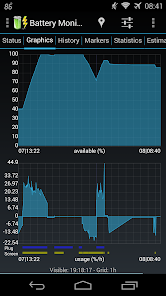
The most complete tool to monitor your battery: Shows historical data (%, mA, mW, mV and temperature), calculates estimated run-times and battery aging, helps calibrate battery, and improves your battery run-time.
Battery Monitoring only, 3C Toolbox available at http://www.3c71.com/atfree
NB:
◊ 2.x users, please read migration guide before updating: http://www.3c71.com/bmw_mig
◊ Please check app status tab for monitoring status and mA/mAh data source
◊ History shows only 1% changes by default, long-press history to change
◊ App logs battery data in real-time by default (compared to 2.x) and still consumes less CPU: https://plus.google.com/photos/+AndroTuner3C/albums/5989574773236760065
◊ Due to a bug in KitKat 4.4.2, please use workaround described here: http://www.3c71.com/kk
◊ The app displays the % remaining, voltage and temperature data reported by Android OS
◊ Android 4.4.x (KitKat): Battery statistics require a rooted device
◊ Requires INTERNET and ACCESS_NETWORK_STATE access for ads
In-app purchase can be made to remove ads or unlock some features
► Pro version has all features unlocked and no ads
◊ Wide (2x1) and graphic (2x1, 3x1, 4x1) widgets
◊ Export data to System Tuner Pro
◊ Update battery capacity or reference based on measured data
◊ Keep information of unlimited number of batteries (2 in free)
◊ Add history markers manually or automatically on boot, ROM/kernel/battery changes
► Pro version has all features unlocked and no ads
► Use in-app purchase to remove ads or enable automatic history markers.
► Display all information using great looking graphics, fully scrollable and zoomable.
► Use additional packages to show great looking icons in notification bar
► Display historical graphics or battery data on your home screen using widgets of various sizes!
► Triggers alarm based on any battery data
► Manually resets battery statistics on rooted phone
► Calculate remaining time while unplugged or charging (AC/USB/Wireless)
► Calculate actual battery capacity (mAh)
► Support multiple batteries
► Support Motorola Defy/Atrix 1% reporting
► Online help accessible from app
► Export data to System Tuner Pro to analyze which process is responsible for battery drain!
◊ Lowest battery consumption on the market:
You must install this app before submitting a review.
Google Play reviews now use Google+ so it's easier to see opinions from people you care about. New reviews will be publicly linked to your Google+ profile. Your name on previous reviews now appears as "A Google User".
Write a review
My review
Review from
Reviews
Helpfulness
Newest
Rating
Helpfulness
All Versions
All Versions
Latest Version
4.3
13,271 total
5 8,339
4 2,801
3 1,052
2 438
1 638
Kamil Páral
Helpful Very useful if you have a feeling that your battery is getting deleted faster than it used to, and you want some numbers.
Bob O`Bob
Used to be controllable. I really liked it for months. Every so often my tablet would remove the widget and I'd have to put it back and configure it all over again. With the latest update, the configuration control is gone
A Google User
Great app Gives a lot of information about battery usage so you can tune your power consumption.
Dee Mayo
Quality App, with hard numbersS to reference, No Fluff Great hard numbers: Temperature, Voltage , Capacity mAh, Current ma . Statistic Summary,.... Graph...Estimate... Strive to understand the difference between Misinformation & Disinformation ( generally has a sinister agenda ) No Roman Bread & Circus here, just people doing their best to produce a quality product. Thanks...
User reviews
Great app Gives a lot of information about battery usage so you can tune your power consumption.
Quality App, with hard numbersS to reference, No Fluff Great hard numbers: Temperature, Voltage , Capacity mAh, Current ma . Statistic Summary,.... Graph...Estimate... Strive to understand the difference between Misinformation & Disinformation ( generally has a sinister agenda ) No Roman Bread & Circus here, just people doing their best to produce a quality product. Thanks...
3c September 20, 2013
Thank You. What's New
Battery Monitoring only, 3C Toolbox available at http://www.3c71.com/atfree
2.x users please read migration guide before updating: http://www.3c71.com/bmw_mig
3.1.7.1:
Fix in-app purchases
3.1.7: Now requires Android 2.3 or higher
New battery manager configuration wizard
Ability to hide tab strip or show it at the bottom
Add mA support for OnePlus One
Various cosmetics and bug fixes
◊ Requires SYSTEM_ALERT_WINDOW (draw over other apps) to show a battery notification bar
Additional information
Updated
August 15, 2014
Size
5.4M
Installs
1,000,000 - 5,000,000
Current Version
3.1.7.1
Requires Android
2.3 and up
Content Rating
Everyone
In-app Products
$1.27 - $2.56 per item
Permissions
Report
Flag as inappropriate Offered By
3c
Developer
Similar
Battery Monitor Widget
fsinib
1
With Battery Monitor you can control your Battery status, here are some features:
- Fuel Widget
- Circle Widget, with big numbers
- Neon Gauge Widget
- Alarms and Notifications
- Battery indicator on the notification bar
- General and Weekly Statistics
- Charts
- Simple and neat interface
- Support for Tablets and Android Kitkat
A Pro version is available with plenty of Widgets personalizations, lots of settings and no ads.
Follow @fsinib on Twitter, Facebook and Google+
http://twitter.com/fsinib
http://www.facebook.com/fsinib
http://plus.google.com/105085970473553541041
Battery Doctor (Battery Saver)
Battery Doctor is a FREE battery saving app that can extend your battery life up to 50% by finding apps and settings that drain power on your device. Join 150+ million users on Android and iOS who have seen the benefits!
Professional, easy to use and supporting 19 languages, Battery Doctor by Cheetah Mobile (formerly known as KS Mobile) gives a longer life to your Android phone , provides you with detailed battery information and helps it charge healthily with our unique 3 Stage Charging system. Enjoy an incredible power saving experience that's as good as Project Volta, even before Android L comes out.
Defend your Juice!
Find out what’s draining your power. Adjust your draining settings (e.g. brightness) and disable unnecessary apps that drain your battery.
Accurately Estimates Remaining Battery Time
Tells how long battery will last under a variety of situations (playing games, wifi on or off, etc)
Professional Charging
Battery Doctor regulates the manner in which your device is charged with a Unique 3 Stage Charging system to ensure you get the most out of your battery and reminds you not to over charge. It also has features that can monitor and regulate power consumption.
Widget Included
Our "Task Killer" widget will optimize your power consumption conveniently. The 4x1 widget makes it easier to manage Wifi, Data, Brightness, etc, and set power saving modes.
Key Features
- Disable unnecessary apps that drain your battery!
- Task Killer kills tasks with one click!
- Kill apps when screen is off!
- Accurate battery remaining time!
- Accurate charging remaining time!
- Schedule power saving modes for work/class/sleep and more!
- Unique 3 Stage Charging system!
- Wifi/Data/Bluetooth toggle!
- Brightness control!
- CPU Management (for rooted phones)!
- Battery temperature!
- Charging Tips!
- 15 languages supported!
- Simple easy-to-use interface!
Battery Doctor fans, please join our beta testing group. Be the first to try our recent updates, report bugs, and contact developers.
http://bit.ly/17AtLdn
Q&A
Q: Can Battery Doctor save power and extend battery life?
A: Yes!
Tap the circle at the home screen (Save Power) to kill power hog apps that are not currently in use to improve battery life.
Run our app while charging to let Battery Doctor manage the process with its Unique 3 Stage Charging system that ensures a longer battery life.
Use the "Task Killer" widget to optimize your power consumption conveniently
Q: What is a full charge and why does it matter?
A: Plug in your phone when the battery has about 20% remaining and continue to charge until Battery Doctor tells you the 3rd stage of trickle charging is complete. Do not overcharge by keeping your device plugged in nor undercharge by charging in short bursts whenever convenient.
Q: How does "Saving Mode" work?
A: "Saving Mode" is an extreme setting that shuts down all non-essential functions of your phone with exception of making phone calls and sending/receiving text messages. WiFi, Data, GPS, etc will all be shut down to ensure battery life and defend your juice.
Q: How do I set up the widgets?
A: The "Task Killer" widget will automatically appear on your home screen with installation. The other widget that monitors WiFi/GPS/etc can be installed just as any other widget on your device would be set up.
--
Other CM apps:
Clean Master:
https://play.google.com/store/apps/details?id=com.cleanmaster.mguard
CM Browser :
https://play.google.com/store/apps/details?id=com.ksmobile.cb
======================================================================
Twitter.com/ksbatterydoctor
Facebook.com/ksbatterydoctor
Battery Widget
Battery Widget is an elegant 1x1 widget which shows you the battery level on your home screen, with some nice animation when charging. Tapping on it will show more battery information with a shortcut to view battery use. Now Battery Widget can help you save battery by letting you control device settings such as WiFi, screen brightness, GPS, and more.
In case you don't have enough space in your home screen, a clear battery level indicator is available on status bar so that you can see it even when you are browsing the web or sending text messages. It can be configured to show in 3 different colors to reflect high/medium/low battery levels. You can also define your own alerts, so that Battery Widget will automatically notify you about battery status changes.
Available in multiple languages: English, Chinese (Traditional), Chinese (Simplified), Japanese, Korean, Spanish, Russian, Greek, Italian, Hungarian, Estonian, Turkish, French, German, Brazilian Portuguese, Polish, Catalan, Dutch, Ukrainian and Romanian.
Please email us if you would like to help localize Battery Widget.
========================
Feature Overview
========================
- Battery level indicator on status bar, showing in different colors in 3 configurable level ranges
- Toggle screen brightness, screen time, WiFi, data, vibration, volume, Bluetooth, sync, screen rotation, airplane mode, and GPS
- Alerts for various battery statuses
- Time information when device is plugged/unplugged
- Option to disable charging animation
- Option to show temperature in Fahrenheit
- Various indicator icon styles
========================
Important Notes
========================
- Make sure that Battery Widget is excluded in any task killer programs; it might fail to work properly otherwise.
- Due to the limitation of the Android platform, homescreen widgets will NOT be available if Battery Widget is moved to SD card.
- Some devices indicate battery level every 10% due to their kernel design (known ones are: most Motorola devices including Droid and Atrix series, Samsung Moment series).
- In Android 4.0, the system may shrink and dim level indicator icons in status bar.
- Receive community-powered battery reports that compare and analyze the battery usage of popular apps such as Facebook and Twitter.
- The permissions are required to allow you to easily control your device settings and optimize your battery directly from within the widget. By having Battery Widget running, you’ll be contributing app performance data anonymously to the Battery Community, thereby helping other community members and app developers improve their Android battery performance.
========================
Instructions
========================
Please add Battery Widget to your home screen with the general methods below:
Method 1:
Press Home button followed by Menu button. Select Add -> Widgets -> Battery Widget.
Method 2:
Press Home button to show the home screen. Tap and hold your finger on any available space, select Widgets -> Battery Widget.
Procedures to add widgets on home screen might be different in devices from various manufacturers with their custom user interfaces.
===========================
Special Thanks (Localization)
===========================
Edith Lam - Japanese
Jintae Kim / YoungChul Chung - Korean
Fernando - Spanish
Roman Rublevskiy - Russian
Miltos - Greek
Marco Giorgi - Italian
bencebacsi - Hungarian
Margus P - Estonian
Mehmet ÖZCAN - Turkish
Billoux - French
Luis & Anjali / Sbeyderman - German
Rodrigo de Avila - Brazilian Portuguese
Albert Czyżewski - Polish
Josep Caritg - Catalan
Twan Veugelers - Dutch
Мирончук Николай - Ukrainian
Vlad Andrei - Romanian
Тима Картман - Azerbaijan
Battery
Battery indicates the battery charge level of your device.
Battery is a small, sleek and elegant app that will help you follow the current battery percentage on your Android device, and even serve as a battery saver.
With Battery, every time and everywhere you will know if your battery is charged enough to play a game, a movie, or to browse the web.
There is no other battery app with such intuitive, neat and gorgeous interface as Battery has. The UI of Battery is as simple as possible, but tremendously practical.
We will work constantly to improve Battery, adding in the very near future new features, like useful battery information, battery saver tips, new widgets, and many more.
* FEATURES
✓ Displays battery information in percent (%)
✓ Supports the lock screen widget introduced in Android 4.2
✓ Offers quality support for Android devices - from Android 1.5 to Android 4.3
✓ Full support for all known screen resolutions
✓ Power source indicator
✓ The precise battery level is displayed in 1% increments
✓ It is helpful and can serve as a battery saver.
✓ Battery is incredibly lightweight!
✓ Additional battery information:
- Temperature
- Voltage
- Health status
- Technology
Get in touch with us and follow the latest news regarding our apps:
http://www.facebook.com/macropinch
http://twitter.com/macropinch
GSam Battery Monitor
Is your battery draining too quickly? Do you simply want to know how much time you have left before you need to recharge? Then GSam Battery Monitor to the rescue!
Features
• Hunt down those battery draining Apps with the App Sucker
• Always know your battery state and time left estimates with a optional status bar notification
• Overlay the stock battery icon with the icon pack add-on.
• Dig deep into how an App uses your battery - including wakelock details
• Sort your app suckers by things such as CPU & sensor usage, app wakelocks, wake time, and kernel wakelocks.
• Set a custom time reference to see stats over a certain period of time.
• See time remaining estimates based on current and historical usage
• See historical averages - how long does your battery usually last?
• Add a widget to your home screen showing the battery status and time remaining
• Include all sorts of great battery information in your DashClock widget using the included DashClock Extension
• Download or create your own icon themes
• Set customizable alarms for various charge states, temperature, and battery health
If you have a Tablet, then you'll want to check out the Professional Edition. It includes:
• Optimized views for Tablets or other devices with large screens.
• More accurate time remaining estimates for devices such as tablets with long standby times.
For more information including instructions on creating your own Icon Packs, see:
Features
• Hunt down those battery draining Apps with the App Sucker
• Always know your battery state and time left estimates with a optional status bar notification
• Overlay the stock battery icon with the icon pack add-on.
• Dig deep into how an App uses your battery - including wakelock details
• Sort your app suckers by things such as CPU & sensor usage, app wakelocks, wake time, and kernel wakelocks.
• Set a custom time reference to see stats over a certain period of time.
• See time remaining estimates based on current and historical usage
• See historical averages - how long does your battery usually last?
• Add a widget to your home screen showing the battery status and time remaining
• Include all sorts of great battery information in your DashClock widget using the included DashClock Extension
• Download or create your own icon themes
• Set customizable alarms for various charge states, temperature, and battery health
If you have a Tablet, then you'll want to check out the Professional Edition. It includes:
• Optimized views for Tablets or other devices with large screens.
• More accurate time remaining estimates for devices such as tablets with long standby times.
For more information including instructions on creating your own Icon Packs, see:
http://badassbatterymonitor.blogspot.com
NOTE: Please email me if you encounter any issues with this app.
Permissions: Please see the users-guide for a full explanation of the permissions that GSam Battery Monitor requires: http://badassbatterymonitor.blogspot.com/2011/11/badass-battery-monitor-users-guide.html#permissions
Translations:
• Russian (Thanks to Dmitry Chernogaev)
• French (Thanks to Jaworski Johan)
• Italian (Thanks to Fabio Abbà)
• Hungarian (Thanks to István Kriskó (Stefi))
• Czech (Thanks to Matěj Trakal)
• Swedish (Thanks to Pontus Edgren)
• Dutch (Thanks to ArTsLeOpS)
• Hebrew (Thanks to Michael Sandler)
• Chinese (Thanks to Gavin Fang)
• Turkish (Thanks to Saldıray Günal)
• Polish (Thanks to cvxcvx)
• German (Thanks to Jan Fortein)
• Spanish (Thanks to Carlos Salazar & Broquen)
• Ukrainian (Thanks to Yaroslav Brukh)
• Portuguese (Thanks to João Ricardo)
• Interested in translating? See http://code.google.com/p/gsam-battery-monitor-translation/
Battery HD
This is the perfect battery monitor for your phone or tablet. It is simple, beautiful and can be calibrated specially for your device.
- Widget
- Notification bar
- Charge Alerts
- Usage chart
Instantly know how many hours you have left for:
- Listening to music
- Watching video
- Talking on the phone
- Internet Browsing ( WiFi / Edge / 3G / 4G )
- Standby
- Time left to recharge
- Time to use LED Flashlight
- 2D and 3D Games
- Reading books
- GPS navigation
- Video chat
- Taking photos
- Recording videos
If you have a new or rare device, please run calibration tests to share your results with the community and make this app even more precise !
Try it now ! It's simply the best at what it does.
Gauge Battery Widget 2014
Bored of ordinary battery widgets? All looks the same? Try this analog one! Measure your battery life and have fun.
★ Do you want to know why this is one of coolest battery widgets on the market? Visit http://www.gaugebatterywidget.com for more info ★
★ App is not working as expected? Visit http://www.gaugebatterywidget.com/faq.html for troubleshooting ★
Features:
- small, medium and large versions with high quality graphics
- battery percent in widget (shows percentage of battery life left)
- battery status in status bar (can be turned off!)
- configurable battery widget color options
- customize look of the widget (colors)
- shows temperature and voltage in status bar
- experimental support for Motorola 1% (one percent) change detection
Notes:
* To improve your phone's battery you should kill running tasks, adjust screen brightness (volume), turn off wifi, gps, bluetooth and Auto-sync
* Uninstall task killer (to add into ignore list is not enough)
* Please note that very small set of features is donator only.
* Internet access permission is required for crash reports and anonymous usage metrics. Contact me if you need more details.
IMPORTANT: This app is home screen widget. Long press on home screen to install.
If you like this app please rate it!!!
If you miss some feature or see bug please DON'T RATE BAD but send me an email! I'll fix it!
Credits: Feature graphics contains http://www.flickr.com/photos/chiaralily/4197480024/in/set-72157619178753958 released under CC license.
Battery Solo Widget
Widget, battery level indicator.
PRO VERSION AVAILABLE WITH MORE FEATURES.
Perfectly clear, easy readable battery widget providing you quick and accurate information about power you have in your phone.
ATT: The 1x1 widget allows various sizes, check the settings of the widget! (click widget, click settings, cick blue label)
- Resizable Widget (Android 4.0 and later)
- Lightweight program (80 KB)
- Not battery drain.
- Shows accurate data: Level, Temperature, Voltage, ...
- 48 hours graph of the level and temperature of the battery.
- Prediction of battery consumption (see graph)
- Warnings: over temperature, full load, and low battery.
- Upscale 1% in some Motorola
=========================================================
ATT: Warnings (Notifications)
There are three types of notifications: full battery, low battery, over temperature.
Each notification type can be set individually. Click on the blue label and will open the configuration window.
============================================================
Users report:
- Best battery level indicator for Android.
- Great, simple, accurate. This app is the dark horse of battery status monitors.
- Big numbers and dial give all the info needed at a quick glance.
- Simple, cool, awesome.
Battery Widget
JH Jeong
1
Display battery information and estimation time. Also, notify when battery is consumed too fast.
Major features are
Show battery status
Show battery status (Level, Temperature(Cellcius, Farenheit), Voltage...)
Notify when batter is consumed too fast
Notify using "Toast" message periodically
Battery usage history graph
SD card usage (2x1 widget only)
Customizable color & background
1x1, 2x1 widget, notification bar support
etc...
As the main design concept is to consume battery power for monitoring as less as possible, estimation time & graph data are not collect real time.
Lite version: Auto-launching when plugged. (please consider this as donation). not every time but per 3~4 hours.
You can find a paid version [Battery Widget Pro].
Recommended by Appgovideo.com (http://www.appgovideo.com/)
Battery Widget Reborn (BETA)
✭✭✭ This is is time limited BETA version of Battery Widget Reborn application ✭✭✭
Please note that paid version maybe slightly delayed comparing to Beta version. We deploy Beta features into paid version after a few days of testing in Beta.
Application features
==============
This app provides following functionality:
Battery widget
- circle battery level indicator indicator perfectly fits pure Android design
- resizable on Android 4.x+
- support for both main and external dock battery (Asus Transformer only)
Basic battery info
- Battery Info
- Shortcuts to Power-Summary/Background Sync/Wifi/BT Settings
Status bar notification of battery status
- multiple icon styles
- prediction (estimation) how long battery lasts
- customisable texts in notification area (estimated time left, voltage, temperature, battery health)
Power saving functionality
- automatic power saving mode during the night (simple but powerful battery saver functionality)
Charging and discharging chart
Extended notifications support for Jelly Bean phones
- optional charging and discharging chart
- power related toggles:
- Wifi
- Bluetooth
- Background Sync
- Airplane mode
- customizable notification priority
Additional tools
- Torch
- Settings shortcuts
- DashClock Extension
Specific HW vendor support
- supports Motorola 1% increment
- supports Asus Transformer secondary (dock) battery
Material themed interface on phones with Android 4.0+
Installation and operation notes
=======================
- Task Killer or Task Manager may affect this app. Please don’t use them if app does not work as expected
- App is highly optimised and DOES NOT drain you battery
- Known issues are at http://www.batterywidgetreborn.com/known-bugs.html you can prioritise bug fixes and enhancements there by voting
- Frequently asked questions are at http://www.batterywidgetreborn.com/faq.html, look there before sending support request
- Due to the limitation of the Android platform, home screen widgets will NOT be available if application is moved to SD card.
- Some devices indicate battery level every 10% due to their kernel design (known ones are: most Motorola devices including Droid and Atrix series, Samsung Moment series). Try to use Motorola 1% hack feature if your phone is among these devices
- In Android 4.0, the system may shrink and dim level indicator icons in status bar.
Voluntere for translations at http://translations.hubalek.net/app/bwr
Which version to download?
====================
If you like Material Design install either Beta or Pro version
- Beta and Pro flavours of the app are Ads free.
If you like Holo Theme install Classic version
- Classic has two options how to reward developer for his effort: either single payment for Pro functionality or Ad Supported version
Galaxy Charging Current Lite
abmantis
1
Check if your device battery is charging correctly and at the maximum speed!
With this application you can check the battery charging electrical current of your Samsung Galaxy devices.
*Note: please check the compatible devices list below*
Please check the Pro version which also has widget to let you quickly check the charging current, auto-refresh, current notifications, a dark theme, and no ads!
The application *may* not work on the following devices:
- Samsung Galaxy S3 Mini.
- Sprint devices.
- Verizon S3 devices.
- Any device older than the Samsung Galaxy S3 (Galaxy Note 1, Galaxy S2, ...).
Note: The internet permission is needed for the ads. Please check the Pro version which has no ads and does not need that permission.
Compatibility list:
- Most Galaxy S5 models (reported by users).
- Most Galaxy Note 3 models (reported by users).
- Most Galaxy S4 models.
- International Samsung Galaxy S III (GT-I9300 and GT-I9305).
- South Korean Samsung Galaxy S III (SHV-E210K/L/S).
- International Samsung Galaxy Note II (GT-N7105).
- South Korean Samsung Galaxy Note II (SHV-E250S)
- Verizon Samsung Galaxy Note II (SCH-i605).
It may also work on other devices, but such is not guaranteed.
CurrentWidget: Battery Monitor
CurrentWidget displays how much electric current the device is using from the battery or receiving from the charger. It can also notify you when the device is using too much battery.
*NOTE: The electric current reading doesn't work on all devices. The reason is that the manufactures (mostly Motorola and Samsung) don't support this in the battery driver or in the hardware.
* Add widget to home screen after installation.
Now also includes:
- Two widget designs (as two widgets in the widgets list) - Classic and Text.
- Notification - get real time alerts on high current values!
- Transparent style with customization options
- Android Backup Service - Automatically restores your settings on new installations
- Voltage & Battery level (%) display
- Log battery values
- Plot current graph
- Analyze log options
- Log file rotation
- Custom operation - set an arithmetic operation on the current value to adjust for different devices
- Option to show a persistent notification with all information from widget.
- Customizations (size, color, etc.).
- DashClock Widget extension.
Touch the displayed value to switch views.
Select only one view to bring back configuration shortcut.
Open settings & graph via launcher icon.
* The lightning icon changes color when the phone is charging (white/green).
NEW: Analyze CurrentWidget log to get your battery capacity - http://nkhosla.com/battery/
Please contact me if you experience any problems.
Available also in Donate version.
CurrentWidget is open source (GPL).
show battery percentage
Adcoms
1
This application show your battery percentage in a clear elegant display.
you can display your battery charge any time, it's addictive!
Features:
- Battery life indicator in toolbar.
- Show battery percentage constantly on the top section of your screen.
- Color display between the charging levels: green, orange, and red.
- Display charging icon when charging.
- You can see percentage when charging.
- You can always know the battery percent.
- It's free!
Notes:
- The battery icon is displayed on the left side.
- In some android versions you will see a more dark and small icon.
Battery Life Repair
Battery Life Repair is a new tool that will make your dead or old battery last much more.
Batteries, as time passes by lose their ability to charge fully and the only solution is recharge them frequently. Battery Life Repair uses proprietary high technology to revamp your battery duration and make it charge again to its full potential. Forget about recharging your phone every day!!!!
Battery Life Repair used frequently can improve battery time up to a 70%.
Start using Battery Life Repair today and take your phone wherever you like without thinking about this old, short lasting battery.
Highlights:
- Really simple interface made for everyone.
- Use Battery Life Repair every week and boost your battery duration.
- Use Battery Life Repair Pro version connected with our other Battery tools to share information and make repairing even better.
- Top notch support. We hear our customers!
Some comments from our clients:
-Patrick LaMarca
"Superior Customer Service I was having a problem and the developers responded almost immediately. They were genuinely interested in fixing the problem I encountered and getting it to work for me. App itself actually works very well. Best support for an app I have ever seen. 5's all around."
- Devin Bocook
"Love it This app yearly increases your s battery life and I should know with all my texting and playing games get it if u don't have it"
-Efren Aldrich Delos
"Awesome! Not sure about this app but it seems like it really increase even for a few percentage for my battery life."
Join our world wide customers and start improving your battery life!
Battery widget Z
comxp
1
Update History
- Add widgets characters
You can check the remaining battery widget and status bar notification.
Minimize battery drain.
(Only displays the remaining battery charge, does not detect when the battery is Screen Off Screen On when the gauge is a slight delay in the information display.)
However, due to other memory cleanup program at the end of the forced can malfunction.
In features
- The remaining battery
- Use widget (1x1)
- Status bar notification
- Memory cleaning
- Battery status information.
[[Now with Buzz Launcher support]]
Battery Widget Z can be restored exactly the way it has been packed using the Buzz Launcher. This way you can share your complete Homescreen easy with other Buzz Launcher users!
Download Buzz Launcher here: https://play.google.com/store/apps/details?id=com.buzzpia.aqua.launcher
* Battery saving tips
WIFI and GPS when not in use, put off.
To reduce the use of the same features of the application-driven service.
- Automatic data synchronization is used only when necessary.
- Reduce the number of the home screen widget update manually using the Time Stretch /
Beautiful Battery Disc
Thalion
1
Beautifully designed, simple, customizable battery widget. Displays the remaining battery percentage in the form of a holographic disc or circle.
Beautiful Battery Disc has two sizes: 1x1 and 2x2.
Widget does not drain battery. It receives only battery broadcasts.
Circle battery widget fits perfect for Ice Cream Sandwich Devices with Holographic User Interface.
Beautiful Battery Disc has two sizes: 1x1 and 2x2.
Widget does not drain battery. It receives only battery broadcasts.
Circle battery widget fits perfect for Ice Cream Sandwich Devices with Holographic User Interface.
To add Battery Disc widget press: Home->Menu->Add->Widgets->Battery Disc
Press Battery Disc widget to display detailed information about your smartphone's battery.
This Battery Indicator will help you to save battery life of you phone by presenting delightful hd graphics showing current battery charge status.
App contains ads from following Ad networks: Mopub, Smaato, Leadbolt
More from developer
System Tuner
3c
1
System tuning only, 3C Toolbox available at http://www.3c71.com/atfree
A system suite to monitor and record all activities, backup and restore *any* applications, extended task killer, CPU SD and memory controls, logcat reader, terminal emulator, widgets and notifications, all in one highly optimized app!
♦♦ Feature set (some require root access or pro version) ♦♦
In-app purchase can be made to remove ads
► Application manager *1
◊ Backup and verify app apk/data
◊ System app uninstaller
◊ Share and backup apps to e-mail, DropBox, GDrive, etc...
◊ Move any apps to user, system, SD
◊ Freeze/unfreeze apps, and control app startup and events
◊ Zip align, clear cache, wipe dalvik-cache, fix permissions and optimize databases
► Task manager
◊ Check CPU, network and memory usage
◊ Kill (default) or force-stop *1 any apps or kernel processes
◊ Automatic task killer, memory booster, memory cleaner
► System Control *1
◊ CPU governor, frequency, voltage, GPU controls, thermal and MPDecision controls
◊ Build.prop and sysctl editor (basic and advanced mode)
◊ Boost, analyze and benchmark SD cards
◊ Android memory manager, memory cleaner, f-sync control
◊ Safe: auto-restore CPU settings on boot-loop
► System Monitoring
◊ All Android applications or all processes, CPU, memory
► Status bar notifications
◊ CPU, memory, sd, optionally with graphics in drop-down
► Highly Configurable Widgets
◊ Resizable gauge widget
◊ 1x1 and 2x1 (PRO ONLY) text widgets
◊ 2x1-5x2 graphic widgets (PRO ONLY)
► Terminal Emulator
◊ Command history
◊ Share commands and outputs
► System Logs Reader *1
◊ Logcat or kernel messages
◊ Advanced filtering and search
and much more that meets the eye ☺
*1 Requires root and kernel support for full feature
Caution: Rooting and root brushing your mobile device can compromise its performance or cause malfunctions.
Battery Monitor Widget Pro
3c
1
The most complete tool to manage your battery or batteries
30% OFF REGULAR PRICE FOR LIMITED TIME ONLY
Battery Monitoring only, 3C Toolbox Pro available at http://www.3c71.com/at
Before you buy this app, please try free version: http://play.google.com/store/apps/details?id=ccc71.bmw
and check 3C Toolbox: http://www.3c71.com/at
The most complete tool to manage your battery: Shows historical data (%, mA, mW, mV and temperature), calculates estimated run-times and battery aging, helps calibrate battery, and improves your battery run-time.
NB:
◊ 2.x users, please read migration guide before updating: http://www.3c71.com/bmw_mig
◊ Please check app status tab for monitoring status and mA/mAh data source
◊ History shows only 1% changes by default, long-press history to change
◊ App logs battery data in real-time by default (compared to 2.x) and still consumes less CPU: https://plus.google.com/photos/+AndroTuner3C/albums/5989574773236760065
◊ Due to a bug in KitKat 4.4.2, please use workaround described here: http://www.3c71.com/kk
◊ The app displays the % remaining, voltage and temperature data reported by Android OS
◊ Android 4.4 (KitKat): Battery statistics require a rooted device
◊ Requires INTERNET permission to download external notification icons
► Pro version has all features unlocked and no ads
◊ Wide (2x1) and graphic (2x1, 3x1, 4x1) widgets
◊ Export data to System Tuner Pro
◊ Update battery capacity or reference based on measured data
◊ Keep information of unlimited number of batteries (2 in free)
◊ Add history markers manually or automatically on boot, ROM/kernel/battery changes
► Pro version has all features unlocked and no ads
► Display all information using great looking graphics, fully scrollable and zoomable.
► Use additional packages to show great looking icons in notification bar
► Display historical graphics or battery data on your home screen using widgets of various sizes!
► Triggers alarm based on any battery data
► Manually resets battery statistics on rooted phone
► Calculate remaining time while unplugged or charging (AC/USB/Wireless)
► Calculate actual battery capacity (mAh)
► Support multiple batteries
► Support Motorola Defy/Atrix 1% reporting
► Online help accessible from app
► Export data to System Tuner Pro to analyze which process is responsible for battery drain!
◊ Lowest battery consumption on the market:
https://plus.google.com/b/106924681632471871369/photos/102304021208890908384/albums/5989574773236760065?sqi=114366623839082572768&sqsi=65194c1a-d82a-4ba6-b2a6-4207a7dcba36
System Tuner Pro
3c
1
A system suite to monitor and backup apps and tweak your system and CPU
System tuning only, 3C Toolbox Pro available at http://www.3c71.com/at
Before you buy this app, please try free version: http://play.google.com/store/apps/details?id=ccc71.pmw
and check 3C Toolbox: http://www.3c71.com/at
A system suite to monitor and record all activities, backup and restore *any* applications, extended task killer, CPU SD and memory controls, logcat reader, terminal emulator, widgets and notifications, all in one highly optimized app!
WARNING: PRO VERSION REQUIRES WIFI, BT, PHONE and GPS permissions to record phone states. App checked with Privacy Inspector!
♦♦ Feature set (some require root access, try free version first) ♦♦
► Application manager *1
◊ Backup and verify app apk/data
◊ System app uninstaller
◊ Share and backup apps to e-mail, DropBox, GDrive, etc...
◊ Move any apps to user, system, SD
◊ Freeze/unfreeze apps, and control app startup and events
◊ Zip align, clear cache, wipe dalvik-cache, fix permissions and optimize databases
► Task manager
◊ Check CPU, network and memory usage
◊ Kill (default) or force-stop *1 any apps or kernel processes
◊ Automatic task killer, memory booster, memory cleaner
► System Control *1
◊ CPU governor, frequency, voltage, GPU controls, thermal and MPDecision controls
◊ Build.prop and sysctl editor (basic and advanced mode)
◊ Boost, analyze and benchmark SD cards
◊ Android memory manager, memory cleaner, f-sync control
◊ Safe: auto-restore CPU settings on boot-loop
► System Monitoring
◊ All Android applications or all processes, CPU, memory
► Status bar notifications
◊ CPU, memory, sd, optionally with graphics in drop-down
► Highly Configurable Widgets
◊ Resizable gauge widget
◊ 1x1 and 2x1 (PRO ONLY) text widgets
◊ 2x1-5x2 graphic widgets (PRO ONLY)
► Terminal Emulator
◊ Command history
◊ Share commands and outputs
► System Logs Reader *1
◊ Logcat or kernel messages
◊ Advanced filtering and search
and much more that meets the eye ☺
*1 Requires root and kernel support for full feature
Caution: Rooting and root brushing your mobile device can compromise its performance or cause malfunctions.
3C Toolbox (aka Android Tuner)
3c
1
3C Toolbox is the most comprehensive must-have toolbox for Android version 2.3 up-to L, running any ROM or kernel.
3C Toolbox combines the features of Battery Monitor Widget, System Tuner, 3C Toggles and more into one easy-to-use giant toolbox to control, monitor and optimize your Android devices.
3C Toolbox combines the features of many top-100 paid apps like Titanium Backup, Greenify, BetterBatteryStats, App2SD, Seeder, ROM Toolbox, SetCPU, System Panel, Root Explorer, Autorun Manager, Terminal Emulator, Script Editor, SD Booster, BuildProp Editor, ATK and many more. 3C Toolbox combines all other 3C apps into one.
☺ 3C Toolbox works best on rooted phones, works well on stock phones too
♦♦ 3C Toolbox feature set ♦♦
► Toolbox integration
◊ Profiles to control CPU, IO and device states
◊ Manage apps from anywhere
◊ System toolbox for easy setup
◊ Battery configuration wizard
► Device manager *1
◊ Device profiles (CPU, IO, components)
◊ Tasks scheduler (app management, clean-up, etc)
◊ Device watchers to automatically activate a profile, run tasks or display alarms
◊ Battery savings using profiles and tasks
► File explorer *1
◊ Batch copy/paste, zip, delete, move, share and stream files and folders
◊ Change files/folders permissions and ownership
◊ Access all your Samba network shares
► Application manager *1
◊ Backup and verify app apk/data (multiple versions), sms and call-logs
◊ System app uninstaller and update cleaner
◊ Share and backup apps to e-mail, DropBox, GDrive, etc...
◊ Move any apps to user, system, SD or link2SD
◊ Freeze/unfreeze apps, crystallize (eg hibernate/greenify) and control app startup and events
◊ Zip align, clear cache, wipe dalvik-cache, fix permissions and optimize databases
◊ Control app notifications, permissions, locker (secure access), rotation and force screen-on *2
◊ Usage and standby statistics (find app draining your battery)
► Network manager
◊ Set WiFi access point priority
◊ Configure Android firewall, TCP Congestion, DNS *1
► Task manager
◊ Check CPU, network and memory usage
◊ Kill (default) or force-stop *1 any apps or kernel processes
◊ Automatic task killer, memory booster, memory cleaner
► System Control *1
◊ CPU governor, frequency, voltage, GPU controls, thermal and MPDecision controls
◊ Build.prop and sysctl editor (basic and advanced mode)
◊ Boost, analyze and benchmark SD cards
◊ Android memory manager, memory cleaner, SD linker (directory binder)
◊ fsync, sweep2wake, gamma and fast charge control
◊ Safe: restore defaults from app or recovery and CPU settings on boot-loop
► System Monitoring
◊ All Android applications or all processes, battery, CPU, network, memory
◊ Component states (WiFi, Bluetooth, GPS, 3G, Phone, APN)
► Status bar notifications
◊ Battery, cpu, memory, sd, temperature optionally with graphics in drop-down
◊ Add battery remaining bar on top or bottom
◊ Remove original battery icon
► Highly Configurable Widgets
◊ Resizable gauge widget
◊ 1x1 and 2x1 (PRO ONLY) text widgets
◊ 2x1-5x2 graphic widgets (PRO ONLY)
◊ 1x1 and 4x1-1x4 (PRO ONLY) toggle widgets *1
◊ 4x4 summary widget (PRO ONLY)
► System Switches (manual widgets or in profiles)
◊ GPS, WiFi localization
◊ WiFi, BT, BT discoverable, APN, NFC, airplane
◊ Tethering (USB, WiFi, BT)
◊ Brightness, screen time-out, stay awake, flashlight
◊ Ringer, vibrate, synchro, background data
◊ Debug (over WiFi), unknown sources, USB storage, reboot
► Terminal Emulator & Script Editor
◊ Command history
◊ Run or test any scripts, optionally on boot
◊ Share scripts, commands and outputs
► System Logs Reader *1
◊ Logcat or kernel messages
◊ Advanced filtering and search
and much more that meets the eye ☺
*1 Requires root and kernel support for full feature
*2 Requires root and Xposed framework
Keywords: 3C toolbox battery android tuner monitor widget xposed rom network firewall optimizer root system explorer
3C Toolbox Pro (Android Tuner)
3c
1
3C Toolbox Pro is the most comprehensive must-have toolbox for Android version 2.3 up-to L, running any ROM or kernel.
3C Toolbox Pro combines the features of Battery Monitor Widget, System Tuner, 3C Toggles and more into one easy-to-use giant toolbox to control, monitor and optimize your Android devices.
3C Toolbox Pro combines the features of many top-100 paid apps like Titanium Backup, Greenify, BetterBatteryStats, App2SD, Seeder, ROM Toolbox Pro, SetCPU, System Panel, Root Explorer, Autorun Manager, Terminal Emulator, Script Editor, SD Booster, BuildProp Editor, ATK and many more.
☺ 3C Toolbox Pro works best on rooted phones, works well on stock phones too
♦♦ 3C Toolbox Pro feature set (some require root access, try free version first) ♦♦
► Toolbox integration
◊ Profiles to control CPU, IO and device states
◊ Manage apps from anywhere
◊ System toolbox for easy setup
◊ Battery configuration wizard
► Device manager *1
◊ Device profiles (CPU, IO, components)
◊ Tasks scheduler (app management, clean-up, etc)
◊ Device watchers to automatically activate a profile, run tasks or display alarms
◊ Battery savings using profiles and tasks
► File explorer *1
◊ Batch copy/paste, zip, delete, move, share and stream files and folders
◊ Change files/folders permissions and ownership
◊ Access all your Samba network shares
► Application manager *1
◊ Backup and verify app apk/data (multiple versions), sms and call-logs
◊ System app uninstaller and update cleaner
◊ Share and backup apps to e-mail, DropBox, GDrive, etc...
◊ Move any apps to user, system, SD or link2SD
◊ Freeze/unfreeze apps, crystallize (eg hibernate/greenify) and control app startup and events
◊ Zip align, clear cache, wipe dalvik-cache, fix permissions and optimize databases
◊ Control app notifications, permissions, locker (secure access), rotation and force screen-on *2
◊ Usage and standby statistics (find app draining your battery)
► Network manager
◊ Set WiFi access point priority
◊ Configure Android firewall, TCP Congestion, DNS *1
► Task manager
◊ Check CPU, network and memory usage
◊ Kill (default) or force-stop *1 any apps or kernel processes
◊ Automatic task killer, memory booster, memory cleaner
► System Control *1
◊ CPU governor, frequency, voltage, GPU controls, thermal and MPDecision controls
◊ Build.prop and sysctl editor (basic and advanced mode)
◊ Boost, analyze and benchmark SD cards
◊ Android memory manager, memory cleaner, SD linker (directory binder)
◊ fsync, sweep2wake, gamma and fast charge control
◊ Safe: restore defaults from app or recovery and CPU settings on boot-loop
► System Monitoring
◊ All Android applications or all processes, battery, CPU, network, memory
◊ Component states (WiFi, Bluetooth, GPS, 3G, Phone, APN)
► Status bar notifications
◊ Battery, cpu, memory, sd, temperature optionally with graphics in drop-down
◊ Add battery remaining bar on top or bottom
◊ Remove original battery icon
► Highly Configurable Widgets
◊ Resizable gauge widget
◊ 1x1 and 2x1 (PRO ONLY) text widgets
◊ 2x1-5x2 graphic widgets (PRO ONLY)
◊ 1x1 and 4x1-1x4 (PRO ONLY) toggle widgets *1
◊ 4x4 summary widget (PRO ONLY)
► System Switches (manual widgets or in profiles)
◊ GPS, WiFi localization
◊ WiFi, BT, BT discoverable, APN, NFC, airplane
◊ Tethering (USB, WiFi, BT)
◊ Brightness, screen time-out, stay awake, flashlight
◊ Ringer, vibrate, synchro, background data
◊ Debug (over WiFi), unknown sources, USB storage, reboot
► Terminal Emulator & Script Editor
◊ Command history
◊ Run or test any scripts, optionally on boot
◊ Share scripts, commands and outputs
► System Logs Reader *1
◊ Logcat or kernel messages
◊ Advanced filtering and search
and much more that meets the eye ☺
*1 Requires root and kernel support for full feature
*2 Requires root and Xposed framework
Keywords: 3C toolbox pro battery android tuner monitor widget xposed rom network firewall optimizer root system explorer
3C CPU Manager
3c
1
3C CPU Manager is the must-have CPU control app for root users, replacing the well known app "CPU Tweaker" created following popular requests. It adds GPU and hexa/octa-core support as well as numerous other improvements.
3C CPU Manager requires a rooted device to offer a simple yet powerful interface to control your CPU and GPU configurations.
You can remove ads and unlock all features using in-app purchase inside 3C CPU Manager.
Control single, dual, quad, hexa and octa-core CPU settings.
- Set frequencies, governor and voltages *
- Configure thermal and mp-decision deamons
- Set SD read cache size to boost read performance
- Set IO scheduler to optimize multi-task
- Set fsync to improve write performance*
- View frequency usage table
- Control cores separately*
Set screen on or off configurations of all above settings.
Control GPU configuration *
- Set max frequency, governor and votlages *
- View frequency usage table
* Support depends on kernel
Process Monitor Widget
3c
1
A comprehensive task manager and recorder with extra widgets to keep an eye on CPU and memory consumption
♦♦ Feature set (some require root access, try free version first) ♦♦
In-app purchase can be made to remove ads
► Task manager
◊ Check CPU, network and memory usage
◊ Kill (default) or force-stop* any apps or kernel processes
◊ Automatic task killer, memory booster, memory cleaner
► System Monitoring
◊ Record all apps or all process activities CPU and memory
◊ Analyze past recording, zoom, clip, hide processes
► Status bar notifications
◊ CPU, memory, sd, with optional graphics in drop-down
► Highly Configurable Widgets
◊ Resizable gauge widget
◊ 1x1 and 2x1 (PRO ONLY) text widgets
◊ 2x1-5x2 graphic widgets (PRO ONLY)
► Use in-app purchase to remove ads.
* Requires root
Caution: Rooting and root brushing your mobile device can compromise its performance or cause malfunctions.
3C Toggles
3c
1
Toggle widget pack with HTC Sense 2/3, Google, Glass and ICS look'n'feel, highly customizable.
Blue themed icons
11 toggles supported:
- Auto-rotate
- Brightness (4 state, auto, 15%, 50%, 100%)
- Screen time-out
- Ringer (normal, silent, vibrate)
- Vibrate
- Bluetooth
- Bluetooth discovery
- WiFi
- WiFi Tethering
- APN (mobile data)
- Auto-synchronization
- Airplane (requires root on Android 4.2+ to install app to system)
12 System toggles (requires rooted phones to install toggle helper):
- Stay awake
- GPS Localization
- WiFi Localization
- Full Localization
- Synchronization (auto-sync+background data)
- Background-data
- USB Debug Mode
- WiFi Debug Mode
- USB Mass Storage
- Unknown Application Source
- Reboot choice (not all phones supports all options!)
- Auto-Reboot
On rooted phones, the application can install a system helper to enable the 10 system toggles.
Process Monitor Widget Pro
3c
1
Before you buy this app, please try free version: http://play.google.com/store/apps/details?id=ccc71.pmw2 and check Android Tuner: http://www.3c71.com/at
A comprehensive task manager and recorder with extra widgets to keep an eye on CPU and memory consumption
** PLEASE TRY FREE VERSION BEFORE BUYING: http://play.google.com/store/apps/details?id=ccc71.pmw2
♦♦ Feature set (some require root access, try free version first) ♦♦
► Task manager
◊ Check CPU, network and memory usage
◊ Kill (default) or force-stop* any apps or kernel processes
◊ Automatic task killer, memory booster, memory cleaner
► System Monitoring
◊ Record all apps or all process activities CPU and memory
◊ Analyze past recording, zoom, clip, hide processes
► Status bar notifications
◊ CPU, memory, sd, with optional graphics in drop-down
► Highly Configurable Widgets
◊ Resizable gauge widget
◊ 1x1 and 2x1 (PRO ONLY) text widgets
◊ 2x1-5x2 graphic widgets (PRO ONLY)
* Requires root
Caution: Rooting and root brushing your mobile device can compromise its performance or cause malfunctions.
3C Task Manager
3c
1
A simple task manager for everyday use
In-app purchase can be made to remove ads and unlock features.
► Task manager
◊ Sort by CPU, memory or network usage
◊ Kill non-foreground apps
◊ Add home-screen launcher to kill included apps
◊ Add notification to kill included apps (require in-app purchase to unlock)
◊ Set refresh rate (requires in-app purchase to unlock)
◊ Configure UI the way you like it (dark/light, button themes, text size, etc...)
◊ See detailed information about apps or kernel processes
◊ Pause display
◊ Kill any apps or kernel processes on rooted devices
◊ Force-stop (instead of kill) apps on rooted devices