
4.2star
54K reviews
1M+
Downloads

Everyone
info



About this app
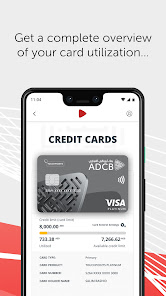
Experience the new and improved mobile banking app from ADCB. Enjoy seamless banking on-the-go with the enhanced features combined with an intuitive and user-friendly visual experience.
More power at your fingertips
- A simplified 'Payments and Transfers' section where you can view your beneficiaries and registered billers all in one screen
- Search Payees and Transaction History by name, amount and much more
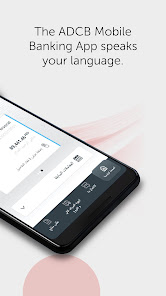
- Dual language option in Arabic and English
Plus, you can continue to enjoy these services
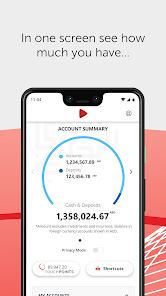
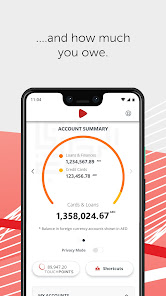
- Balance Preview
- Bill Payment
- Funds Transfer
- Locate ADCB ATM and Branches
If you are a new ADCB Mobile App user or if you are using the app on a new device, register with the following steps:
- Download and launch the ADCB Mobile App
- When prompted, enter your ADCB Credit Card/Debit Card Number and PIN; enter the activation key that is sent to your registered mobile number
- Alternatively, you can enter your ADCB Customer ID and activation key which you can obtain through our Personal Internet Banking or the 24/7 Contact Centre
If you are an existing user, you will be prompted to enter your existing ADCB Mobile App password for authentication and biometric re-enrollment (handset dependent).
More power at your fingertips
- A simplified 'Payments and Transfers' section where you can view your beneficiaries and registered billers all in one screen
- Search Payees and Transaction History by name, amount and much more
- Dual language option in Arabic and English
Plus, you can continue to enjoy these services
- Balance Preview
- Bill Payment
- Funds Transfer
- Locate ADCB ATM and Branches
If you are a new ADCB Mobile App user or if you are using the app on a new device, register with the following steps:
- Download and launch the ADCB Mobile App
- When prompted, enter your ADCB Credit Card/Debit Card Number and PIN; enter the activation key that is sent to your registered mobile number
- Alternatively, you can enter your ADCB Customer ID and activation key which you can obtain through our Personal Internet Banking or the 24/7 Contact Centre
If you are an existing user, you will be prompted to enter your existing ADCB Mobile App password for authentication and biometric re-enrollment (handset dependent).
Updated on
Safety starts with understanding how developers collect and share your data. Data privacy and security practices may vary based on your use, region, and age. The developer provided this information and may update it over time.

This app may share these data types with third parties
Photos and videos

No data collected
Learn more about how developers declare collection

Data is encrypted in transit

Data can’t be deleted
Ratings and reviews
4.2
53.4K reviews

Elie Ghoussoub
- Flag inappropriate
- Show review history
April 12, 2022
April 2022 - Many improvements. The money transfer UI improved. Unfortunately, we still can't see the entire description or name of payees or account names. The names we give to certain accounts show up in the money transfer UI but not in the main page. These small things are frustrating in daily use. ------- It's sometimes slow and hangs. Some UI elements such as the way you select the account to pay from and the account you're paying into could be improved.
22 people found this review helpful
Abu Dhabi Commercial Bank
September 29, 2021
Hi Elie, I’m sorry for this experience and thank you for your review. We will share your feedback with the concerned department.
A.M

A Google user
- Flag inappropriate
- Show review history
November 8, 2018
If you try to setup a payee for bank transfer, you will not have enough time before it logs you out. Even if you try to do it very quickly. Also, if you enter a wrong swift code and then try to fix it, the Bic code that self populates from the swift will not correct itself or let you edit it. I had to give up and go into the bank to make my transfer.
3 people found this review helpful
Abu Dhabi Commercial Bank
March 18, 2020
Hi, thanks for your review. We`ve updated our app to provide you a better experience. Feel free to write back to us if you are still facing any issues.
M.I

Amal Narayanan Photography
- Flag inappropriate
October 22, 2024
I've had an exceptional experience with ADCB's mobile banking app! The transactions are seamless, efficient, and secure. The app's intuitive interface makes managing my accounts a breeze. The customer service is top-notch! Responsive, knowledgeable, and courteous staff resolved my queries promptly. I highly recommend ADCB for hassle-free banking. Download the app and experience the difference!
1 person found this review helpful
Abu Dhabi Commercial Bank
October 23, 2024
Hello, thank you so much for your feedback. It's always a pleasure to serve our customers.
M.A
What's new
Minor improvements and bug fixes.
App support
phone
Phone number
+97126210090
About the developer
ABU DHABI COMMERCIAL BANK
febin.ashraf@adcb.com
Al Salam Street Plot C- 33, Sector E-11, Sheikh Zayed Bin Sultan Street
أبو ظبي
United Arab Emirates
+971 50 828 1481


