
Letter Tiles for Learning

star
58 reviews

Everyone
info
5K+
Downloads

Everyone
Learn more


About this app
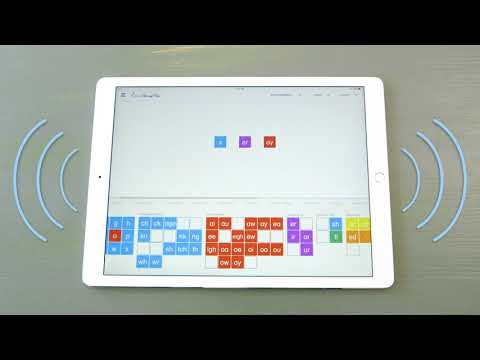
Our Letter Tiles app lets you build words, divide words into syllables, and hear the sounds of the phonograms. Just choose your program from the menu (All About Reading or All About Spelling) and select which lesson number you are currently teaching. The appropriate letter tiles for that lesson will appear, making it easy for you to teach and easy for your student to learn.
The app contains all the phonograms, suffixes, and word parts taught in the All About Reading and All About Spelling lesson plans.
Suitable for all ages and learning styles!
Please note: this app does not read words aloud.
The app contains all the phonograms, suffixes, and word parts taught in the All About Reading and All About Spelling lesson plans.
Suitable for all ages and learning styles!
Please note: this app does not read words aloud.
Build words with this moveable letter tile app.
Updated on
Safety starts with understanding how developers collect and share your data. Data privacy and security practices may vary based on your use, region, and age. The developer provided this information and may update it over time.
- No data shared with third partiesLearn more about how developers declare sharing
- No data collectedLearn more about how developers declare collection


Ratings and reviews
16 reviews

Nichole Trufin
- Flag inappropriate
February 8, 2022
I love this app especially on the iPad. However a lot of our work is now done on the chromebook so I figured I would buy the app again to use especially since we can use the chrome book as a touch pad. However clearing the board is super hard and just being able to drag and drop the tiles seems to glitch a lot. I really hope that you guys can get it compatible with the chromebook soon because it would make life so much easier.
12 people found this review helpful
All About Learning Press
February 8, 2022
Hi Nichole, I'm sorry about that! We do not officially support Chromebook devices and have no plans to at this time. If you would like a refund and are beyond the 48 hours that Google Play allows, please email me at support@allaboutlearningpress.com. I'd be happy to help with a refund! ~Merry :-)

D Ekanger
- Flag inappropriate
March 13, 2021
It works just like the whiteboard, but you don't have to worry about losing tiles and you can take it in the car, etc. I admit I was expecting it to have more features, like audibly telling the student what word to spell based on the lesson he was at, and then telling him if it was correct or not, but maybe that will come in a future version. Worth the $20.
8 people found this review helpful
All About Learning Press
March 15, 2021
Thanks for your comments! We don't have plans to add that feature but I'll pass on your interest. An important part of learning is making mistakes, and the teacher will still need to analyze why the mistakes are being made. A program that shows the answer wouldn’t help the student know the underlying reasons why the misspelling wasn’t correct.

Emily Krotz
- Flag inappropriate
August 2, 2026
bought it on my phone and it doesn't work. It cuts off the letters and is hard to navigate
All About Learning Press
August 4, 2026
Hi Emily, the app was specifically designed for tablets (165 tiles would be much too tiny on a phone!), so if you have a tablet, try transferring the app. If not, you can get a refund from GP within the first 48 hours, or contact us for help if you are beyond that time: support@allaboutlearningpress.com. Thanks for trying the app! ~Merry :-)
Everyone
Learn moreApp support
phone
Phone number
+17154771976
About the developer
All About Learning Press, Inc.
it@allaboutlearningpress.com
615 Commerce Loop
Eagle River, WI 54521
United States
+1 917-475-6942


