
Move to iOS
3.6star
193K reviews
100M+
Downloads

Everyone
info
About this app
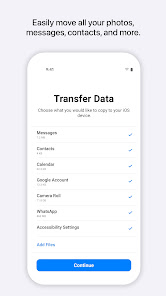
Everything about iOS is designed to be easy. That includes switching to it. With just a few steps, you can migrate your content automatically and securely from your Android device with the Move to iOS app. No need to save your stuff elsewhere before switching from Android. The Move to iOS app securely transfers all kinds of content data for you:
Contacts
Message history
Camera photos and videos
Mail accounts
Calendars
WhatsApp content
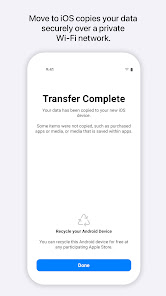
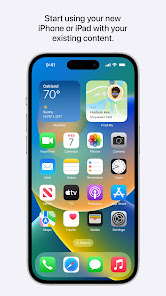
Make sure to keep your devices nearby and connected to power until the transfer is complete. When you choose to migrate your data, your new iPhone or iPad will create a private Wi-Fi network and find your nearby Android device running Move to iOS. After you enter a security code, it will begin transferring your content and put it in the right places. Just like that. Once your content has been transferred, you’re ready to get going. That’s it — you can start using your new iPhone or iPad and experiencing its endless possibilities. Enjoy.
Contacts
Message history
Camera photos and videos
Mail accounts
Calendars
WhatsApp content
Make sure to keep your devices nearby and connected to power until the transfer is complete. When you choose to migrate your data, your new iPhone or iPad will create a private Wi-Fi network and find your nearby Android device running Move to iOS. After you enter a security code, it will begin transferring your content and put it in the right places. Just like that. Once your content has been transferred, you’re ready to get going. That’s it — you can start using your new iPhone or iPad and experiencing its endless possibilities. Enjoy.
Updated on
Safety starts with understanding how developers collect and share your data. Data privacy and security practices may vary based on your use, region, and age. The developer provided this information and may update it over time.

No data shared with third parties
Learn more about how developers declare sharing

This app may collect these data types
App info and performance

Data is encrypted in transit

You can request that data be deleted
Ratings and reviews
3.6
185K reviews

Lily Gaschel
- Flag inappropriate
April 24, 2024
I was extremely hesitant to move from a pixel phone to an iphone after I saw the mixed reviews for this app, but I figured I'd give it a shot anyway, thinking it couldn't possibly be as bad as the reviews said. But after transferring my data half of my contacts were merged into groups I lost a majority of my text messages, pictures have become a jumbled mess, and have completely wrong dates. I would strongly suggest looking into other options rather than risking your data by using this app.
56 people found this review helpful

Travis Meinders
- Flag inappropriate
March 31, 2024
It would fail after an hour or so if I included photos in the transfer (ample space on the phone). In the migrated message history, some of the one-on-one discussions have a bunch of random contacts added to them so they look like group texts. This apparently isn't a rare issue. I ended up returning the iPhone and staying in the Android fold for now. I've been a happy iPhone user in the past so I'm not afraid of change, but this basic stuff needs to uh... just work.
71 people found this review helpful

Thomas Pool
- Flag inappropriate
April 25, 2024
Horrible app!!! Move to iOS struggles to get SOME of the data transferred. It fails miserably to get messages transferred from Google Pixel to iPhone. Group messages are unusable...it adds multiple people to the group. Other messages are incomplete at best. It's a horrible excuse for an app and makes the transition from Android to iPhone very difficult. Transferred messages are not searchable in the iPhone. You are better to start fresh and not transfer messages.
11 people found this review helpful
What's new
Here is What’s New for v3.5.1.
* Migration is faster with support for network speeds up to 5GHz
* Photo transfers now support individual images above 2GB
* Message migration is improved with support for more variations of Android OS
* Pairing your Android phone is more seamless with support for the latest Android APIs
* Speed and reliability improvements for iOS 14.6 and above
* Migration is faster with support for network speeds up to 5GHz
* Photo transfers now support individual images above 2GB
* Message migration is improved with support for more variations of Android OS
* Pairing your Android phone is more seamless with support for the latest Android APIs
* Speed and reliability improvements for iOS 14.6 and above


