
Site Inspector
In-app purchases


Everyone
info
0+
Downloads


About this app
Site Inspector
Keep every site issue connected to its location, photos and next action. Build a punch list or snag list on Android, compare conditions before and after corrective work, and hand over a PDF or editable Word inspection report.
Local recording, photos and report exports are included in the one-time app purchase. No account is needed for local tools. Cloud sync is optional and requires an account and a separate monthly or yearly subscription.
Record the issue where you find it
• Add a title, location, notes, status, priority, assigned person and due date to each finding.
• Import photos or use a compatible installed camera app. Add arrows and rectangles while keeping the original image.
• Group before-and-after photos, change their order and zoom in to review details.
• Search findings and track what is open, in progress or complete.
Prepare a report for the client
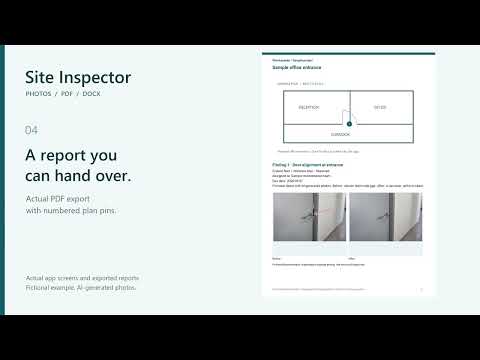
• Include company and client details, your logo, report reference and numbered finding pins on a site-plan image.
• Choose large-photo, before-and-after or compact layouts. Preview a PDF or export an editable Word document.
• Set required fields and review missing information before delivery. Complete a finding or record a reason for an exception.
• Add a handwritten signature after review and save a PDF revision to retain the findings and photos as they were at that time.
Reuse your report setup
Save company details and report appearance for the next project. You can also use a customer's DOCX form with explicit field markers, map project, finding and photo fields, then inspect the generated document. Not every Word form is supported; review the result in a Word viewer before delivery.
Keep and move your work
Back up or share a project ZIP containing findings, photos, plans and saved report revisions. Import it as a separate project while keeping existing projects. JSON export contains record information only; use ZIP to move photos and project files. Undo is available for finding removals and photo changes.
Optional cloud sync
Sync current saved work and linked files across your devices. Unsaved edits and separate project-library copies are excluded. Uploads run while the app is open. When device and cloud copies differ, you choose which to use. The separate subscription includes 1 GB per account per app, shared by up to 20 cloud versions. After a plan expires, existing cloud copies remain available to download or delete. Simultaneous team editing is not supported.
No ads. Local tools do not require a cloud subscription.
Open the result before you buy
https://site-inspector.cairo-plus.com/
Fictional demonstration project. Screens and downloadable PDF/Word files are produced by the app. Scenario photographs are AI-generated illustrations, not customer projects.
Support: info@cairo-plus.com
Keep every site issue connected to its location, photos and next action. Build a punch list or snag list on Android, compare conditions before and after corrective work, and hand over a PDF or editable Word inspection report.
Local recording, photos and report exports are included in the one-time app purchase. No account is needed for local tools. Cloud sync is optional and requires an account and a separate monthly or yearly subscription.
Record the issue where you find it
• Add a title, location, notes, status, priority, assigned person and due date to each finding.
• Import photos or use a compatible installed camera app. Add arrows and rectangles while keeping the original image.
• Group before-and-after photos, change their order and zoom in to review details.
• Search findings and track what is open, in progress or complete.
Prepare a report for the client
• Include company and client details, your logo, report reference and numbered finding pins on a site-plan image.
• Choose large-photo, before-and-after or compact layouts. Preview a PDF or export an editable Word document.
• Set required fields and review missing information before delivery. Complete a finding or record a reason for an exception.
• Add a handwritten signature after review and save a PDF revision to retain the findings and photos as they were at that time.
Reuse your report setup
Save company details and report appearance for the next project. You can also use a customer's DOCX form with explicit field markers, map project, finding and photo fields, then inspect the generated document. Not every Word form is supported; review the result in a Word viewer before delivery.
Keep and move your work
Back up or share a project ZIP containing findings, photos, plans and saved report revisions. Import it as a separate project while keeping existing projects. JSON export contains record information only; use ZIP to move photos and project files. Undo is available for finding removals and photo changes.
Optional cloud sync
Sync current saved work and linked files across your devices. Unsaved edits and separate project-library copies are excluded. Uploads run while the app is open. When device and cloud copies differ, you choose which to use. The separate subscription includes 1 GB per account per app, shared by up to 20 cloud versions. After a plan expires, existing cloud copies remain available to download or delete. Simultaneous team editing is not supported.
No ads. Local tools do not require a cloud subscription.
Open the result before you buy
https://site-inspector.cairo-plus.com/
Fictional demonstration project. Screens and downloadable PDF/Word files are produced by the app. Scenario photographs are AI-generated illustrations, not customer projects.
Support: info@cairo-plus.com
Punch lists and snag lists with photos, PDF and editable Word reports.
Updated on
Safety starts with understanding how developers collect and share your data. Data privacy and security practices may vary based on your use, region, and age. The developer provided this information and may update it over time.
- No data shared with third partiesLearn more about how developers declare sharing
- This app may collect these data typesPersonal info, Financial info and 5 others
- Data is encrypted in transit
- You can request that data be deleted


What’s new
• Import customer DOCX templates with field markers and map findings, photos and other report fields.
• Show finding numbers and titles with report photos.
• Protect drafts and saved report versions; improve saving, sharing, backup and restore.
• Optional cloud sync with a separate monthly or yearly plan. Local tools remain included in the app purchase.
• Show finding numbers and titles with report photos.
• Protect drafts and saved report versions; improve saving, sharing, backup and restore.
• Optional cloud sync with a separate monthly or yearly plan. Local tools remain included in the app purchase.
App support
About the developer
CAIROPLUS, K.K.
info@cairo-plus.com
29-3, IWAMOTO, HIGASHIOBAYASHICHO
TOYOTA, 愛知県 444-3261
Japan
+81 80-6474-9748


