Marantz Remote App
2.4star
3.8K reviews
100K+
Downloads

Everyone
info






About this app
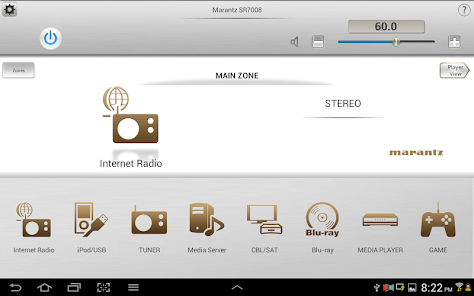
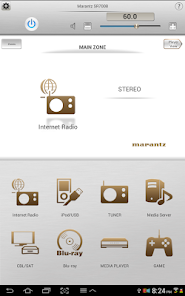
We are happy to announce the release of the Marantz Remote App for Android! The beautiful interface and intuitive layout offer a fun and simple way to control your Marantz network product.
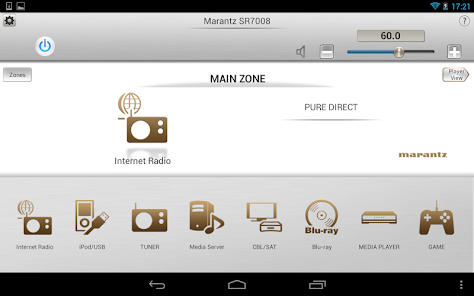
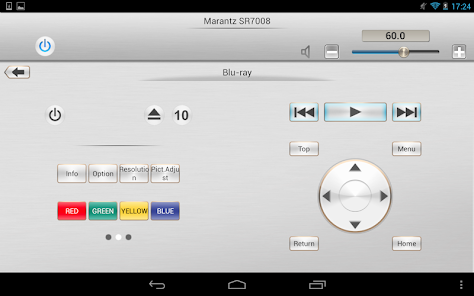
Adjust the basic functions of your Marantz product with power, volume, input and surround mode selection. Marantz disc player control is also available via Marantz Remote Terminals (D-BUS, RC-5) connection.
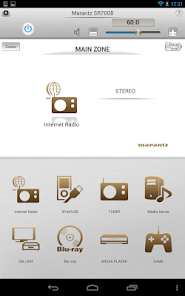
A customizable home screen allows you to tailor the look and function of the Marantz Remote App to suit your needs.
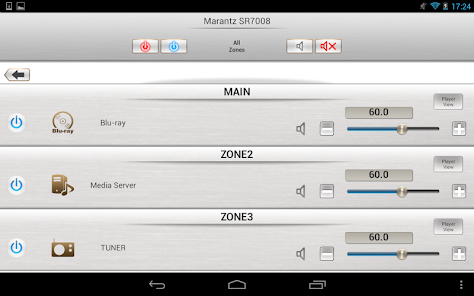
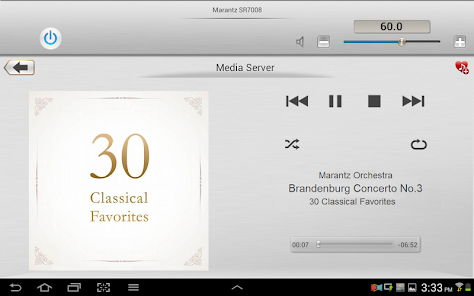
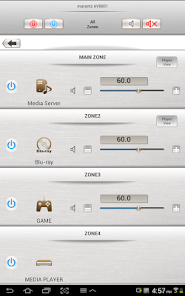
A dedicated page now gives you full, easy to access control of your multi-room system. Fast thumbnail browsing, library search and playlist creation make navigating your large digital media library easier than ever before. The Marantz Remote App takes your listening enjoyment to the next level.
"Because Music Matters"
Main feature:
- Single Page Multi Zone Control Screen for AV Receivers
- Assignable Home Screen Shortcut Buttons
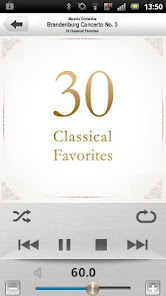
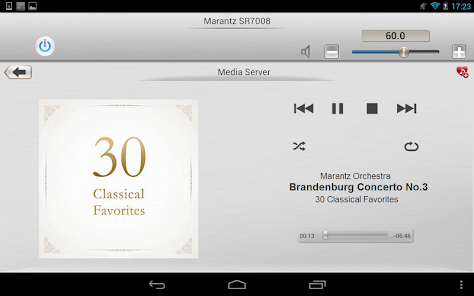
- Fast Thumbnail Browsing for Network Music File Playback (*1)
- Playlist management for Network Music File Playback (Create/Edit/Delete)
- Frequency Direct FM Tuning
- Fast Internet Radio Browsing (*1)
- Volume Limit Setting
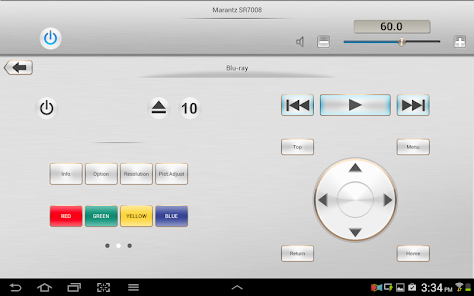
- New Marantz Blu-ray Player Control when paired with 2012 or later Marantz AVR and Marantz Blu-ray Models (*2)
- Photo Slideshow Transition Adjustment
- AVR and Multi Zone Renaming Capability
- Simple Home Screen Help Display
- Multi-Language Support (English, French, German, Spanish, Dutch, Italian, Swedish, Japanese, Simplified Chinese, Russian, Polish) (*3)
Notes:
*1: During fast network browsing, the AVR GUI and Remote App display may be temporarily out of sync.
*2: An HDMI connection between the AVR and Blu-ray player is required. HDMI control needs to be set to ON for both units.
*3: The OS language setting is automatically detected; when not available, English is selected.
Compatible Network models:
2015 Models:
Network AV Receiver SR7010, SR6010, SR5010, NR1606, NR1506
Network AV Pre-Amplifier AV8802(A)
2014 Models:
Network AV Receiver SR7009, SR6009, SR5009, NR1605
Network AV Pre-Amplifier AV7702
Network Audio Player NA8005
2013 Models:
Network AV Receiver SR7008, SR6008, SR5008, NR1604,NR1504
Network CD Receiver M-CR610
Network Receiver M-CR510
Network Audio Player NA-11S1
2012 Models:
Network AV Receiver SR7007, SR6007, SR5007, NR1603
Network AV Pre Tuner AV8801, AV7701
* Not compatible with Marantz models other than those listed above.
Note:
Please update to a latest firmware by following each User manual.
Please set the "IP Control / Network / Network Control” = “Always On / On" of the device to ensure a smooth operation with the Marantz remote app.
- Compatible Android devices:
• Android Smartphones with Android OS ver.5.0(or higher) or Android Smartphones/Tablets with Android OS ver.5.0(or higher)
• Screen resolution: 800x480, 854x480, 960x540, 1280x720, 1280x800, 1920x1080, 1920x1200, 2048x1536 *This application does not support smartphones in QVGA(320x240) and HVGA(480x320) resolution.
• Confirmed Android devices:
Samsung Galaxy S5(OS5.0.0), Google(ASUS) Nexus 7 (2013) (OS5.1), Google(LG) Nexus 5 (OS5.0.1), Google(LG) Nexus 4 (OS5.0.1), Google(HTC) Nexus 9 (OS5.0.1), Google(Motorola) Nexus 6 (OS5.1), Google Pixel 2 (OS9), Google Pixel 3 (OS10)
Caution:
We do not guarantee that this application works with all Android devices.
Adjust the basic functions of your Marantz product with power, volume, input and surround mode selection. Marantz disc player control is also available via Marantz Remote Terminals (D-BUS, RC-5) connection.
A customizable home screen allows you to tailor the look and function of the Marantz Remote App to suit your needs.
A dedicated page now gives you full, easy to access control of your multi-room system. Fast thumbnail browsing, library search and playlist creation make navigating your large digital media library easier than ever before. The Marantz Remote App takes your listening enjoyment to the next level.
"Because Music Matters"
Main feature:
- Single Page Multi Zone Control Screen for AV Receivers
- Assignable Home Screen Shortcut Buttons
- Fast Thumbnail Browsing for Network Music File Playback (*1)
- Playlist management for Network Music File Playback (Create/Edit/Delete)
- Frequency Direct FM Tuning
- Fast Internet Radio Browsing (*1)
- Volume Limit Setting
- New Marantz Blu-ray Player Control when paired with 2012 or later Marantz AVR and Marantz Blu-ray Models (*2)
- Photo Slideshow Transition Adjustment
- AVR and Multi Zone Renaming Capability
- Simple Home Screen Help Display
- Multi-Language Support (English, French, German, Spanish, Dutch, Italian, Swedish, Japanese, Simplified Chinese, Russian, Polish) (*3)
Notes:
*1: During fast network browsing, the AVR GUI and Remote App display may be temporarily out of sync.
*2: An HDMI connection between the AVR and Blu-ray player is required. HDMI control needs to be set to ON for both units.
*3: The OS language setting is automatically detected; when not available, English is selected.
Compatible Network models:
2015 Models:
Network AV Receiver SR7010, SR6010, SR5010, NR1606, NR1506
Network AV Pre-Amplifier AV8802(A)
2014 Models:
Network AV Receiver SR7009, SR6009, SR5009, NR1605
Network AV Pre-Amplifier AV7702
Network Audio Player NA8005
2013 Models:
Network AV Receiver SR7008, SR6008, SR5008, NR1604,NR1504
Network CD Receiver M-CR610
Network Receiver M-CR510
Network Audio Player NA-11S1
2012 Models:
Network AV Receiver SR7007, SR6007, SR5007, NR1603
Network AV Pre Tuner AV8801, AV7701
* Not compatible with Marantz models other than those listed above.
Note:
Please update to a latest firmware by following each User manual.
Please set the "IP Control / Network / Network Control” = “Always On / On" of the device to ensure a smooth operation with the Marantz remote app.
- Compatible Android devices:
• Android Smartphones with Android OS ver.5.0(or higher) or Android Smartphones/Tablets with Android OS ver.5.0(or higher)
• Screen resolution: 800x480, 854x480, 960x540, 1280x720, 1280x800, 1920x1080, 1920x1200, 2048x1536 *This application does not support smartphones in QVGA(320x240) and HVGA(480x320) resolution.
• Confirmed Android devices:
Samsung Galaxy S5(OS5.0.0), Google(ASUS) Nexus 7 (2013) (OS5.1), Google(LG) Nexus 5 (OS5.0.1), Google(LG) Nexus 4 (OS5.0.1), Google(HTC) Nexus 9 (OS5.0.1), Google(Motorola) Nexus 6 (OS5.1), Google Pixel 2 (OS9), Google Pixel 3 (OS10)
Caution:
We do not guarantee that this application works with all Android devices.
Updated on
Safety starts with understanding how developers collect and share your data. Data privacy and security practices may vary based on your use, region, and age. The developer provided this information and may update it over time.

No data shared with third parties
Learn more about how developers declare sharing

No data collected
Learn more about how developers declare collection

Data isn’t encrypted
Data can’t be deleted
Ratings and reviews
2.4
3.37K reviews

A Google user
- Flag inappropriate
November 10, 2019
I use it to control my MCR-610. It does the job at a basic level but has faults. For example, it crashes and restarts when you try to change the tone controls. It sometimes will not allow you to change sources when you're using Spotify connect. It's useful for changing radio stations or controlling an iPod through USB, although the latter can be very laggy. Overall, it doesn't replace the proper remote but adds a few functions, albeit quite clukily.
A Google user
- Flag inappropriate
October 8, 2018
The latest firmware update has restored this app to (almost) what it should be. It's essential to work the device in a sensible manner, finding tracks by name from your chair by album and title. Save all your music from CD to FLAC (no loss of quality) and load onto a 128Gb flash drive. It's the end of sorting through racks of CDs for the track you want. Brilliant! So what's wrong with it? Occasionally it freezes and has to be restarted. Allow time between commands usually avoids this annoyance, be patient
6 people found this review helpful
A Google user
- Flag inappropriate
- Show review history
October 18, 2018
Marantz has some of the best equipment I have owned two of their receivers and absolutely love them. However this mobile app as well as Heroes I did not get to work at all. I consider myself a tech savvy person as well. Again love the Marantz receivers but disappointed in the mobile apps and software are useless to me. Guess you can't get everything good in one package.
18 people found this review helpful
What’s new
•Bug fixes
Notes:
*If the App doesn't work properly, please try to reboot your mobile device, unplug the power cord of the main unit and reinsert into the power outlet or check your home network.
*Please use a latest firmware in your Marantz models by checking it via the system setup menu. (General > Firmware)
*Please set "Network Standby / IP Control / Network / Network Control" to "On / Always On" in your Marantz product’s menu to use this app.
Notes:
*If the App doesn't work properly, please try to reboot your mobile device, unplug the power cord of the main unit and reinsert into the power outlet or check your home network.
*Please use a latest firmware in your Marantz models by checking it via the system setup menu. (General > Firmware)
*Please set "Network Standby / IP Control / Network / Network Control" to "On / Always On" in your Marantz product’s menu to use this app.
App support
About the developer
D&M HOLDINGS INC.
dmhapp-master.dmj@dmh-global.com
2-1, NISSHINCHO, KAWASAKI-KU
D&M BLDG.
KAWASAKI, 神奈川県 210-0024
Japan
+1 978-357-0416


