
Mobmote: PC Control


Everyone
info
10+
Downloads

Everyone
Learn more


About this app
Mobmote allows you to turn your phone into a secure, private control center for your Windows PCs and home lab. Control devices, automate workflows, and transfer files safely with E2EE keystrokes and TLS-protected file transfers.
🔒 100% Local, Private, & Offline-First
Your data never leaves your home network. Mobmote uses direct, peer-to-peer Wi-Fi connections with no middleman cloud servers, no account registration, and zero data collection.
No ads, no subscriptions — pay once and own the app for life.
*(Note: Requires installing the free, lightweight companion server on your PC. Linux support is currently in development.)*
🖥 Remote PC Control
Standard remote tools send your clicks and keystrokes unencrypted over your Wi-Fi. Mobmote secures your inputs with end-to-end encryption (E2EE), making it safe to use even on shared networks.
• Use your phone as a high-precision, low-latency wireless trackpad and keyboard.
• Move smoothly between connected PCs with seamless multi-device switching.
• Full keyboard support with autocorrect and autocomplete.
• All mouse movements and keystrokes are secured using modern E2EE cryptography.
⚡ Automation & Shortcuts
Create custom shortcuts to launch applications, run complex terminal commands, or open websites on your PC in a single tap.
• Build powerful automation chains by combining actions.
• Add custom delays with wait actions.
• Record and replay custom keyboard macros for repetitive workflows.
• Execute macro-driven sequences safely and remotely.
📋 Secure Shared Clipboard
Copy text, images, or files on your PC and instantly paste them on your phone — and vice versa.
• Work across devices as if they shared a single, encrypted clipboard.
• All clipboard transfers use TLS encryption, protecting your sensitive data while in transit.
• Seamlessly supports text, images, and files.
📁 Integrated File Management
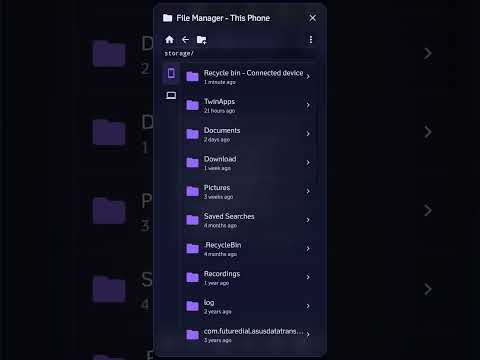
Browse your computer's storage, manage directories, and transfer files directly from your phone.
• Copy, move, rename, and organize files on your PC from your mobile screen.
• Create folders and manage your system directories remotely.
• Safe, high-speed file transfers between your phone and connected PCs secured by TLS.
• Complete image and file previews within the app.
🔗 Built for Power Users & Home Labs
Designed for developers, system administrators, and home lab enthusiasts who manage multiple systems and want fast, secure control without switching devices.
---
⚠️ Prerequisites & Compatibility:
• Requires a Windows PC (Windows 10 or 11).
• Your phone and PC must be connected to the same local network (Wi-Fi).
• Requires downloading the free companion server on your PC (download link provided inside the app).
🔒 100% Local, Private, & Offline-First
Your data never leaves your home network. Mobmote uses direct, peer-to-peer Wi-Fi connections with no middleman cloud servers, no account registration, and zero data collection.
No ads, no subscriptions — pay once and own the app for life.
*(Note: Requires installing the free, lightweight companion server on your PC. Linux support is currently in development.)*
🖥 Remote PC Control
Standard remote tools send your clicks and keystrokes unencrypted over your Wi-Fi. Mobmote secures your inputs with end-to-end encryption (E2EE), making it safe to use even on shared networks.
• Use your phone as a high-precision, low-latency wireless trackpad and keyboard.
• Move smoothly between connected PCs with seamless multi-device switching.
• Full keyboard support with autocorrect and autocomplete.
• All mouse movements and keystrokes are secured using modern E2EE cryptography.
⚡ Automation & Shortcuts
Create custom shortcuts to launch applications, run complex terminal commands, or open websites on your PC in a single tap.
• Build powerful automation chains by combining actions.
• Add custom delays with wait actions.
• Record and replay custom keyboard macros for repetitive workflows.
• Execute macro-driven sequences safely and remotely.
📋 Secure Shared Clipboard
Copy text, images, or files on your PC and instantly paste them on your phone — and vice versa.
• Work across devices as if they shared a single, encrypted clipboard.
• All clipboard transfers use TLS encryption, protecting your sensitive data while in transit.
• Seamlessly supports text, images, and files.
📁 Integrated File Management
Browse your computer's storage, manage directories, and transfer files directly from your phone.
• Copy, move, rename, and organize files on your PC from your mobile screen.
• Create folders and manage your system directories remotely.
• Safe, high-speed file transfers between your phone and connected PCs secured by TLS.
• Complete image and file previews within the app.
🔗 Built for Power Users & Home Labs
Designed for developers, system administrators, and home lab enthusiasts who manage multiple systems and want fast, secure control without switching devices.
---
⚠️ Prerequisites & Compatibility:
• Requires a Windows PC (Windows 10 or 11).
• Your phone and PC must be connected to the same local network (Wi-Fi).
• Requires downloading the free companion server on your PC (download link provided inside the app).
Control PCs, automate tasks, and transfer files across devices from your phone.
Updated on
Safety starts with understanding how developers collect and share your data. Data privacy and security practices may vary based on your use, region, and age. The developer provided this information and may update it over time.
- No data shared with third partiesLearn more about how developers declare sharing
- No data collectedLearn more about how developers declare collection


What’s new
feat: real touchpad zoom feel.
Everyone
Learn moreApp support
About the developer
Avraham Yaakov
mobmote@gmail.com
Bosmat 6
1
Geva Binyamin, 9063200
Israel


