
Borescope ET16

star
596 reviews

Everyone
info
100K+
Downloads

Everyone
Learn more


About this app
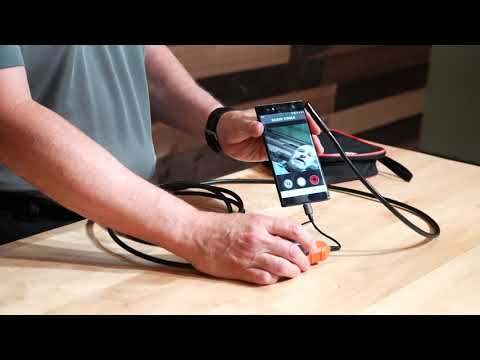
Klein Tools ET16 Borescope features a 9 mm camera surrounded by 6 LEDs attached to a 10-Foot (3 m) armored gooseneck cable. The digital camera has a USB Type-C (and micro-USB) connection for most Android® (OTG 4.0 or higher) smartphones and devices. The camera and video output is displayed on the Android® device using the free Klein Tools ET16 Borescope App. The ET16 does not require batteries; it is powered by a device connection.
Full Android App for ET16 Boroscope
Updated on
Safety starts with understanding how developers collect and share your data. Data privacy and security practices may vary based on your use, region, and age. The developer provided this information and may update it over time.
- No data shared with third partiesLearn more about how developers declare sharing
- No data collectedLearn more about how developers declare collection


Ratings and reviews
560 reviews

Matthew Kastor
- Flag inappropriate
May 23, 2026
The camera works but there are no image quality controls at all. The exposure levels are too low for photographing void spaces behind knee walls and such. In a room with a lamp on I can take a photo and have enough detail to see several feet away. I turn off the lamp and take a photo with just the camera lights and all I get are nearly black silhouettes of things I can clearly see. It's like wearing a welding mask for every photo. I'm trying to find walled over access doors and safety issues.
2 people found this review helpful

Daxx Axx
- Flag inappropriate
June 20, 2024
Not bad, ran into a little problem when I had the scope plugged in first and the app not picking it up. All I did was unplug it, then plug it back into the phone with the app already open. Connected right up and was good to go! There may be a manual that originally came with it that probably tells you that, we bought it at a garage sale for like $20. But it's not needed, just download the app and plug it in, and your good to go. Minimal knowledge or experience to use.
5 people found this review helpful

Christopher Booth
- Flag inappropriate
November 1, 2022
Doesn't actually do anything. Says it connects; doesn't display. Managed to get it to display with "USB Camera App" generic app, but focal range is too small. Can't make out anything within an inch of the lens, which is mostly what I need it for...you know, small cam for small places... Also can't make out anything over a foot away, so if you get through a small space into a larger one, good luck figuring out where you need to go from there.
52 people found this review helpful
What’s new
After the user declines camera access, the app shows a prompt that it is required and will lock the user out of the app.
If the user closes or reopens the app, it prompts the user again to accept access, if it is declined, the same warning is shown.
The user then will need to go to settings > apps > ET16 and allow camera access
Everyone
Learn moreApp support
phone
Phone number
+18005534676
About the developer
Klein Tools, Inc.
kenke@kleintools.com
450 Bond St
Lincolnshire, IL 60069
United States
+1 630-337-9697


