
Assistive Touch iOS
Contains ads
4.7star
525K reviews
10M+
Downloads

Everyone
info


About this app
We using API Accessibility Service to helps people with disabilities easily control their phones on large phone screens.
"This app uses the Device Administrator permission." It is necessary and used only for locking the device when you use feature turn off the screen. You need to enable Administration before it can be used that feature. To uninstall the app, please open my app and click the "Uninstall" button.
"This app uses Accessibility services." It is necessary and used only to perform a global action. For example going back, going home, opening recent, power dialog, notification etc. You need grant this permission to use that action.
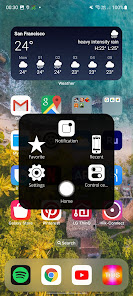
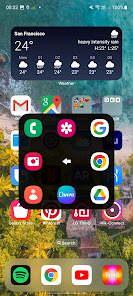
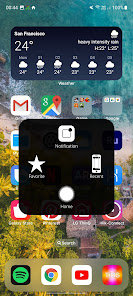
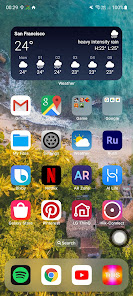
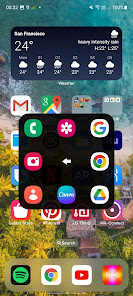
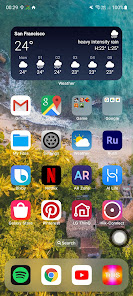
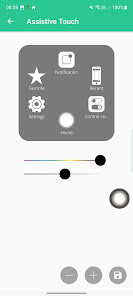
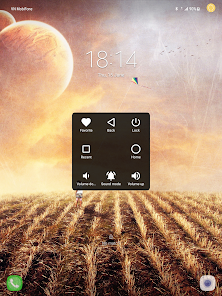
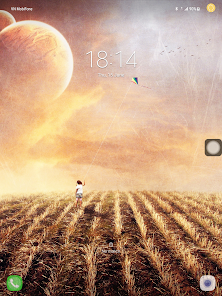
When you turn on Assistive Touch iOS 26, you’ll see the AssistiveTouch menu. You can drag it to any edge of the screen, then tap the menu to open it.
1. To turn on AssistiveTouch iOS 26:
Open my app > Switch on AssistiveTouch.
2. To use more actions:
Go to Settings > Accessibility > Services and turn on AssistiveTouch.
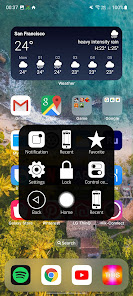
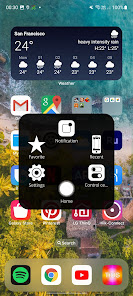
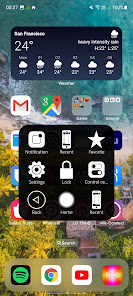
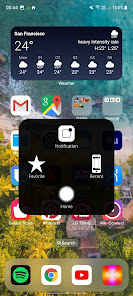
You can also use AssistiveTouch to access your Home screen, Recent screen and use Back Key. Just open the AssistiveTouch menu and tap Home, Recent, Back action.
To access your Notifications, open the AssistiveTouch menu and tap Notification. To get to the control, open the AssistiveTouch menu. From here, you'll be able to do things like turn Bluetooth on and off, use Wifi on and off, take screenshots, and more.
FEATURES:
- Control your device with Assistive Touch menu.
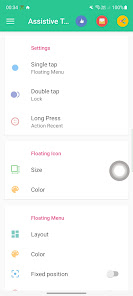
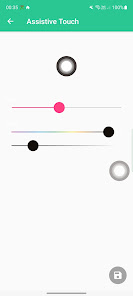
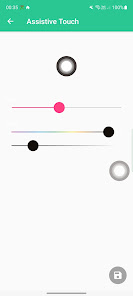
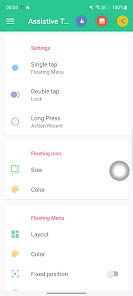
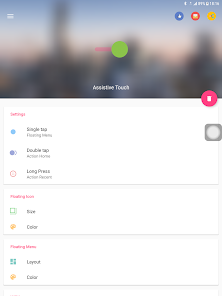
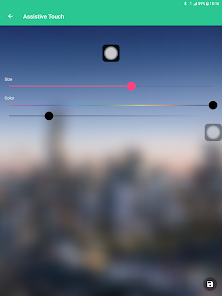
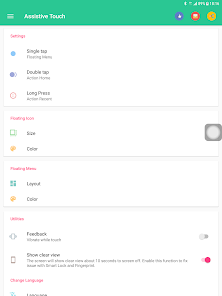
- Custom size and color Floating icon.
- Custom color Assistive Touch menu.
- And more.
SUPPORT:
- Email: andywill.itplus@gmail.com
- Website: https://www.luutinhdeveloper.com
THANKS FOR USING MY APPS.
"This app uses the Device Administrator permission." It is necessary and used only for locking the device when you use feature turn off the screen. You need to enable Administration before it can be used that feature. To uninstall the app, please open my app and click the "Uninstall" button.
"This app uses Accessibility services." It is necessary and used only to perform a global action. For example going back, going home, opening recent, power dialog, notification etc. You need grant this permission to use that action.
When you turn on Assistive Touch iOS 26, you’ll see the AssistiveTouch menu. You can drag it to any edge of the screen, then tap the menu to open it.
1. To turn on AssistiveTouch iOS 26:
Open my app > Switch on AssistiveTouch.
2. To use more actions:
Go to Settings > Accessibility > Services and turn on AssistiveTouch.
You can also use AssistiveTouch to access your Home screen, Recent screen and use Back Key. Just open the AssistiveTouch menu and tap Home, Recent, Back action.
To access your Notifications, open the AssistiveTouch menu and tap Notification. To get to the control, open the AssistiveTouch menu. From here, you'll be able to do things like turn Bluetooth on and off, use Wifi on and off, take screenshots, and more.
FEATURES:
- Control your device with Assistive Touch menu.
- Custom size and color Floating icon.
- Custom color Assistive Touch menu.
- And more.
SUPPORT:
- Email: andywill.itplus@gmail.com
- Website: https://www.luutinhdeveloper.com
THANKS FOR USING MY APPS.
Updated on
Safety starts with understanding how developers collect and share your data. Data privacy and security practices may vary based on your use, region, and age. The developer provided this information and may update it over time.

No data shared with third parties
Learn more about how developers declare sharing

No data collected
Learn more about how developers declare collection

Data is encrypted in transit

Data can’t be deleted
Ratings and reviews
4.7
507K reviews

Verna Witheld
- Flag inappropriate
- Show review history
November 19, 2021
This Assistive Touch is such a great help. I couldn't get along without it. The volume buttons are awkward on my phone and this tool makes it much easier. I really need It. It is great for screenshots, it floats on all pages(your choice). There are so many adjustments you can make. This tool is a joy to work with and it's FREE. You never get a free tool that is so great at making your phone what it should be, except this one. Thanks Dev
188 people found this review helpful
LuuTinh Developer
November 19, 2021
Thank you so much for your review! I will always improvement Assistive Touch application to as perfect as possible.

A Google user
- Flag inappropriate
January 5, 2020
I've found the app to be very useful. In my case, the navigational soft buttons (e.g. back, home) stopped working on my Pixel 3a (still haven't been able to determine what went wrong there), so I needed a temporary fix. But, I've found this app to be handy enough that I'll keep using it for the foreseeable future. It's not obtrusive and (obviously) works much the same as the AssistiveTouch on iOS devices.
371 people found this review helpful
LuuTinh Developer
January 6, 2020
Thank you so much for your review! I will always improvement Assistive Touch application to as perfect as possible.

Kristian S
- Flag inappropriate
- Show review history
September 20, 2020
Edit: I had to install this again. This is by far the best out there. No ads whatsoever plus it works great. Few hiccups but I'd rather this than those ad laden others. ------++-------- It's good when it works, but the floating ball just disappears when you try to change the floating options. I had to clear data to bring it back. I'm gonna do that again the 3rd time so sorry but I have to uninstall.
582 people found this review helpful
LuuTinh Developer
September 20, 2020
Please open my app and choose delete button to uninstall.. Thank you so much for your review! I will always improvement Assistive Touch application to as perfect as possible.
What’s new
- Upgrade Assistive Touch iOS 26.
- Make Assistive Touch smoother.
- Fixes crash issue and all bugs report by user.
IF YOU HAVE ANY PROBLEMS, PLEASE SEND EMAIL TO ME.
THANK YOU VERY MUCH FOR USING MY APP, I WILL TRY IMPROVE MY APP TO BETTER.
- Make Assistive Touch smoother.
- Fixes crash issue and all bugs report by user.
IF YOU HAVE ANY PROBLEMS, PLEASE SEND EMAIL TO ME.
THANK YOU VERY MUCH FOR USING MY APP, I WILL TRY IMPROVE MY APP TO BETTER.
App support
About the developer
Lưu Quang Tỉnh
luutinhit.1412@gmail.com
SN39 ngách 6/46 phố Miêu Nga TDP 3 Miêu Nha, Phường Tây Mỗ, Quận Nam Từ Liêm
Hà Nội 10000
Vietnam


