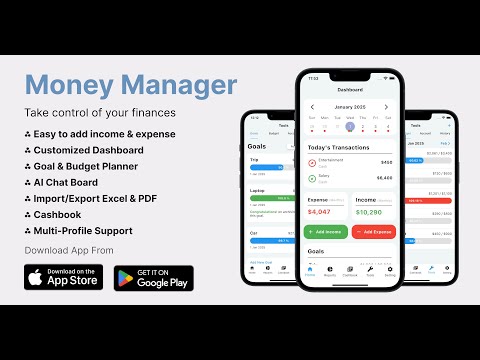

Money Manager: Expense Tracker

star
872 reviews

Everyone
info
50K+
Downloads

Everyone
Learn more


About this app
Looking for the best expense tracker and money manager app to take control of your personal finances?
Money Manager (by MyMoneyTracker) is a smart, offline-first personal finance app designed for effortless daily spending tracking, monthly budget planning, and intelligent AI insights — with 100% data privacy and zero bank logins required.
Whether you want to stop living paycheck to paycheck, manage cashflow, or track debt, this all-in-one money manager and expense tracker makes managing money simple, secure, and fast.
WHY USERS RATE IT THE BEST EXPENSE TRACKER & BUDGET APP:
• Income & Expense Tracking: The fastest spending
tracker and expense manager to log your salary, daily
expenses, and income with just one tap - quick and easy!
• Home Screen Widgets: Keep your finances at a glance
- add income, expense, or combined summary widgets directly
to your home screen. No need to open the app every time.
• Customizable Dashboard: Personalise your dashboard
by adding, removing, or rearranging widgets to suit your
unique financial needs.
• Reports & Expense Diary: Your daily expense diary
made digital - view weekly, monthly, and annual spending
trends, and export reports in PDF or Excel format for easy
sharing.
• Goal Planner & Savings Tracker: Set and track
financial goals. Monitor your savings progress and stay on
top of your achievements.
• Budget Planning: A powerful household budget tracker
and planner - create budgets for the week, month, or year.
Keep track of your spending and take full control of your
finances.
• AI-Chat: Get personalized advice and tips from Money
Manager's AI assistant. Whether it's budgeting, saving
strategies, or money management tips - AI has you covered.
• EMI & Salary Tracker: Automate recurring entries
like EMI payments, bill tracker reminders, salary credits,
and subscriptions - your complete money tracking app for
regular transactions on a daily, weekly, monthly, or yearly
basis.
• Cashbook & Debt Tracker: Keep track of cash flow,
manage borrowed money, and track debts with the built-in
cashbook feature.
• Smart Reminders: Never miss a transaction or bill
with reminders for daily, weekly, monthly, or custom dates.
• Account Management & Net Worth Tracker: Add and
manage multiple accounts to track your assets, liabilities,
and net worth in one place.
• Backup & Restore: Securely back up your financial
data to the cloud or your device and restore it whenever
needed.
• Import/Export Data: Easily import or export data in
PDF, Excel, or database formats, making it easy to manage
your financial records.
• Passcode Protection: Safeguard your financial
information with a secure passcode, ensuring your data is
always safe.
• Bookmarks: Quickly access important transactions or
data with the bookmark feature.
• Multi-Profile Support: Manage personal, family, or
business finances with multiple profiles. Switch easily
between them.
• Multi-Currency & Language Support: Track your
finances in different currencies and languages, making it
truly global.
• Real-time support: Get real time support and connect with us at budgetmanagerapps@gmail.com.
Security You Can Trust
Your financial data is fully encrypted and protected by
advanced security features to keep your information safe.
Download Money Manager Now!
Start managing your finances with ease today and take control
of your financial future!
Money Manager (by MyMoneyTracker) is a smart, offline-first personal finance app designed for effortless daily spending tracking, monthly budget planning, and intelligent AI insights — with 100% data privacy and zero bank logins required.
Whether you want to stop living paycheck to paycheck, manage cashflow, or track debt, this all-in-one money manager and expense tracker makes managing money simple, secure, and fast.
WHY USERS RATE IT THE BEST EXPENSE TRACKER & BUDGET APP:
• Income & Expense Tracking: The fastest spending
tracker and expense manager to log your salary, daily
expenses, and income with just one tap - quick and easy!
• Home Screen Widgets: Keep your finances at a glance
- add income, expense, or combined summary widgets directly
to your home screen. No need to open the app every time.
• Customizable Dashboard: Personalise your dashboard
by adding, removing, or rearranging widgets to suit your
unique financial needs.
• Reports & Expense Diary: Your daily expense diary
made digital - view weekly, monthly, and annual spending
trends, and export reports in PDF or Excel format for easy
sharing.
• Goal Planner & Savings Tracker: Set and track
financial goals. Monitor your savings progress and stay on
top of your achievements.
• Budget Planning: A powerful household budget tracker
and planner - create budgets for the week, month, or year.
Keep track of your spending and take full control of your
finances.
• AI-Chat: Get personalized advice and tips from Money
Manager's AI assistant. Whether it's budgeting, saving
strategies, or money management tips - AI has you covered.
• EMI & Salary Tracker: Automate recurring entries
like EMI payments, bill tracker reminders, salary credits,
and subscriptions - your complete money tracking app for
regular transactions on a daily, weekly, monthly, or yearly
basis.
• Cashbook & Debt Tracker: Keep track of cash flow,
manage borrowed money, and track debts with the built-in
cashbook feature.
• Smart Reminders: Never miss a transaction or bill
with reminders for daily, weekly, monthly, or custom dates.
• Account Management & Net Worth Tracker: Add and
manage multiple accounts to track your assets, liabilities,
and net worth in one place.
• Backup & Restore: Securely back up your financial
data to the cloud or your device and restore it whenever
needed.
• Import/Export Data: Easily import or export data in
PDF, Excel, or database formats, making it easy to manage
your financial records.
• Passcode Protection: Safeguard your financial
information with a secure passcode, ensuring your data is
always safe.
• Bookmarks: Quickly access important transactions or
data with the bookmark feature.
• Multi-Profile Support: Manage personal, family, or
business finances with multiple profiles. Switch easily
between them.
• Multi-Currency & Language Support: Track your
finances in different currencies and languages, making it
truly global.
• Real-time support: Get real time support and connect with us at budgetmanagerapps@gmail.com.
Security You Can Trust
Your financial data is fully encrypted and protected by
advanced security features to keep your information safe.
Download Money Manager Now!
Start managing your finances with ease today and take control
of your financial future!
Best expense tracker & money manager app. Track budget, cashbook & AI insights
Updated on
Featured stories

Safety starts with understanding how developers collect and share your data. Data privacy and security practices may vary based on your use, region, and age. The developer provided this information and may update it over time.
- No data shared with third partiesLearn more about how developers declare sharing
- This app may collect these data typesPersonal info, Files and docs and 3 others
- Data isn’t encrypted
- You can request that data be deleted


Ratings and reviews
865 reviews

Swaminathan V
- Flag inappropriate
September 9, 2026
I found some bugs in this app. Sometimes menus at the bottom(home, reports...) are not working. Also when I go to the settings tab and scroll down, I can't scroll up again. I can view and download reports from the cashbook tab but i don't see any other option to import to the cashbook. I tried to get help from AI chat but i don't see any import option for cashbook anywhere. I already know how to import income/expense transactions. So, please let me know how to import cashbook transactions.
N Tech
September 9, 2026
Sorry for the inconvenience. We’ll work on fixing these issues in an upcoming update. we’d really appreciate it if you could update your rating to 5 stars it really motivates us!

SD Kanu
- Flag inappropriate
- Show review history
June 12, 2026
Lacks Sierra Leone currency. Please add it to your list. Updated to 4 stars. It looks helpful for tracking expenses. Hoping to see SLL currency added ongoing improvements like sub categories are very nice and enhance tracking expenses more accurately. But still the currency options need to be expanded to make it attractive to a wider audience.
2 people found this review helpful
N Tech
February 9, 2025
If you like our product and its features, we’d appreciate it if you could reconsider your rating. Thank you!

Ayush Humbal
- Flag inappropriate
August 2, 2026
Best personal finance app for daily tracking your daily income and expenses, expenses tracking best features is AI support i love it ..
1 person found this review helpful
N Tech
September 13, 2026
Thank you so much for your amazing feedback! We’re thrilled that you love the AI support and find Money Manager useful for tracking your daily income and expenses. Your support means a lot to us!
Everyone
Learn moreApp support
About the developer
ZALAVADIYA NIRAVKUMAR HARSUKHBHAI
budgetmanagerapps@gmail.com
F 401 DADA BHAGVAN COMP
AT NAVAGAM 050610 VILL:Navagam TAL:Kamrej
DISTRICT:Surat, Gujarat 394185
India


