

Battery Guru: Battery Health
Contains adsIn-app purchases

4.3star
21.2K reviews
1M+
Downloads

Everyone
info
About this app
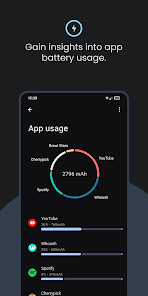
Battery Guru is the ultimate app for displaying battery info of your phone and tablet! With a wide range of features, we offer everything users need.
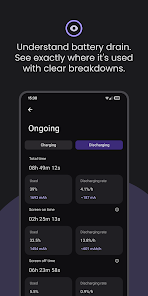
Want to know your screen-on time? Or an estimate of power used while the screen was off? We save you time, everything is one click away. Set battery alarm, check battery temperature while charging, when fully charged, monitor battery health, all about battery life in a simple way. With Battery Guru, you have everything in the palm of your hand.
🌍 Carefully translated into 30+ languages, we put our users first!❤️
🔋 WHY USE BATTERY GURU?
We always listen to our community, and that's why we offer many well-packed features and regular app updates. With this app, you can actively oversee your battery capacity, configure alarms and reminders for battery level, battery temperature, and increased power draw, while also gaining real-time usage statistics.
🔌 Battery Info
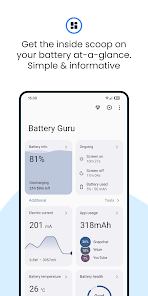
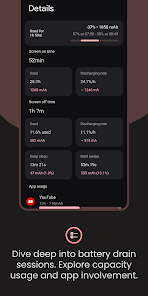
Unlike others, our battery app offers comprehensive battery info right after opening the app. Screen-on time, battery usage, information regarding the electric current, battery voltage, power, and many other details. We also take in account that one of the biggest degradation factors of the battery is temperature, which we show as a graph over time. We also offer deep sleep and awake metrics so you can better understand idle drain.
🛡️Battery Health
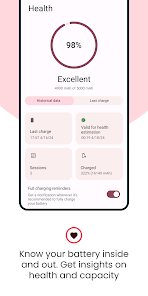
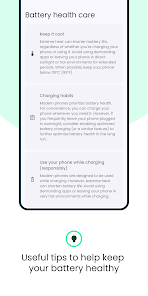
Battery health estimation is the process of determining your battery's current condition and capacity compared to its original capacity when it was new. Over time, batteries degrade due to factors like charging cycles, temperature, and usage patterns. This degradation reduces the battery's ability to hold a charge and shortens its overall lifespan. While battery health fluctuates due to temperature changes and aging, Battery Guru strives to provide realistic statistics. We have a dedicated section for battery health estimation and helpful tips to maintain good battery health.
⏰ Battery Alarm
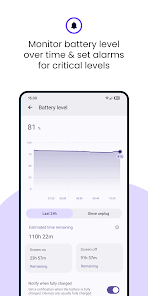
Set personalized alarms to receive alerts when your battery reaches specific thresholds. Choose the sounds you want and configure alarms for various situations, including battery heat, full charge, low battery level, and even unusually high power usage. These alarms can help you develop better charging habits and prevent unexpected shutdowns.
💡 Learning & Patterns
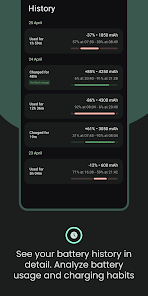
Battery Guru constantly learns about your device's power usage habits. The longer you use the app, the smarter it becomes, providing more accurate measurements tailored to your specific needs. All the data used for learning and estimations can be found in a dedicated history section for easy access.
🤝 Need help? Contact us!
If you have any questions about Battery Guru, encounter issues using the app, or simply need help understanding any of the displayed metrics, please feel free to contact our support team directly. You can reach us through various channels:
You can find us on:
🌟 Our site: https://www.paget96projects.com/battery-guru
🌟 Telegram channel: https://www.t.me/Paget96_Projects
🌟 Dev X profile: https://x.com/paget96
🌟 Dev Instagram profile: https://www.instagram.com/thedakiness
Want to know your screen-on time? Or an estimate of power used while the screen was off? We save you time, everything is one click away. Set battery alarm, check battery temperature while charging, when fully charged, monitor battery health, all about battery life in a simple way. With Battery Guru, you have everything in the palm of your hand.
🌍 Carefully translated into 30+ languages, we put our users first!❤️
🔋 WHY USE BATTERY GURU?
We always listen to our community, and that's why we offer many well-packed features and regular app updates. With this app, you can actively oversee your battery capacity, configure alarms and reminders for battery level, battery temperature, and increased power draw, while also gaining real-time usage statistics.
🔌 Battery Info
Unlike others, our battery app offers comprehensive battery info right after opening the app. Screen-on time, battery usage, information regarding the electric current, battery voltage, power, and many other details. We also take in account that one of the biggest degradation factors of the battery is temperature, which we show as a graph over time. We also offer deep sleep and awake metrics so you can better understand idle drain.
🛡️Battery Health
Battery health estimation is the process of determining your battery's current condition and capacity compared to its original capacity when it was new. Over time, batteries degrade due to factors like charging cycles, temperature, and usage patterns. This degradation reduces the battery's ability to hold a charge and shortens its overall lifespan. While battery health fluctuates due to temperature changes and aging, Battery Guru strives to provide realistic statistics. We have a dedicated section for battery health estimation and helpful tips to maintain good battery health.
⏰ Battery Alarm
Set personalized alarms to receive alerts when your battery reaches specific thresholds. Choose the sounds you want and configure alarms for various situations, including battery heat, full charge, low battery level, and even unusually high power usage. These alarms can help you develop better charging habits and prevent unexpected shutdowns.
💡 Learning & Patterns
Battery Guru constantly learns about your device's power usage habits. The longer you use the app, the smarter it becomes, providing more accurate measurements tailored to your specific needs. All the data used for learning and estimations can be found in a dedicated history section for easy access.
🤝 Need help? Contact us!
If you have any questions about Battery Guru, encounter issues using the app, or simply need help understanding any of the displayed metrics, please feel free to contact our support team directly. You can reach us through various channels:
You can find us on:
🌟 Our site: https://www.paget96projects.com/battery-guru
🌟 Telegram channel: https://www.t.me/Paget96_Projects
🌟 Dev X profile: https://x.com/paget96
🌟 Dev Instagram profile: https://www.instagram.com/thedakiness
Updated on
Safety starts with understanding how developers collect and share your data. Data privacy and security practices may vary based on your use, region, and age. The developer provided this information and may update it over time.

This app may share these data types with third parties
Location, App activity and 2 others

No data collected
Learn more about how developers declare collection

Data is encrypted in transit

Data can’t be deleted
Ratings and reviews
4.3
20.8K reviews

Tall Whites
- Flag inappropriate
- Show review history
July 9, 2024
Definitely my top 3 app for battery stats. The new UI looks modern and nice, although it can be confusing at times, possibly because I have been accustomed to the previous UI for so long. *I would want to see new information provided to future updates, such as the number of healthy/normal charge cycles, total battery cycles, total battery cycles per week/month, etc.
8 people found this review helpful
Paget96
July 9, 2024
Thank you for feedback regarding the UI. Old UI has became less organised as mote metrics came to the place. Thats why we hired a professional UI/UX designers, and with a lot of user feedbacks we made pretty good modern looking UI. Hopefully it will become a "new standard" for such apps.
More features are likely to come 😊 Stay tuned.

Kenneth Z
- Flag inappropriate
- Show review history
June 28, 2024
it's a great app but two major issues. 1. It doesn't update or refresh the data on the screen automatically when you switch back to the app. You have to manually refresh. 2. The notification refresh interval time often doesn't show whats going on because the minimum value you can set is 5 seconds. Allow us to switch lower value like 3 seconds. Update: Above two suggestions is fulfilled. 5 stars.
18 people found this review helpful
Paget96
June 28, 2024
Hello, thanks for your feedback. Problems you are mentioned here are solved and will be visible on the next app update. Plans for releasing it is somewhere at the end of next week. Don't be surprised if it come earlier :D
Regarding the notification refresh interval, we brought 1s refresh.
Have a good day
Edit: thank you very much ❤️❤️❤️

Brandon Stephens
- Flag inappropriate
July 15, 2024
Surprisingly good, I saw a few people talking about this and I decided to download it and it is surprising how well everything works, the UI tells you everything you need to know and it also allows you to have a free membership that gets her to ads by just simply watching a 30-second ad. Overall I've had the app for less than 2 days and I've already loving it
2 people found this review helpful
Paget96
July 17, 2024
Thank you for reviewing Battery Guru 😊
What's new
v2.3.5
- Fixed crash on open support section from tools section
- Fixed notification refresh
- Fixed Awake and Deep Sleep time capacity for dual battery devices
- Updated bars background in history section
- Added new drawable on app intro
- Fixed crash on open support section from tools section
- Fixed notification refresh
- Fixed Awake and Deep Sleep time capacity for dual battery devices
- Updated bars background in history section
- Added new drawable on app intro


