
PowerSchool Mobile
2.5star
39.3K reviews
5M+
Downloads

Everyone
info

About this app
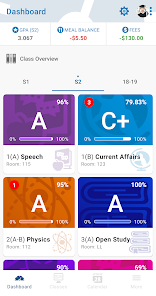
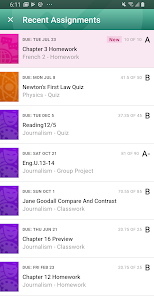
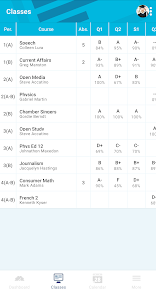
PowerSchool is the fastest growing, most widely used student information system, serving tens of millions of students across the globe. PowerSchool Mobile improves parent engagement and student accountability with easy, instant access to real-time attendance, assignments, scores, grades, and more!
Parents or guardians with multiple students can align all students to a single account, eliminating the need to remember different login accounts and passwords to view student details!
Use PowerSchool Mobile to:
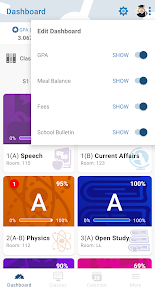
• Customize the dashboard view to gather your important information in one location
• Monitor changes to grades and attendance with push notifications
• Register to receive email alerts for grades, attendance, or assignments
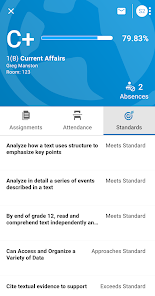
• See real-time updates of grades and attendance
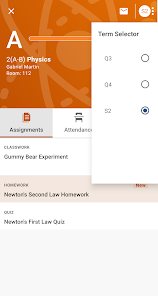
• View assignment details
• Review teacher comments
• Check the school’s daily bulletin board
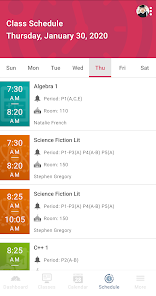
• View a full course schedule
• Monitor meal and fee balances
• View a calendar showing all assignment due dates
IMPORTANT!
To use the PowerSchool Mobile app, your district must be running the PowerSchool Student Information System. If your district uses a different SIS, suggest they switch to PowerSchool!
POWERSCHOOL MOBILE REQUIREMENTS
• The school district running the latest supported PowerSchool SIS version
• The school district has enabled mobile access
• A wireless connection or mobile data plan
• Users must consent to receive push notifications when connecting to servers outside of the United States
Parents or guardians with multiple students can align all students to a single account, eliminating the need to remember different login accounts and passwords to view student details!
Use PowerSchool Mobile to:
• Customize the dashboard view to gather your important information in one location
• Monitor changes to grades and attendance with push notifications
• Register to receive email alerts for grades, attendance, or assignments
• See real-time updates of grades and attendance
• View assignment details
• Review teacher comments
• Check the school’s daily bulletin board
• View a full course schedule
• Monitor meal and fee balances
• View a calendar showing all assignment due dates
IMPORTANT!
To use the PowerSchool Mobile app, your district must be running the PowerSchool Student Information System. If your district uses a different SIS, suggest they switch to PowerSchool!
POWERSCHOOL MOBILE REQUIREMENTS
• The school district running the latest supported PowerSchool SIS version
• The school district has enabled mobile access
• A wireless connection or mobile data plan
• Users must consent to receive push notifications when connecting to servers outside of the United States
Updated on
Safety starts with understanding how developers collect and share your data. Data privacy and security practices may vary based on your use, region, and age. The developer provided this information and may update it over time.


Ratings and reviews
2.5
37.5K reviews

Kelly McMullan Guihan
- Flag inappropriate
October 21, 2025
The update is useless if the app can't be used. It takes forever to load, or doesn't load at all and crashes out (wifi or cellular use). I still can't get notifications. Every time I hit back, the page goes to full reload and then fails out. Also give me the option to leave my selection to a client semester and not the full year every time I open the app, I have to change it and wait for it to load.. again.
89 people found this review helpful

Isabelle Schulte
- Flag inappropriate
- Show review history
January 6, 2025
It's okay, but sometimes the notifications don't work properly, or it doesn't update my grades and tells me I have no classes this week, but when that happens, I delete and reinstall the app, which means I have to sign back in again, but it works and updates it properly after. But never had any issues with it on Chromebook, it's just the mobile app, which works, is just a little buggy sometimes. Edit: Dropped it down to two star, have to delete every time a grade changes to see the update
113 people found this review helpful

Evens Cosmeus
- Flag inappropriate
January 17, 2025
I'm having difficulties logging into the PowerSchool app, even though I can access the website with the same email. The app displays an "Access blocked: Authorization Error" message. I've tried clearing the cache, reinstalling the app, but it still won't work. Additionally, I have a suggestion for improving the user experience. There should be an option to choose which email address to use when logging in.
126 people found this review helpful
What’s new
PowerSchool Mobile version 25.12.0 is now available for download.
Key Updates:
- Various improvements to performance
- Added additional error details and handling
- Added support for Resource Links
Key Fixes:
- Resolved an issue with users being silently logged out
- Resolved an issue with users seeing a blank screen after logging in
- Resolved an issue with users seeing a blank screen when opening a Form
- Resolved a crash for iPads on OS 26.1
Key Updates:
- Various improvements to performance
- Added additional error details and handling
- Added support for Resource Links
Key Fixes:
- Resolved an issue with users being silently logged out
- Resolved an issue with users seeing a blank screen after logging in
- Resolved an issue with users seeing a blank screen when opening a Form
- Resolved a crash for iPads on OS 26.1
App support
About the developer
PowerSchool Holdings, Inc.
mobile@powerschool.com
150 Parkshore Dr
Folsom, CA 95630
United States
+1 512-641-4070


