
Split Screen Launcher
In-app purchases

star
327 reviews

Everyone
info
100K+
Downloads

Everyone
Learn more


About this app
* Works with the latest Android 17
* No ads
* Pro unlocked free for 7 days
Split Screen Launcher lets you save your favorite app combinations as "pairs" and launch both apps at once in split screen (multitasking) with a single tap. No more picking and arranging apps every time — just create a pair and tap.
[New] SideEdge — a sidebar you can pull out from any screen
Swipe in from the edge of the screen and SideEdge opens, letting you launch a saved pair or a single app on the spot — no need to go back to the home screen. It's an ad-free sidebar that works on any Android phone or tablet, and you can adjust the handle's position, size, color, and transparency to your liking.
Miss launching split-screen app pairs from your old phone's sidebar? SideEdge brings that favorite feature back to any Android device.
Common Uses
Photos + Music: Browse your photos while music plays
Video + Social: Watch YouTube while checking Instagram
Research + Notes: Search in Chrome while jotting things down
Work + Comms: Keep Gmail and Slack side by side
Compare + Calculate: Put your browser next to a calculator
Navigate + Chat: Check your route on Maps while sending a message
Automation: Maps and music when you get in the car, Spotify and notes when you plug in your earphones. Your saved pairs are ready when you are (works with automation apps like MacroDroid, Tasker, or Automate).
Key Features
- Create, save, and launch app pairs or single apps with one tap
- SideEdge — a pull-out sidebar to launch pairs and apps from any screen
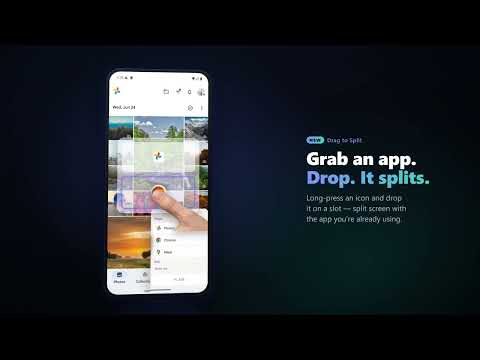
- Drag-to-Split — drag an app from SideEdge onto your current app to split them on the spot
- Android Shortcuts support — open saved pairs or single apps automatically by time, location, or Bluetooth (works with automation apps like MacroDroid, Tasker, or Automate).
- Per-entry screen orientation — auto-rotate on/off, plus portrait and landscape lock for pairs or single apps. Locked pairs open the split already in the right orientation — ideal for landscape games and video
- Home-screen shortcuts — pin a pair to your home screen for one-tap launch
- Organize pairs in folders
- Custom colors
- Reorder pairs by drag and drop
- Backup & restore
- Dark mode
- 15 languages with in-app language switcher
- Lightweight and simple
Note: some apps, such as Camera, can't enter split screen because of how Android works. Changing an Android setting may make them work — see in-app Help for details.
Support the Developer
The free version saves up to 2 slots. Each slot holds either an app pair or a single app. SideEdge, Drag-to-Split, dark mode, and all 15 languages are included at no cost. Everything else — unlimited slots, home-screen shortcuts, folders, custom colors, reordering, Android Shortcuts, and backup & restore — unlocks with Pro. Upgrading to Pro keeps the app ad-free and supports continued independent development.
Thank you to everyone who supports this app!
Accessibility API Usage
This app uses the Accessibility Service for two purposes only:
1) To trigger split-screen mode on Android 9-12 (not needed on Android 12L and newer).
2) So SideEdge can automatically recognize login and password entry screens and hide its handle so it never blocks your taps (it restores automatically once you are done).
The service never reads, collects, or transmits any screen content.
Learn more: https://sakuradevjp.github.io/split-screen-launcher-notes/store/
* No ads
* Pro unlocked free for 7 days
Split Screen Launcher lets you save your favorite app combinations as "pairs" and launch both apps at once in split screen (multitasking) with a single tap. No more picking and arranging apps every time — just create a pair and tap.
[New] SideEdge — a sidebar you can pull out from any screen
Swipe in from the edge of the screen and SideEdge opens, letting you launch a saved pair or a single app on the spot — no need to go back to the home screen. It's an ad-free sidebar that works on any Android phone or tablet, and you can adjust the handle's position, size, color, and transparency to your liking.
Miss launching split-screen app pairs from your old phone's sidebar? SideEdge brings that favorite feature back to any Android device.
Common Uses
Photos + Music: Browse your photos while music plays
Video + Social: Watch YouTube while checking Instagram
Research + Notes: Search in Chrome while jotting things down
Work + Comms: Keep Gmail and Slack side by side
Compare + Calculate: Put your browser next to a calculator
Navigate + Chat: Check your route on Maps while sending a message
Automation: Maps and music when you get in the car, Spotify and notes when you plug in your earphones. Your saved pairs are ready when you are (works with automation apps like MacroDroid, Tasker, or Automate).
Key Features
- Create, save, and launch app pairs or single apps with one tap
- SideEdge — a pull-out sidebar to launch pairs and apps from any screen
- Drag-to-Split — drag an app from SideEdge onto your current app to split them on the spot
- Android Shortcuts support — open saved pairs or single apps automatically by time, location, or Bluetooth (works with automation apps like MacroDroid, Tasker, or Automate).
- Per-entry screen orientation — auto-rotate on/off, plus portrait and landscape lock for pairs or single apps. Locked pairs open the split already in the right orientation — ideal for landscape games and video
- Home-screen shortcuts — pin a pair to your home screen for one-tap launch
- Organize pairs in folders
- Custom colors
- Reorder pairs by drag and drop
- Backup & restore
- Dark mode
- 15 languages with in-app language switcher
- Lightweight and simple
Note: some apps, such as Camera, can't enter split screen because of how Android works. Changing an Android setting may make them work — see in-app Help for details.
Support the Developer
The free version saves up to 2 slots. Each slot holds either an app pair or a single app. SideEdge, Drag-to-Split, dark mode, and all 15 languages are included at no cost. Everything else — unlimited slots, home-screen shortcuts, folders, custom colors, reordering, Android Shortcuts, and backup & restore — unlocks with Pro. Upgrading to Pro keeps the app ad-free and supports continued independent development.
Thank you to everyone who supports this app!
Accessibility API Usage
This app uses the Accessibility Service for two purposes only:
1) To trigger split-screen mode on Android 9-12 (not needed on Android 12L and newer).
2) So SideEdge can automatically recognize login and password entry screens and hide its handle so it never blocks your taps (it restores automatically once you are done).
The service never reads, collects, or transmits any screen content.
Learn more: https://sakuradevjp.github.io/split-screen-launcher-notes/store/
Open two apps in split screen with one tap. Save pairs, multitask faster.
Updated on
Safety starts with understanding how developers collect and share your data. Data privacy and security practices may vary based on your use, region, and age. The developer provided this information and may update it over time.
- No data shared with third partiesLearn more about how developers declare sharing
- No data collectedLearn more about how developers declare collection


Ratings and reviews
292 reviews

Dan Townsley
- Flag inappropriate
July 1, 2026
This app just works! No server-side, data mining. The developer is very attentive and is open to feature requests. I requested a new feature and a day later it was there in an update. Get the "Pro" version!
7 people found this review helpful
sakura.dev.jp
July 1, 2026
Thank you so much for the wonderful review, Dan!
I'm really glad the new shortcut feature works well with your MacroDroid setup. Your detailed feedback and real-world use case helped shape this update, and I truly appreciate you taking the time to test it and share your experience.
Ride safe, and thanks again for your support!

Greg
- Flag inappropriate
October 1, 2026
best app at what it does, so much easier than any OS implemented split screen as well, which is what sold me. I bought a lifetime. note, restore purchase didn't work on my other phone, so I clicked to buy again and then it triggers, you own this. 👍😄 TYSM!
sakura.dev.jp
October 2, 2026
Thank you so much for the 5-star review and Lifetime purchase! I'm thrilled it's easier to use than the native OS option.
Also, thank you for sharing that helpful workaround for restoring purchases across devices! Your note will definitely help other users in the same situation.
Thanks again for your great support!

Cylon Wright
- Flag inappropriate
October 17, 2026
Sometimes you just need an app that does one thing really well, which split screen does.
sakura.dev.jp
October 18, 2026
Thank you so much for the thoughtful review! Doing one thing simply, quickly, and really well is exactly our design philosophy. We’re thrilled it works for you! 😊
What’s new
- Added per-pair screen orientation (portrait & landscape lock)
- Verified launching pairs from MacroDroid, Automate and Tasker (Pro)
- Improved compatibility for apps that exit split screen immediately after launch
- Small bug fixes
- Verified launching pairs from MacroDroid, Automate and Tasker (Pro)
- Improved compatibility for apps that exit split screen immediately after launch
- Small bug fixes
Everyone
Learn moreApp support
About the developer
林 亮輔
sakura.dev.jp@gmail.com
星田4丁目13−20−401
交野市, 大阪府 576-0016
Japan


