

Safe Lagoon Parental Control

3.4star
7K reviews
500K+
Downloads

Everyone
info







About this app
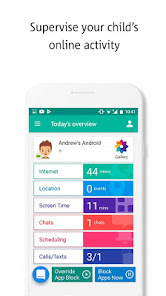
Discover the ultimate parental control solution with our cutting-edge app designed to empower parents in safeguarding their children online. Our feature-packed parental control app offers a comprehensive suite of tools to ensure a secure digital environment for your family.
Key Features:
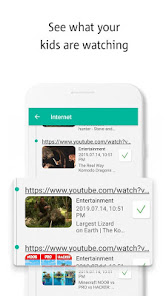
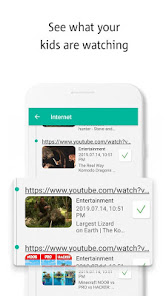
🔒 Content Filtering: Effortlessly filter inappropriate content and manage your child's online experience with our advanced content filtering system.
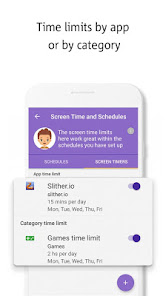
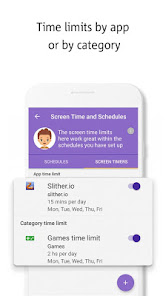
📱 App Management: Take control of your child's device usage by setting limits on specific apps, ensuring a healthy balance between screen time and other activities.
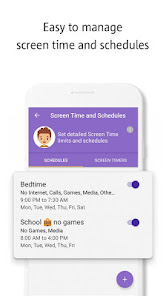
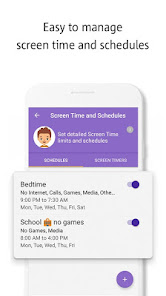
🗓️ Time Management: Easily establish screen time schedules to encourage a balanced lifestyle, helping your child develop healthy habits.
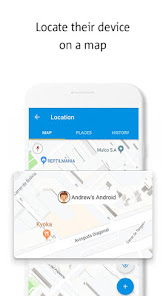
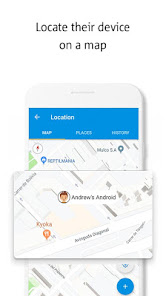
📍 Geofencing: Receive instant alerts and monitor your child's whereabouts with our geofencing feature, providing peace of mind and ensuring their safety.
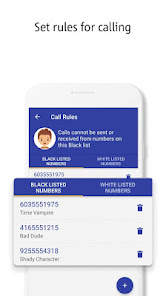
📵 Remote Control: Manage settings and monitor your child's device remotely, ensuring you stay informed and in control even when you're not physically present.
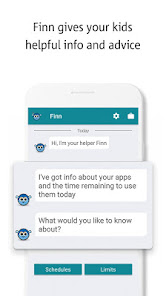
🚨 Alerts and Notifications: Stay in the loop with real-time alerts, keeping you informed about potential risks or breaches of set boundaries.
🔐 Secure Browsing: Safeguard your child's online activities with our secure browsing feature, blocking malicious content and ensuring a secure online experience.
Download our parental control app today to enjoy a worry-free digital environment for your family. Empower yourself with the tools needed to nurture responsible online behavior while optimizing your child's digital safety.
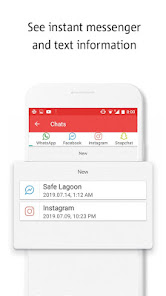
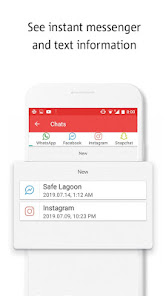
This app uses the Device Administrator permission and Accessibility services. The Accessibility Service is only used for supporting Safe Lagoon app functionality such as saving browsing history, website visits, instant messenger history and reporting app activity and screen content to block unwanted or malicious apps, detect attempts to uninstall the app and warn parents.
Safe Lagoon collects location data to enable parents to find their child's device on a map even when the app is closed or not in use.
We manage app time limits, parental control of internet, wifi parental control, kids app lock, parental control app for cellphones, android parental control app with parental monitoring app, safe kids mobile and app lock.
More info at: https://safelagoon.com
Key Features:
🔒 Content Filtering: Effortlessly filter inappropriate content and manage your child's online experience with our advanced content filtering system.
📱 App Management: Take control of your child's device usage by setting limits on specific apps, ensuring a healthy balance between screen time and other activities.
🗓️ Time Management: Easily establish screen time schedules to encourage a balanced lifestyle, helping your child develop healthy habits.
📍 Geofencing: Receive instant alerts and monitor your child's whereabouts with our geofencing feature, providing peace of mind and ensuring their safety.
📵 Remote Control: Manage settings and monitor your child's device remotely, ensuring you stay informed and in control even when you're not physically present.
🚨 Alerts and Notifications: Stay in the loop with real-time alerts, keeping you informed about potential risks or breaches of set boundaries.
🔐 Secure Browsing: Safeguard your child's online activities with our secure browsing feature, blocking malicious content and ensuring a secure online experience.
Download our parental control app today to enjoy a worry-free digital environment for your family. Empower yourself with the tools needed to nurture responsible online behavior while optimizing your child's digital safety.
This app uses the Device Administrator permission and Accessibility services. The Accessibility Service is only used for supporting Safe Lagoon app functionality such as saving browsing history, website visits, instant messenger history and reporting app activity and screen content to block unwanted or malicious apps, detect attempts to uninstall the app and warn parents.
Safe Lagoon collects location data to enable parents to find their child's device on a map even when the app is closed or not in use.
We manage app time limits, parental control of internet, wifi parental control, kids app lock, parental control app for cellphones, android parental control app with parental monitoring app, safe kids mobile and app lock.
More info at: https://safelagoon.com
Updated on
Safety starts with understanding how developers collect and share your data. Data privacy and security practices may vary based on your use, region, and age. The developer provided this information and may update it over time.


Ratings and reviews
3.5
6.87K reviews

Melissa Haeuser
- Flag inappropriate
December 5, 2023
I have had this app for several years. As the years have gone on, the app made improvements that makes the app better. The platform is easy to use, & most of the time, in my experience, works as intended. I have had some issues with text messages not alway able to be seen in parent app & would like to see improvements on that so I don't have to reset it from the childs phone to have it work again. Overall, I am satisfied with the app & would recommend parents using it.
5 people found this review helpful
Safe Lagoon Software
December 9, 2023
Hi Melissa! Thank you for using our app and taking the time to leave us a review - we have a couple of new features on the way which will make using Safe Lagoon even easier for parents, so please bear with us!
We are sure that your feedback will only help us improve further. Thanks so much for joining our journey :)

A Google user
- Flag inappropriate
October 21, 2019
Most of the time, this app works good. It does what I mainly need which is limiting screen usage time and when she can use it (i.e. school hours, etc.) But a few times it has stopped monitoring altogether on my end but seems to at least keep her daily schedules and times going (most of the time). There have been 2 times it didn't and she was on for almost double her allotted time before I realized it because I was busy and lost track of time. I would LOVE to see these bugs fixed please!?
8 people found this review helpful
A Google user
- Flag inappropriate
October 24, 2019
Don't do it! After downloading this app, not even two days later, I've stopped receiving any kind of notifications from all of my other apps...email, text messages, etc. I had to call my phone carrier, who then connected me to LG support. After trying to figure out what was wrong with my phone, they figured out the cause of my problems was downloading this 3rd party app. After uninstalling the app, my phone instantly started working properly again.
8 people found this review helpful
Safe Lagoon Software
October 26, 2019
Oh no! We sincerely apologize for the troubles you've had with the app. We'd be happy to take a look into this for you, please contact us at hi@safelagoon.com. Thank you.
What's new
🛡 AI Shield: Introducing AI Shield, our latest feature designed to offer advanced AI monitoring and protection for your child's online activities
🤖 Enhanced Monitoring: AI Shield analyzes texts, social media, and app usage in real-time, ensuring your child's digital environment is safe
🧠 Intelligent Alerts: Receive precise alerts about potential risks, thanks to our AI's ability to understand context and prioritize real threats
🧰 Privacy-First Design: Enjoy peace of mind with AI Shield
🤖 Enhanced Monitoring: AI Shield analyzes texts, social media, and app usage in real-time, ensuring your child's digital environment is safe
🧠 Intelligent Alerts: Receive precise alerts about potential risks, thanks to our AI's ability to understand context and prioritize real threats
🧰 Privacy-First Design: Enjoy peace of mind with AI Shield


