
USB Camera
Contains ads

star
17.7K reviews

Everyone
info
5M+
Downloads


About this app
*** The Pro version provides some extra features from General Settings and without ads **
Using USB 3.0 HDMI capture card : https://youtu.be/WkmuyfwKVrs
Using UVC H.264 device : https://youtu.be/j-71QMNuDr0
RTSP real time stream : https://youtu.be/-Qzc0RSDerg
RTMP live streaming : https://youtu.be/S5Bc1r57CUU
Picture In Picture : https://youtu.be/Mbturdxyi5c
VR/FPV View : https://youtu.be/zEqBXLNFnE0
Tip:
Supports following devices:
* UVC WebCam with microphone or external USB Audio input (Supports H.264, H.265, HEVC, MJPG, YUY2, P010, NV12 and so on)
* UVC video grabber with audio input or external USB Audio input (Up to 4K via HDMI, Supports H.264, H.265, HEVC, MJPG, YUY2, P010, NV12 and so on, Supports progressive and interlaced video)
* Windows Hello Camera and IR Camera
* Geek szitman supercamera(2ce3:3828)non-UVC devices, e.g. USB Endoscope
* EasyCap including audio with UTV007 / HTV600 / HTV800 chipsets (VID_1B71&PID_3002)
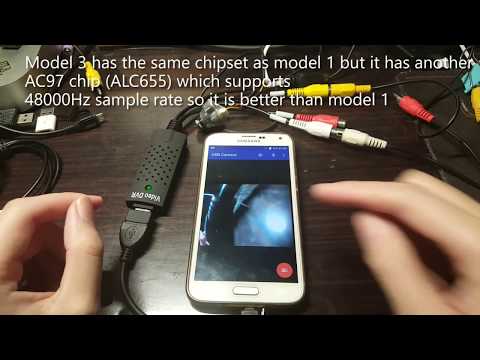
* EasyCap including audio with STK1160 + SAA7113/GM7113 + AC97 chipsets (Audio 48kHz stereo version VID_05E1&PID_0408)
* EasyCap including audio with STK1160 + SAA7113/GM7113 (Audio 8kHz mono version VID_05E1&PID_0408)
* EasyCap including audio with EM2860 + SAA7113/GM7113 + AC97 chipsets (VID_EB1A&PID_2861)
* EasyCap including audio with SMI2021 + SAA7113/GM7113 + ES7240/CS5340 chipsets (VID_1C88&PID_0007, PID_003C, PID_003D, PID_003E, PID_003F, PID_1001)
Please use a good quality OTG cable and ensure power supply. Some devices may need to bridge HUB to enhanced USB signals to work properly, e.g. Elgato Cam link, ezcap Video Grabber.
Using HEVC for video recording/streaming requires Android 5.0 or above, and the device must supports HEVC codec.
Using AV1 for video streaming requires Android 10 or above, and the device must supports AV1 codec.
"USB Camera" can let your android device connect to USB WebCam or video capture card via USB-OTG. You can record video or capture snapshot, OR turn your phone into a wireless IP Camera via build-in RTSP/RTSPS and HTTP/HTTPS Server for security monitoring WITH Bi-directional audio support, you can use your browser to view, of course, include "IP Camera" App.
"USB Camera" can mix USB Audio with a built-in microphone or system audio and output, or overlay the built-in camera/screen video onto the external camera video.
"USB Camera" can push the video and audio to RTMP/SRT live media server and use for network live broadcast. It supports the rtmps security protocol and SRT protocol and it can also push the media to multiple media server at the same time. It also supports HEVC/AV1 over RTMP and can be used for YouTube Live currently.
"USB Camera" supports Side by Side(SBS) view and it can work with FPV goggle
"USB Camera" can add timestamp, GPS, speed and other info on the video frames while recording and can use your headset or Bluetooth headset to capture snapshot and record video. It also supports WebCam's snapshot button.
"USB Camera" supports loop-recording. Can set auto-segment when recording and auto-delete old video archives when no enough storage. "USB Camera" can be used as "Dash Cam"
USB Camera can seamless switching between foreground and background. Just press 'Enter background' from menu. The recording will not interrupted during switching!
It support auto video recording which based on Motion Detection and the video record can be uploaded to FTP server automatically and notify you via Email!
Bi-directional audio requires IP Camera App, you can get it from https://play.google.com/store/apps/details?id=com.shenyaocn.android.WebCam
IMPORTANT! On Android 9 and above, Camera permission is required to get fully USB Video device access..
This is userspace driver so it used for the app only. Android does not allow to install kernel driver so it unable to use for third-party apps.
Using USB 3.0 HDMI capture card : https://youtu.be/WkmuyfwKVrs
Using UVC H.264 device : https://youtu.be/j-71QMNuDr0
RTSP real time stream : https://youtu.be/-Qzc0RSDerg
RTMP live streaming : https://youtu.be/S5Bc1r57CUU
Picture In Picture : https://youtu.be/Mbturdxyi5c
VR/FPV View : https://youtu.be/zEqBXLNFnE0
Tip:
Supports following devices:
* UVC WebCam with microphone or external USB Audio input (Supports H.264, H.265, HEVC, MJPG, YUY2, P010, NV12 and so on)
* UVC video grabber with audio input or external USB Audio input (Up to 4K via HDMI, Supports H.264, H.265, HEVC, MJPG, YUY2, P010, NV12 and so on, Supports progressive and interlaced video)
* Windows Hello Camera and IR Camera
* Geek szitman supercamera(2ce3:3828)non-UVC devices, e.g. USB Endoscope
* EasyCap including audio with UTV007 / HTV600 / HTV800 chipsets (VID_1B71&PID_3002)
* EasyCap including audio with STK1160 + SAA7113/GM7113 + AC97 chipsets (Audio 48kHz stereo version VID_05E1&PID_0408)
* EasyCap including audio with STK1160 + SAA7113/GM7113 (Audio 8kHz mono version VID_05E1&PID_0408)
* EasyCap including audio with EM2860 + SAA7113/GM7113 + AC97 chipsets (VID_EB1A&PID_2861)
* EasyCap including audio with SMI2021 + SAA7113/GM7113 + ES7240/CS5340 chipsets (VID_1C88&PID_0007, PID_003C, PID_003D, PID_003E, PID_003F, PID_1001)
Please use a good quality OTG cable and ensure power supply. Some devices may need to bridge HUB to enhanced USB signals to work properly, e.g. Elgato Cam link, ezcap Video Grabber.
Using HEVC for video recording/streaming requires Android 5.0 or above, and the device must supports HEVC codec.
Using AV1 for video streaming requires Android 10 or above, and the device must supports AV1 codec.
"USB Camera" can let your android device connect to USB WebCam or video capture card via USB-OTG. You can record video or capture snapshot, OR turn your phone into a wireless IP Camera via build-in RTSP/RTSPS and HTTP/HTTPS Server for security monitoring WITH Bi-directional audio support, you can use your browser to view, of course, include "IP Camera" App.
"USB Camera" can mix USB Audio with a built-in microphone or system audio and output, or overlay the built-in camera/screen video onto the external camera video.
"USB Camera" can push the video and audio to RTMP/SRT live media server and use for network live broadcast. It supports the rtmps security protocol and SRT protocol and it can also push the media to multiple media server at the same time. It also supports HEVC/AV1 over RTMP and can be used for YouTube Live currently.
"USB Camera" supports Side by Side(SBS) view and it can work with FPV goggle
"USB Camera" can add timestamp, GPS, speed and other info on the video frames while recording and can use your headset or Bluetooth headset to capture snapshot and record video. It also supports WebCam's snapshot button.
"USB Camera" supports loop-recording. Can set auto-segment when recording and auto-delete old video archives when no enough storage. "USB Camera" can be used as "Dash Cam"
USB Camera can seamless switching between foreground and background. Just press 'Enter background' from menu. The recording will not interrupted during switching!
It support auto video recording which based on Motion Detection and the video record can be uploaded to FTP server automatically and notify you via Email!
Bi-directional audio requires IP Camera App, you can get it from https://play.google.com/store/apps/details?id=com.shenyaocn.android.WebCam
IMPORTANT! On Android 9 and above, Camera permission is required to get fully USB Video device access..
This is userspace driver so it used for the app only. Android does not allow to install kernel driver so it unable to use for third-party apps.
Connect EasyCap or UVC devices for recording and broadcast video/audio stream
Updated on
Safety starts with understanding how developers collect and share your data. Data privacy and security practices may vary based on your use, region, and age. The developer provided this information and may update it over time.
- This app may share these data types with third partiesApp activity, App info and performance, and Device or other IDs
- No data collectedLearn more about how developers declare collection
- Data is encrypted in transit
- Data can’t be deleted


Ratings and reviews
16.5K reviews

Zane Zapata
- Flag inappropriate
August 14, 2026
I honestly don't have too many uses for this app.Except for one thing, as the name implies u s b camera, you're able to connect an external camera to this And I guess use it for whatever Tools you need it for. But in this case, the use that I have for it currently is mainly to USB Video and audio out and into a t v monitor, for my playstation vita. it works great, and it looks perfect on full screen, obviously, depending on the type of phone and how fast it processes well depend on latency.
5 people found this review helpful

Leo M
- Flag inappropriate
November 13, 2020
Tried to use with an endoscope/ borescope. It has a variety of settings and features, but UI not so good. Worst of all -ads cover a portion of the screen, which becomes significant in landscape mode. That made me uninstall and instead use an alternate app called "Endoscope Camera". Much simpler, and automatically comes up showing the image as soon as I plug in the camera. After all, that's really all that I need it to do. No prompts, settings, questions... it just runs and records if needed.
273 people found this review helpful

Tarrabyte
- Flag inappropriate
- Show review history
March 9, 2026
So the app does exactly what it's supposed to do however the amount of ads on this thing is absolutely atrocious. I can't go in and out of the app without being bombarded with it. I see that you guys want $6 for the other app and I think that might be a fair use for it but you need to also add in like an external grabber or something for other programs like the elgato video capture would be pretty dope
6 people found this review helpful
What’s new
* IP Camera Server supports TLS now, you can add pfx/p12 certificate to enable https/rtsps connection
* Supports generating self-signed certificates for TLS
* Improve the compatibility with Elgato Cam Link 4K
* Reduce the rendering delay of EasyCap devices
* Position and speed overlay can be set separately
* Can animate long text
* Video Overlay can be shown on Video Preview, you can turn it off from Settings
* Supports overlaying animated image (GIF or Webp) as watermark on video frames
* Supports generating self-signed certificates for TLS
* Improve the compatibility with Elgato Cam Link 4K
* Reduce the rendering delay of EasyCap devices
* Position and speed overlay can be set separately
* Can animate long text
* Video Overlay can be shown on Video Preview, you can turn it off from Settings
* Supports overlaying animated image (GIF or Webp) as watermark on video frames
App support
About the developer
沈垚
shenyao21@gmail.com
大同新巷3号
芗城区, 漳州市, 福建省
China
363000


