
Weave Chat AAC

star
255 reviews

Everyone
info
10K+
Downloads


About this app
Weave Chat AAC is a free, dynamic, and completely customizable AAC app that is available to a variety of devices.
There are over 3,500 pre-configured words with a symbol library including more than 65,000 symbols that you can choose from.
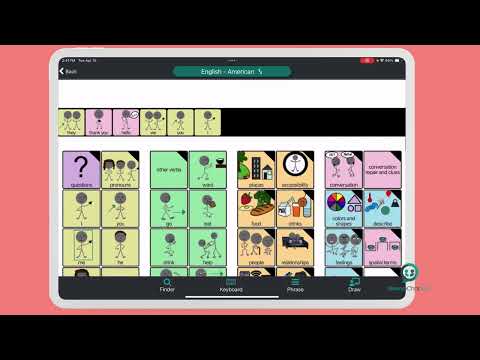
Weave Chat AAC offers a large variety of verbs (green), pronouns (yellow), questions (purple), nouns (tan/orange), adjectives (blue), and conversational words (pink). All color choices were made based on the Fitzgerald Key and new vocabulary is added weekly.
Users can add their own custom images and categories in Settings —> Manage Custom Images.
In addition, users can add their own custom phrases that can easily be accessed from their board; to add phrases, go to Settings —> Manage Phrases.
Users can select a synthetic voice (dependent on their device settings) from Settings —> Change Voice Settings - here you can select your voice, vocal pitch, and rate of speech.
Image and text size can be personalized from Settings —> Change Image & Text Size (select from default - small, medium, and large). Settings —> Configure Image Keyboard allows the user to turn on/off features that allow for the category text to be read aloud (synthetic voice for categories), to keep the user in the category after a image has been selected (stay on category after image selection), and disable the speech output for individual words so that it only reads aloud when the white text screen is touched (synthetic voice disabled for individual words).
The AAC board can be modified in Settings —> Manage Board Builder. Here, the user can select from the default board (you must make a copy to edit it - to do this select “Add new keyboard” and then select “Hide Images” for Type of Keyboard); grid position boards (ranging in size from 1x2 - 7x15 rows/columns); and Board Builder (gives you the option to build a board from scratch). All boards are completely editable and all custom images and categories can be used from all boards.
Lastly, Manage Pin Configuration allows the user to set a pin over all (or just some) aspects of customization to lock down features as needed.
Feature List:
- Dynamic, customizable, AAC boards
- Large variety of verbs, nouns, and adjectives with additional vocabulary added weekly
- Add custom images and custom categories
- Create and save phrases
- Select a synthetic voice (as available per your device settings)
- Copy & Paste AAC picture icon messages via “share”
- Create and/or modify AAC boards via 3 options: grid position boards (ranging from 1x2 - 7x15), hide images, and/or create a new board from scratch
- “Text” others who have the app using AAC picture icons
- Set a passcode to lock down features as needed
- Weave Chat AAC currently only has English buttons/images
There are over 3,500 pre-configured words with a symbol library including more than 65,000 symbols that you can choose from.
Weave Chat AAC offers a large variety of verbs (green), pronouns (yellow), questions (purple), nouns (tan/orange), adjectives (blue), and conversational words (pink). All color choices were made based on the Fitzgerald Key and new vocabulary is added weekly.
Users can add their own custom images and categories in Settings —> Manage Custom Images.
In addition, users can add their own custom phrases that can easily be accessed from their board; to add phrases, go to Settings —> Manage Phrases.
Users can select a synthetic voice (dependent on their device settings) from Settings —> Change Voice Settings - here you can select your voice, vocal pitch, and rate of speech.
Image and text size can be personalized from Settings —> Change Image & Text Size (select from default - small, medium, and large). Settings —> Configure Image Keyboard allows the user to turn on/off features that allow for the category text to be read aloud (synthetic voice for categories), to keep the user in the category after a image has been selected (stay on category after image selection), and disable the speech output for individual words so that it only reads aloud when the white text screen is touched (synthetic voice disabled for individual words).
The AAC board can be modified in Settings —> Manage Board Builder. Here, the user can select from the default board (you must make a copy to edit it - to do this select “Add new keyboard” and then select “Hide Images” for Type of Keyboard); grid position boards (ranging in size from 1x2 - 7x15 rows/columns); and Board Builder (gives you the option to build a board from scratch). All boards are completely editable and all custom images and categories can be used from all boards.
Lastly, Manage Pin Configuration allows the user to set a pin over all (or just some) aspects of customization to lock down features as needed.
Feature List:
- Dynamic, customizable, AAC boards
- Large variety of verbs, nouns, and adjectives with additional vocabulary added weekly
- Add custom images and custom categories
- Create and save phrases
- Select a synthetic voice (as available per your device settings)
- Copy & Paste AAC picture icon messages via “share”
- Create and/or modify AAC boards via 3 options: grid position boards (ranging from 1x2 - 7x15), hide images, and/or create a new board from scratch
- “Text” others who have the app using AAC picture icons
- Set a passcode to lock down features as needed
- Weave Chat AAC currently only has English buttons/images
Free robust AAC app with dynamic display, synthetic voices, and custom boards
Updated on
Safety starts with understanding how developers collect and share your data. Data privacy and security practices may vary based on your use, region, and age. The developer provided this information and may update it over time.
- No data shared with third partiesLearn more about how developers declare sharing
- This app may collect these data typesLocation, Personal info and 2 others
- Data is encrypted in transit
- You can request that data be deleted
- Committed to follow the Play Families Policy


Ratings and reviews
186 reviews

Mickey L
- Flag inappropriate
- Show review history
November 15, 2022
It's okay but it could be better. It would be great if it didn't open the app to the support page. It should open straight to the image board or keyboard (and you should be able to choose which you want it to open to) as for languages it only seems to come in English which is a bit of a bummer since most people speak/type more than one language but again it's a free app so 🤷🏽♂️ Edit: Had to bring this down another star because the app keeps crashing when I try to open the phrase option.
7 people found this review helpful
Weave Chat, LLC
September 9, 2023
Narly_Blue you can now configure your app with the latest version of Weave Chat to open straight to the image board.
We fixed the phrase issue on the keyboard please update the app and message support if this still exists.

Newt Andrews
- Flag inappropriate
- Show review history
April 7, 2026
The absolute best AAC app we've tried, it takes a bit to get used to navigating, but it IS organized really well, editing or adding new buttons and folders is easy, there's NO ads or anything you have to buy, there's tons of voice options, and it is just really smooth in general. Only issue is- none. They fixed all my issues, the customer support is incredible. 5 stars. 💥
8 people found this review helpful
Weave Chat, LLC
February 9, 2026
That's great to hear! Glad things are working well. As far as deletion goes, we do not let you delete the core vocab. You can delete custom buttons and categories. One thing that some people do is move core vocabulary they don't want into the "uncategorized folder". Also, if you'd be able to email us we'd like to investigate the cropping issue.

Daisy Walker
- Flag inappropriate
June 9, 2026
amazing! I love how it has many options to add more words and word packs, many AAC apps don't include things like LGBTQ, politics, sex, etc, so I love this one does and includes non verbal adults. Definitely the best AAC I've ever used. Easy to use, a lot of words, well organised and tons of accessibility features. I also love the bright colours and dark background because it's easy on the eyes and the bright colours make it easy to read the words due to my bad vision.
4 people found this review helpful
What’s new
- The phrase experience has been updated with improved organizational features and editing options!
- A bug in offline mode has been resolved.
- A bug in offline mode has been resolved.
App support
About the developer
Benjamin Lande
weavechatmessenger@gmail.com
523 South Bradford Street
Baltimore, MD 21224
United States


